上午好☀️☀️☀️️
本答案参考通义千问
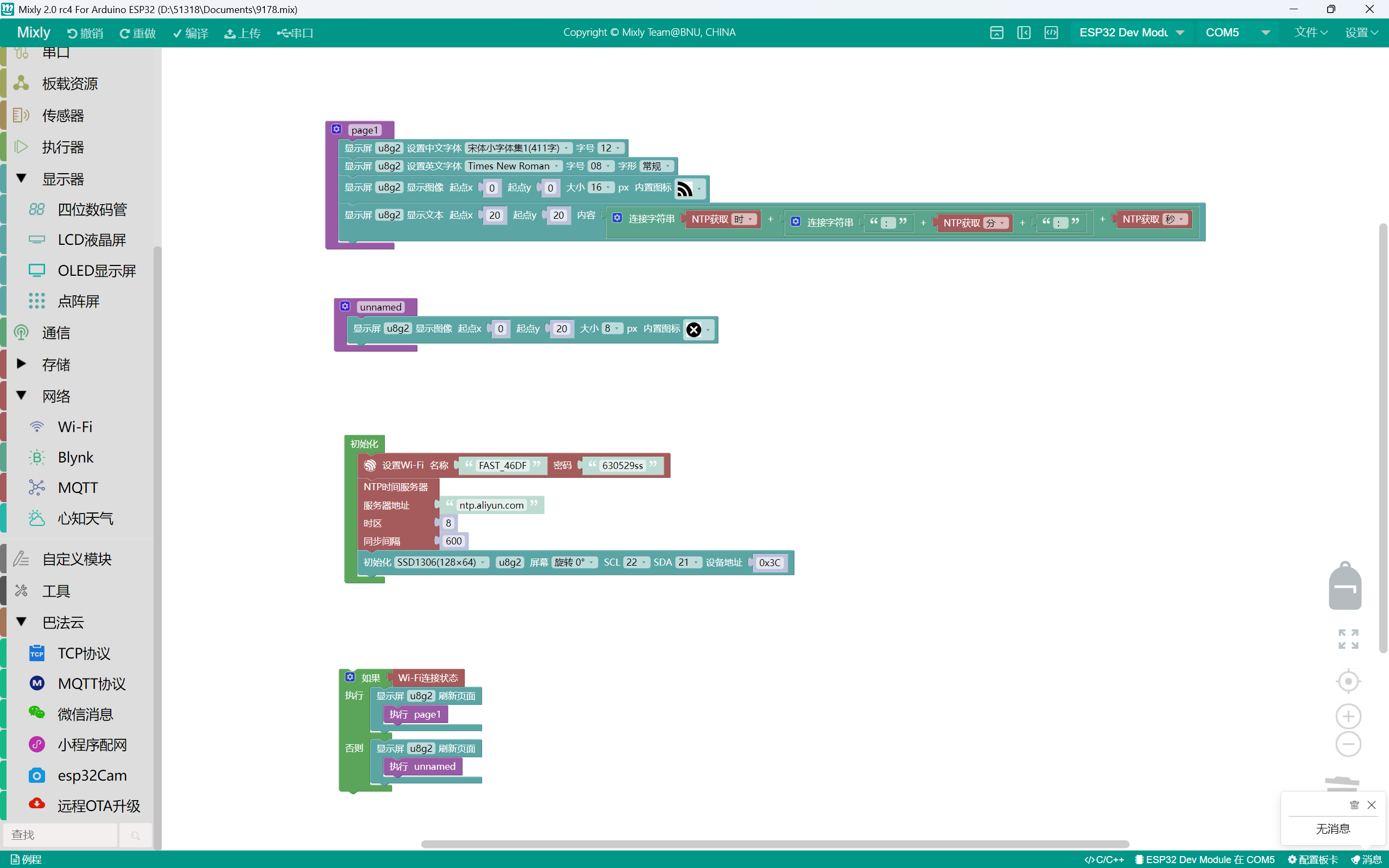
根据你提供的代码和描述,问题主要集中在 ESP32无法显示文字,尤其是在连接WiFi时只能显示一个WiFi图标,而NTP获取的时间无法正常显示。以下是详细分析及解决方案:
一、问题原因分析
-
字体加载问题:
在 page1() 函数中,你多次调用了 setFont(),但没有正确设置字体或未加载所需的字体文件(如 u8g2_font_wqy12_t_chinese1 或 u8g2_font_timR08_tf)。这些字体可能未被正确加载,导致文字无法显示。
-
NTP时间获取失败:
虽然你在 setup() 中初始化了 NTP,但并未检查是否成功获取时间。如果网络连接不稳定或服务器响应慢,可能导致时间未被正确更新。
-
屏幕初始化问题:
u8g2.setI2CAddress(0x3C*2); 可能不正确,OLED 屏幕的 I2C 地址通常是 0x3C,而不是乘以 2。
-
页面刷新逻辑问题:
你使用 firstPage() 和 nextPage() 来刷新屏幕,但在 loop() 中只执行了一次,可能导致页面未被正确绘制。
-
字符编码问题:
使用中文字体时,需要确保 U8g2lib 支持 UTF-8 编码,并且在 setup() 中启用了 enableUTF8Print()。
二、解决方案
✅ 1. 正确加载字体并设置字体
// 确保正确的字体设置
u8g2.setFont(u8g2_font_wqy12_t_chinese1); // 中文字体
u8g2.setFont(u8g2_font_open_iconic_all_2x_t); // 图标字体
注意:请确认你已将相关字体文件(如 u8g2_font_wqy12_t_chinese1.h)包含到项目中,否则无法加载。
✅ 2. 检查 NTP 是否成功获取时间
在 setup() 中添加以下代码来验证 NTP 是否成功:
if (!NTP.isTimeSet()) {
  Serial.println("NTP time not set!");
} else {
  Serial.print("Time: ");
  Serial.println(NTP.getTimeString());
}
✅ 3. 修正 OLED 的 I2C 地址
// 正确设置 I2C 地址为 0x3C
u8g2.setI2CAddress(0x3C);
✅ 4. 优化页面刷新逻辑
确保在每次循环中都重新绘制页面,避免只绘制一次:
void loop() {
  if (WiFi.status() == WL_CONNECTED) {
    u8g2.firstPage();
    do {
      page1();
    } while (u8g2.nextPage());
  } else {
    u8g2.firstPage();
    do {
      unnamed();
    } while (u8g2.nextPage());
  }
  delay(1000); // 延迟防止频繁刷新
}
✅ 5. 修复字符串拼接方式
你的时间字符串拼接方式存在问题,建议改为更清晰的方式:
String timeStr = String(NTP.getTimeHour24()) + ":" +
                 String(NTP.getTimeMinute()) + ":" +
                 String(NTP.getTimeSecond());
u8g2.print(timeStr);
三、修改后的完整代码如下:
#include <WiFi.h>
#include <TimeLib.h>
#include <NtpClientLib.h>
#include <U8g2lib.h>
#include <Wire.h>

int8_t timeZone = 8;
const PROGMEM char *ntpServer = "ntp.aliyun.com";
U8G2_SSD1306_128X64_NONAME_F_HW_I2C u8g2(U8G2_R0, U8X8_PIN_NONE);

void page1() {
  u8g2.setFont(u8g2_font_wqy12_t_chinese1); // 中文字体
  u8g2.setFontPosTop();
  u8g2.setFont(u8g2_font_open_iconic_all_2x_t); // 图标字体
  u8g2.drawGlyph(0, 0 + 2 * 8, 248);
  u8g2.setCursor(20, 20);
  String timeStr = String(NTP.getTimeHour24()) + ":" +
                   String(NTP.getTimeMinute()) + ":" +
                   String(NTP.getTimeSecond());
  u8g2.print(timeStr);
}

void unnamed() {
  u8g2.setFontPosBottom();
  u8g2.setFont(u8g2_font_open_iconic_all_1x_t);
  u8g2.drawGlyph(0, 20 + 1 * 8, 121);
}

void setup() {
  u8g2.enableUTF8Print();

  WiFi.begin("FAST_46DF", "630529ss");
  while (WiFi.status() != WL_CONNECTED) {
    delay(500);
    Serial.print(".");
  }
  Serial.println("Local IP:");
  Serial.print(WiFi.localIP());

  NTP.setInterval(600);
  NTP.setNTPTimeout(1500);
  NTP.begin(ntpServer, timeZone, false);

  // 修正 OLED I2C 地址
  u8g2.setI2CAddress(0x3C);
  u8g2.begin();

  // 验证 NTP 时间
  if (!NTP.isTimeSet()) {
    Serial.println("NTP time not set!");
  } else {
    Serial.print("Time: ");
    Serial.println(NTP.getTimeString());
  }
}

void loop() {
  if (WiFi.status() == WL_CONNECTED) {
    u8g2.firstPage();
    do {
      page1();
    } while (u8g2.nextPage());
  } else {
    u8g2.firstPage();
    do {
      unnamed();
    } while (u8g2.nextPage());
  }
  delay(1000); // 延迟防止频繁刷新
}
四、其他注意事项
- 字体文件支持:确保你已经包含了所有需要的字体文件(如
u8g2_font_wqy12_t_chinese1.h),否则无法正确显示中文。 - OLED 屏幕连接:检查 I2C 引脚是否正确连接(通常为 SDA 和 SCL)。
- 调试信息:通过串口监视器查看 NTP 是否成功获取时间,以及是否有错误提示。
如果你仍然遇到问题,请提供以下信息:
- 所使用的 OLED 屏幕型号(例如 SSD1306);
- 字体文件是否已正确包含;
- 串口输出的调试信息(如 NTP 是否成功获取时间)。
我可以进一步帮助你排查问题。