晚上好🌙🌙🌙
本答案参考通义千问
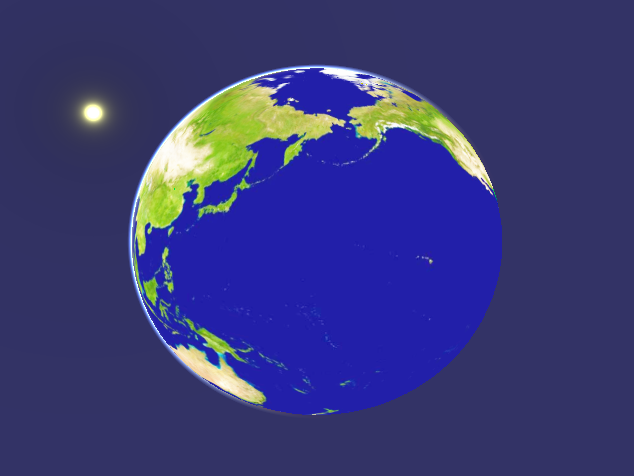
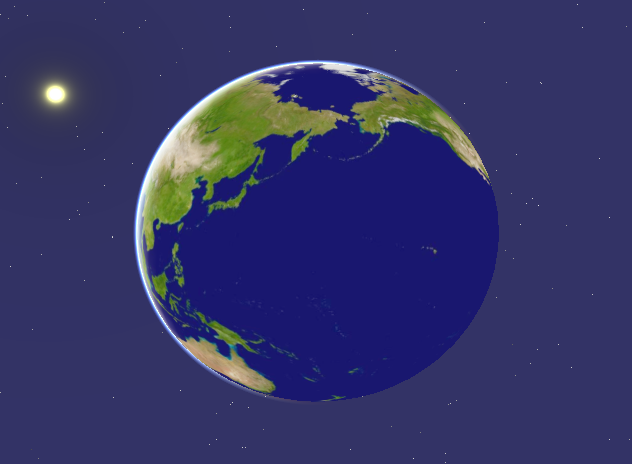
根据你提供的代码和描述,问题出现在 osgEarth 3.7.3 中的 天空节点(SimpleSky) 在 osgQOpenGLWidget 中不显示星图(Stars),但太阳和月亮可以正常显示。而在 osgEarth 3.4.0 中表现正常。这表明可能是 版本差异 或 渲染配置问题 导致的。
✅ 原因分析
1. osgEarth 3.7.3 的 SimpleSky 实现变化
- 在 osgEarth 3.7.3 中,
SimpleSky 的实现可能发生了变化,尤其是在 星图绘制逻辑 或 光照/大气模型 上。 - 可能与 PBR(物理渲染)模式、大气模型参数、或 着色器配置 有关。
2. 依赖库 osg 3.6.5 的兼容性问题
osgQOpenGLWidget 是基于 Qt 的 OpenGL 渲染组件,对 OpenGL 版本和驱动支持有较高要求。- 如果你的系统中 OpenGL 驱动不支持某些功能,可能导致星图无法正确渲染。
3. Star 图像资源未加载或路径错误
SimpleSky 使用了预定义的星图纹理,如果这些资源在 osgEarth 3.7.3 中被重新组织或路径更改,可能导致图像无法加载。
✅ 解决方案
一、检查并确保星图资源正确加载
1. 检查 SimpleSky 是否使用了正确的星图纹理
// 查看 SimpleSky 的构造函数是否加载了 star 纹理
osg::Image* starImage = osgDB::readImageFile("stars.png");
if (!starImage) {
    std::cerr << "Failed to load stars texture!" << std::endl;
}
2. 确保 stars.png 和 starfield.dds 等资源存在于运行目录中,或者设置正确的搜索路径:
osgDB::FilePathList& pathList = osgDB::getFilePathList();
pathList.push_back("C:\\path\\to\\your\\resources\\");
二、修改 SimpleSky 参数以增强可见性
1. 调整 SimpleSkyOptions 参数
osgEarth::SimpleSky::SimpleSkyOptions options;
options.exposure() = 10.f;          // 增强亮度
options.starsVisible() = true;      // 明确开启星星
options.starSize() = 30.f;          // 调整星星大小
options.usePBR() = false;           // 禁用 PBR,避免渲染异常
options.atmosphereVisible() = true; // 保持大气层可见
options.sunVisible() = true;        // 保持太阳可见
options.moonVisible() = true;       // 保持月亮可见
三、调试渲染状态
1. 启用 OSG 的调试输出
osg::setNotifyLevel(osg::DEBUG_FP);  // 打印详细日志
osg::setNotifyHandler(new osg::ConsoleHandler());
2. 检查是否有错误信息或警告
例如:
Texture not foundShader compile errorProgram link failed
四、尝试禁用 PBR 模式
在某些版本中,usePBR() 为 true 时可能会导致星图不显示。你可以尝试强制关闭:
options.usePBR() = false;
五、尝试使用 osgEarth::SkyNode 替代 SimpleSky
如果你仍然无法解决,可以尝试使用更通用的 osgEarth::SkyNode:
osg::Geode* skyGeode = new osg::Geode();
osg::Geometry* geometry = new osg::Geometry();

// 创建一个简单的星空几何体(示例)
osg::Vec4Array* vertices = new osg::Vec4Array(4);
vertices->at(0) = osg::Vec4(-1, -1, 0, 1);
vertices->at(1) = osg::Vec4(1, -1, 0, 1);
vertices->at(2) = osg::Vec4(1, 1, 0, 1);
vertices->at(3) = osg::Vec4(-1, 1, 0, 1);

osg::DrawElementsUInt* draw = new osg::DrawElementsUInt(GL_QUADS, 4);
draw->setIndex(0, 1, 2, 3);

geometry->setVertexArray(vertices);
geometry->addPrimitiveSet(draw);

skyGeode->setDrawCallback(new osg::DrawCallback());
skyGeode->getOrCreateStateSet()->setMode(GL_LIGHTING, osg::StateAttribute::OFF);

mapNode->addExtension(osgEarth::Extension::create("sky", new osgEarth::SkyNode(skyGeode)));
六、更新依赖库(推荐)
- 如果你使用的是 osg 3.6.5,建议升级到 osg 3.8.x 或更高版本,以获得更好的兼容性和稳定性。
- 确保
osgQOpenGLWidget 的版本与 osgEarth 和 osg 匹配。
✅ 修改后的完整代码(优化版)
int main(int argc, char *argv[])
{
    QApplication app(argc, argv);

    osgEarth::initialize();
    osg::setNotifyLevel(osg::DEBUG_FP);  // 开启调试日志
    osg::setNotifyHandler(new osg::ConsoleHandler());

    osgQOpenGLWidget* test = new osgQOpenGLWidget();
    QObject::connect(test, &osgQOpenGLWidget::initialized, [=]()
        {
            // 添加资源路径
            osgDB::FilePathList& pathList = osgDB::getFilePathList();
            pathList.push_back("C:\\Users\\17056\\Desktop\\OpenSceneGraphTrain\\osgEarth\\tests\\");

            osg::ref_ptr<osg::Node> node = osgDB::readNodeFile("simple.earth");
            osg::ref_ptr<osgEarth::MapNode> mapNode = osgEarth::MapNode::findMapNode(node);
            if (mapNode)
            {
                osg::ref_ptr<osg::Group> sceneRoot = new osg::Group;
                osgEarth::SimpleSky::SimpleSkyOptions options;
                options.exposure() = 10.f;
                options.starsVisible() = true;
                options.starSize() = 30.f;
                options.usePBR() = false;  // 禁用 PBR
                options.atmosphereVisible() = true;
                options.sunVisible() = true;
                options.moonVisible() = true;

                sceneRoot->addChild(mapNode);
                mapNode->addExtension(osgEarth::Extension::create("sky_simple", options));
                test->getOsgViewer()->setSceneData(sceneRoot);
                test->getOsgViewer()->addEventHandler(new osgViewer::StatsHandler);
                test->getOsgViewer()->getCamera()->setSmallFeatureCullingPixelSize(-1.0f);
                test->getOsgViewer()->setCameraManipulator(new osgEarth::Util::EarthManipulator());
            }
        });
    test->show();
    return app.exec();
}
✅ 总结
| 问题原因 | 解决方法 |
|----------|----------|
| SimpleSky 在 3.7.3 中行为变化 | 调整 SimpleSkyOptions,关闭 PBR |
| 星图资源未加载 | 确保 stars.png 等资源存在,并设置正确的路径 |
| OpenGL 驱动或版本问题 | 升级 osg 到 3.8.x 或更高版本 |
| osgQOpenGLWidget 兼容性 | 确保与 osgEarth 和 osg 版本匹配 |
如需进一步调试,可以启用 OSG 的调试日志,查看是否出现 纹理加载失败 或 着色器编译错误。