
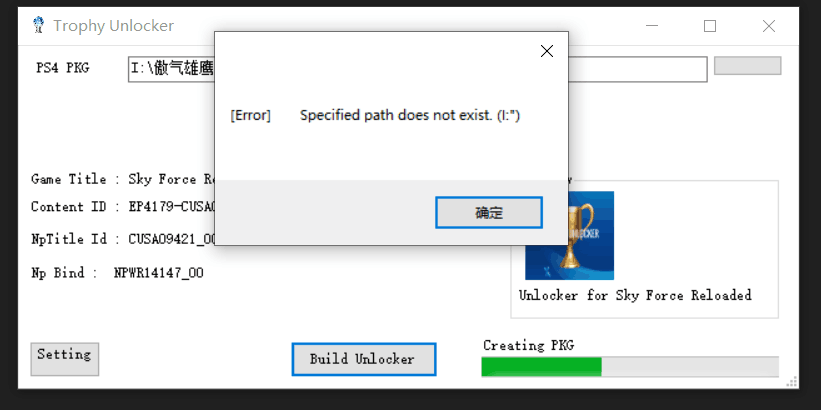
问题遇到的现象和发生背景 trophy unlocker无法正常使用
操作环境、软件版本等信息 win10 软件版本v1.3
尝试过的解决方法 重启、重新解压该压缩包
我想要达到的结果 正常提取PKG文件
https://www.psx-place.com/threads/ps4-trophy-unlocker-v1-0-by-the-darkprogramer.32970/
https://github.com/xXxTheDarkprogramerxXx/PS4_Tools/blob/master/TrophyUnlocker/README.md
gp4文件如下
<?xml version="1.0" encoding="utf-8" standalone="yes"?>
<psproject fmt="gp4" version="1000">
  <volume>
    <volume_type>pkg_ps4_app</volume_type>
    <volume_id>PS4VOLUME</volume_id>
    <volume_ts>2021-02-16 16:43:25</volume_ts>
    <package content_id="EP3678-CUSA10859_00-ADPOFE0000000001" passcode="00000000000000000000000000000000" storage_type="bd50" app_type="full"/>
    <chunk_info chunk_count="1" scenario_count="1">
      <chunks>
        <chunk id="0" layer_no="0" label="Chunk #0"/>
      </chunks>
      <scenarios default_id="0">
        <scenario id="0" type="sp" initial_chunk_count="1" label="Scenario #0">0</scenario>
      </scenarios>
    </chunk_info>
  </volume>
  <files img_no="0">
    <file targ_path="sce_module/libc.prx" orig_path="CONTENTS\sce_module\libc.prx"/>
    <file targ_path="sce_module/libSceFios2.prx" orig_path="CONTENTS\sce_module\libSceFios2.prx"/>
    <file targ_path="sce_sys/icon0.png" orig_path="CONTENTS\sce_sys\icon0.png"/>
    <file targ_path="sce_sys/npbind.dat" orig_path="CONTENTS\sce_sys\npbind.dat"/>
    <file targ_path="sce_sys/nptitle.dat" orig_path="CONTENTS\sce_sys\nptitle.dat"/>
    <file targ_path="sce_sys/param.sfo" orig_path="CONTENTS\sce_sys\param.sfo"/>
    <file targ_path="sce_sys/pic0.png" orig_path="CONTENTS\sce_sys\pic0.png"/>
    <file targ_path="sce_sys/pic1.png" orig_path="CONTENTS\sce_sys\pic1.png"/>
    <file targ_path="sce_sys/trophy/trophy00.trp" orig_path="CONTENTS\sce_sys\trophy\trophy00.trp"/>
    <file targ_path="eboot.bin" orig_path="CONTENTS\eboot.bin"/>
  </files>
  <rootdir>
    <dir targ_name="sce_module"/>
    <dir targ_name="sce_sys">
      <dir targ_name="trophy"/>
    </dir>
  </rootdir>
</psproject>
明明是该路径有全部的文件,但就是提示指定路径不存在,怎么解决?


