下午好🌅🌅🌅
本答案参考通义千问
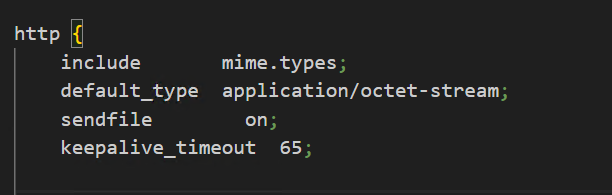
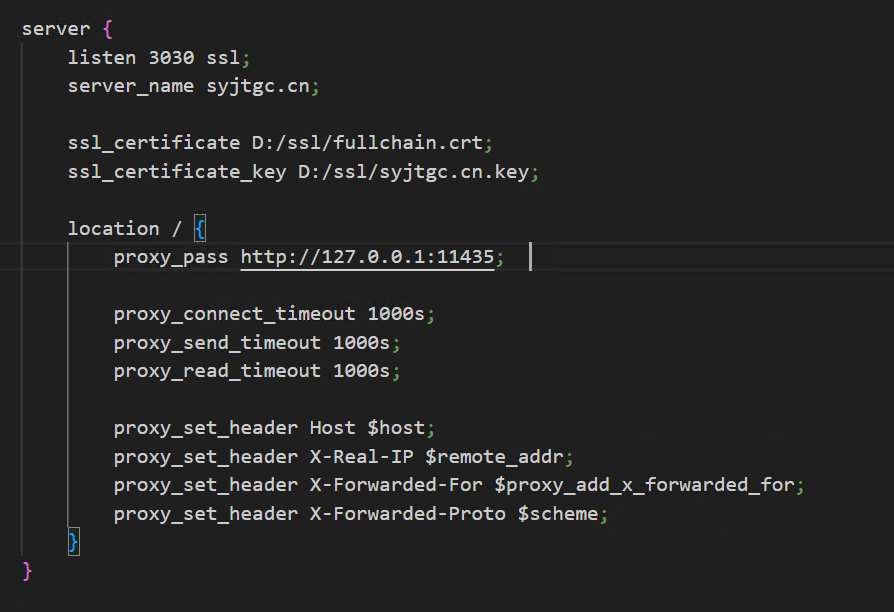
你遇到的问题是 Nginx 代理后设置的超时时间不生效,仍然默认使用 60 秒的超时时间,导致请求在 60 秒后出现 504 Gateway Timeout 错误。这通常是由于 Nginx 的某些配置未正确设置或覆盖了你的自定义配置。
✅ 问题原因分析
proxy_read_timeout、proxy_connect_timeout 和 proxy_send_timeout 配置未正确设置。- 可能在其他地方(如
location 或 upstream)覆盖了这些值。 - 没有正确地将超时参数应用到所有相关的代理配置中。
- Nginx 默认的超时时间是 60 秒,如果你没有显式设置,它会使用这个默认值。
✅ 解决方案
1. 确保正确设置超时参数
在 Nginx 配置中,你需要在 server 或 location 块中明确设置以下三个参数:
proxy_connect_timeout 300;
proxy_send_timeout 300;
proxy_read_timeout 300;
注意: 300 表示 300 秒(5 分钟),你可以根据实际需求调整数值。
2. 完整的配置示例(修改后的配置)
http {
    # 其他配置...

    server {
        listen 80;
        server_name syjtgc.cn;

        location /api/ {
            proxy_pass http://127.0.0.1:11435;
            proxy_set_header Host $host;
            proxy_set_header X-Real-IP $remote_addr;
            proxy_set_header X-Forwarded-For $proxy_add_x_forwarded_for;

            # 设置超时时间
            proxy_connect_timeout 300;
            proxy_send_timeout 300;
            proxy_read_timeout 300;

            # 其他可选配置
            proxy_buffering off;  # 如果需要实时响应
            proxy_cache_bypass $http_upgrade;
            proxy_set_header Upgrade $http_upgrade;
            proxy_set_header Connection 'upgrade';
        }
    }
}
3. 检查是否被其他配置覆盖
确保没有在 location 或 upstream 中重新设置了这些超时值。例如,检查是否有如下内容:
location /api/chat {
    proxy_pass http://127.0.0.1:11435/api/chat;
    # 注意:这里不要重复设置 proxy_connect_timeout 等参数,除非你需要特殊配置
}
4. 重启 Nginx 使配置生效
执行以下命令重启 Nginx:
sudo nginx -t  # 检查配置是否正确
sudo systemctl restart nginx  # 重启服务
5. 查看 Nginx 日志确认配置生效
运行以下命令查看 Nginx 错误日志,确认是否还有 504 报错:
tail -f /var/log/nginx/error.log
✅ 总结
重点配置项如下:
proxy_connect_timeout:连接上游服务器的超时时间。proxy_send_timeout:发送请求到上游服务器的超时时间。proxy_read_timeout:读取上游服务器响应的超时时间。
建议将这三个参数统一设置为一个合理的值(如 300 秒)并放在 location 或 server 块中。
✅ 附加建议
- 如果你的后端服务(如 PHP、Node.js、Python 等)也有自己的超时设置,也需要同步调整。
- 如果你使用的是
fastcgi 或 uwsgi,也需要设置相应的超时参数。
如有更多配置细节(如完整的 Nginx 配置文件),可以提供出来,我可以帮你进一步排查。