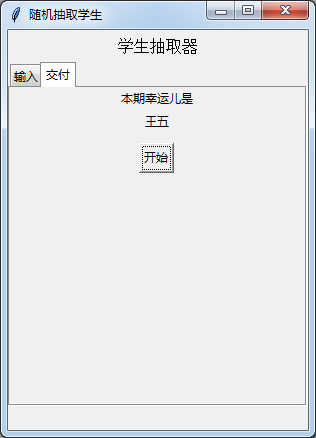
大家好,我是一位初中生。我在空闲时做了一个python小项目练手,但遇到了一个报错,程序总是无法识别输入的最后一个名称
报错如下:
```python
Exception in Tkinter callback
Traceback (most recent call last):
  File "c:\Users\yzc\AppData\Local\Programs\Python\Python310\lib\tkinter\__init__.py", line 1916, in __call__
    return self.func(*args)
  File "D:\python\newapp\ui.py", line 13, in fuck
    label2.config(name)
  File "c:\Users\yzc\AppData\Local\Programs\Python\Python310\lib\tkinter\__init__.py", line 1670, in configure
    return self._configure('configure', cnf, kw)
  File "c:\Users\yzc\AppData\Local\Programs\Python\Python310\lib\tkinter\__init__.py", line 1659, in _configure
    return self._getconfigure1(_flatten((self._w, cmd, '-'+cnf)))
_.py", line 1647, in _getconfigure1
    x = self.tk.splitlist(self.tk.call(*args))
_tkinter.TclError: unknown option "-色彩"
代码如下

```python
import tkinter as tk
import random
import time
from tkinter import ttk
infomation=''
text2=[]

def fuck():
    global text2,infomation
    text2=text.get('1.0','end-1c').split()
    name=random.choice(text2)
    infomation=name
    label2.config(name)

win=tk.Tk()
win.geometry('300x400+100+100')
win.title('随机抽取学生')

label=tk.Label(win,text='学生抽取器',font='12')
label.pack(padx=5,pady=5)
notebook=ttk.Notebook(win)
notebook.pack()
RandomFrame=tk.Frame(notebook)
CheckFrame=tk.Frame(notebook)
OkFrame=tk.Frame(notebook)

notebook.add(RandomFrame,text='输入')
notebook.add(OkFrame,text='交付')

text=tk.Text(RandomFrame)
text.pack()
label1=tk.Label(OkFrame,text='本期幸运儿是')
label1.pack()
label2=tk.Label(OkFrame,text=infomation)
label2.pack()
button=tk.Button(OkFrame,text='开始',command=fuck)
button.pack(padx=10,pady=10)

win.mainloop()
望告知解决办法,谢谢