上午好☀️☀️☀️️
本答案参考通义千问
在使用 Spring Boot 3 集成 Anji 验证码(spring-boot-starter-captcha)时,如果发现配置路径不生效,可能是以下几个原因导致的。以下是详细的解决方案和注意事项:
🧩 问题分析
你提到“配置路径不生效”,通常指的是以下几种情况之一:
- 验证码图片路径未正确配置,导致前端无法访问到生成的验证码图片。
- 静态资源路径配置错误,例如
/captcha 路径未被 Spring Boot 正确识别。 - 依赖版本兼容性问题,尤其是在 Spring Boot 3 中,某些旧版本的库可能不兼容。
✅ 解决方案
1. 检查依赖版本兼容性
确保你使用的 spring-boot-starter-captcha 版本与 Spring Boot 3 兼容。
目前最新版本为 1.3.0,但建议检查官方文档或 GitHub 仓库是否有针对 Spring Boot 3 的适配说明。
注意: 如果该库尚未完全适配 Spring Boot 3,可能会出现路径、安全配置等问题。
推荐做法:
- 查看 Anji 验证码 GitHub 页面 是否有 Spring Boot 3 支持。
- 如果没有,可以尝试升级到支持 Spring Boot 3 的版本,或者考虑替代方案(如使用
kaptcha 或 simple-captcha)。
2. 配置验证码路径
在 application.yml 或 application.properties 中配置验证码相关参数,确保路径正确。
示例配置(application.yml):
anji:
  captcha:
    image:
      path: /captcha/images
    url:
      path: /captcha
注意: 这个配置是否有效,取决于 Anji 验证码模块内部是如何处理这些路径的。你需要查看其源码或文档确认。
3. 自定义验证码图片路径
如果你希望自定义验证码图片的存储路径,可以通过配置类进行设置。
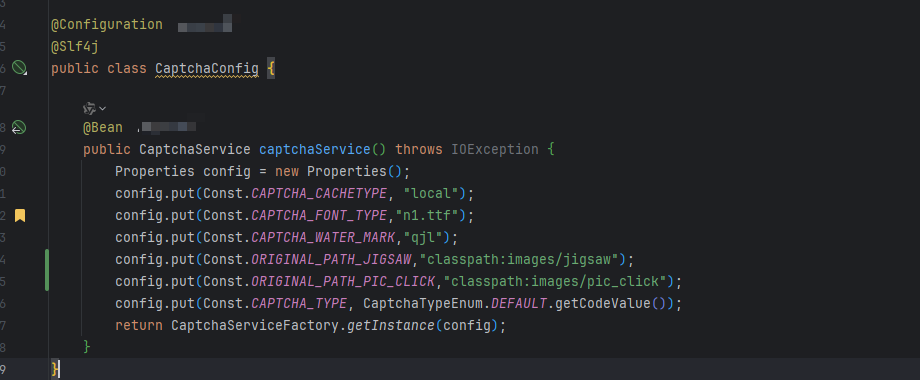
示例代码(Java Config):
@Configuration
public class CaptchaConfig {

    @Value("${anji.captcha.image.path}")
    private String captchaImagePath;

    @Bean
    public CaptchaProperties captchaProperties() {
        CaptchaProperties properties = new CaptchaProperties();
        properties.setCaptchaImageSavePath(captchaImagePath); // 设置验证码图片保存路径
        return properties;
    }
}
注意: 如果你没有使用 CaptchaProperties 类,可能需要通过其他方式注入配置。
4. 静态资源映射
确保 Spring Boot 正确地将验证码图片路径映射为可访问的 URL。
在 application.yml 中添加如下配置:
spring:
  resources:
    static-locations:
      - file:${captcha.image.path} # 假设你设置了图片保存路径
      - classpath:/static/
注意: 如果你使用的是 @EnableWebMvc,还需要配置 WebMvcConfigurer 来添加静态资源映射。
5. 检查 Controller 和 API 路径
确保你调用验证码接口的路径是正确的,并且能够访问到对应的控制器方法。
示例 Controller:
@RestController
public class CaptchaController {

    @Autowired
    private CaptchaService captchaService;

    @GetMapping("/captcha")
    public ResponseEntity<byte[]> getCaptcha() {
        byte[] captchaImage = captchaService.generateCaptcha();
        return ResponseEntity.ok()
                .contentType(MediaType.IMAGE_JPEG)
                .body(captchaImage);
    }
}
注意: 如果你使用了 Anji 提供的默认控制器,请确认其路径是否被正确注册。
6. 检查安全配置(Spring Security)
如果你启用了 Spring Security,需要确保验证码接口不受安全限制。
示例安全配置:
@Configuration
@EnableWebSecurity
public class SecurityConfig {

    @Bean
    public SecurityFilterChain filterChain(HttpSecurity http) throws Exception {
        http
            .authorizeRequests(authorize -> authorize
                .requestMatchers("/captcha/**").permitAll()
                .anyRequest().authenticated()
            )
            .csrf().disable(); // 根据需求开启或关闭 CSRF
        return http.build();
    }
}
🔍 最终建议
| 问题 | 解决方案 |
|------|----------|
| 路径不生效 | 检查 application.yml 中的路径配置,确认是否与实际路径匹配 |
| 静态资源未加载 | 确保 spring.resources.static-locations 正确配置 |
| 安全配置冲突 | 在 Spring Security 中开放 /captcha 接口权限 |
| 依赖版本不兼容 | 确认 Anji 验证码是否支持 Spring Boot 3,必要时更换依赖 |
✅ 总结
- 重点配置项:
application.yml 中的 anji.captcha.image.pathCaptchaProperties 的自定义配置- Spring Security 中对
/captcha 的权限控制
- 代码示例:
CaptchaConfig.javaCaptchaController.javaSecurityConfig.java
如果仍然无法解决,请提供完整的配置文件和异常日志,我可以进一步帮你定位问题。