application.yml文件配置mingzr.file.taskBakPath路径不存在

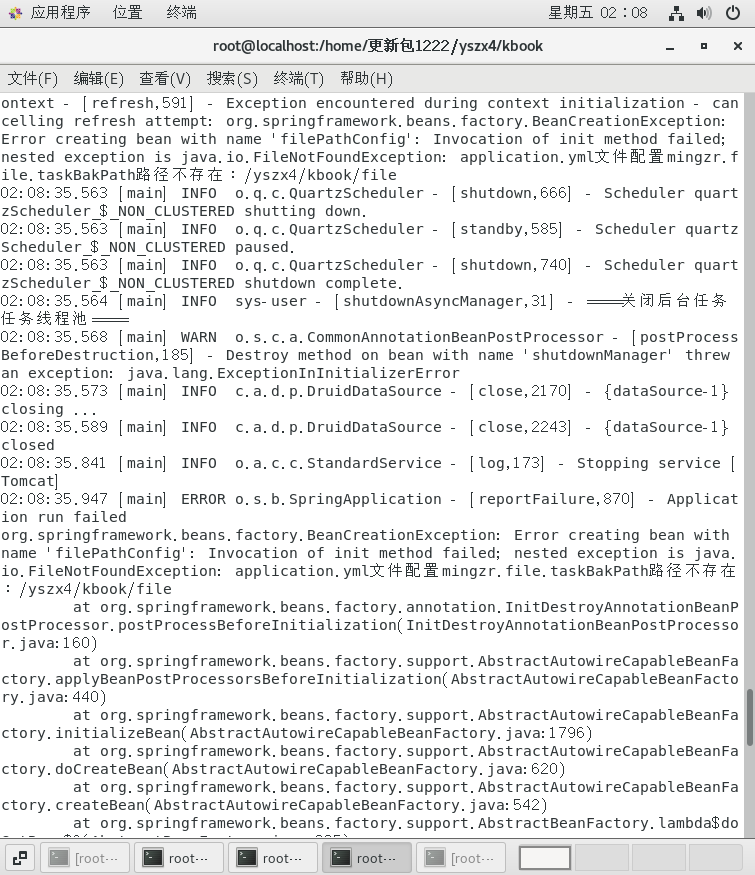

application.yml文件配置mingzr.file.taskBakPath路径不存在
 分享
分享
上午好☀️☀️☀️️
本答案参考通义千问
在使用 application.yml 文件配置路径时,如果遇到 “路径不存在” 的问题,通常是因为你所配置的路径在服务器上并没有被创建,或者没有权限访问。下面我将详细说明原因和解决方案。
你在 application.yml 中配置了类似如下的内容:
mingzr:
  file:
    taskBakPath: /opt/app/taskBackup/
但该目录 /opt/app/taskBackup/ 在服务器上并未存在,导致程序运行时无法写入文件或读取文件。
即使目录存在,如果当前应用使用的用户(如 tomcat 或 java 进程)对该目录没有读写权限,也会导致“路径不存在”的错误提示。
在服务器上执行命令,创建指定路径:
mkdir -p /opt/app/taskBackup/
注意: 使用
-p参数可以确保父目录也一并创建。
确保应用运行的用户对目标目录有读写权限:
chmod 755 /opt/app/taskBackup/
chown -R tomcat:tomcat /opt/app/taskBackup/
说明: 假设你的应用是以
tomcat用户运行的,可以根据实际情况修改用户名。
如果你希望程序在启动时自动创建该目录,可以在代码中添加逻辑:
import org.springframework.beans.factory.annotation.Value;
import org.springframework.stereotype.Component;

import java.io.File;

@Component
public class FileConfig {

    @Value("${mingzr.file.taskBakPath}")
    private String taskBakPath;

    public void init() {
        File dir = new File(taskBakPath);
        if (!dir.exists()) {
            boolean created = dir.mkdirs();
            if (created) {
                System.out.println("目录已创建: " + taskBakPath);
            } else {
                System.err.println("无法创建目录: " + taskBakPath);
            }
        } else {
            System.out.println("目录已存在: " + taskBakPath);
        }
    }
}
然后在启动类中调用这个方法:
@SpringBootApplication
public class Application {
    public static void main(String[] args) {
        SpringApplication app = new SpringApplication(Application.class);
        app.run(args);
    }

    @Bean
    public CommandLineRunner init(FileConfig fileConfig) {
        return args -> fileConfig.init();
    }
}
确保你的 application.yml 文件格式正确,尤其是缩进和冒号后的空格:
mingzr:
  file:
    taskBakPath: /opt/app/taskBackup/
不要写成:
mingzr:
  file:
    taskBakPath: /opt/app/taskBackup/
重点步骤如下:
如果你能提供具体的错误日志或代码片段,我可以进一步帮你定位问题!
分享 创建了问题
1月30日
创建了问题
1月30日

