helmer_hanssen 2026-02-04 20:48 采纳率: 47.1%
浏览 2

关于华为路由器和交换机的问题

关于华为路由器和交换机的问题

拓扑结构如下
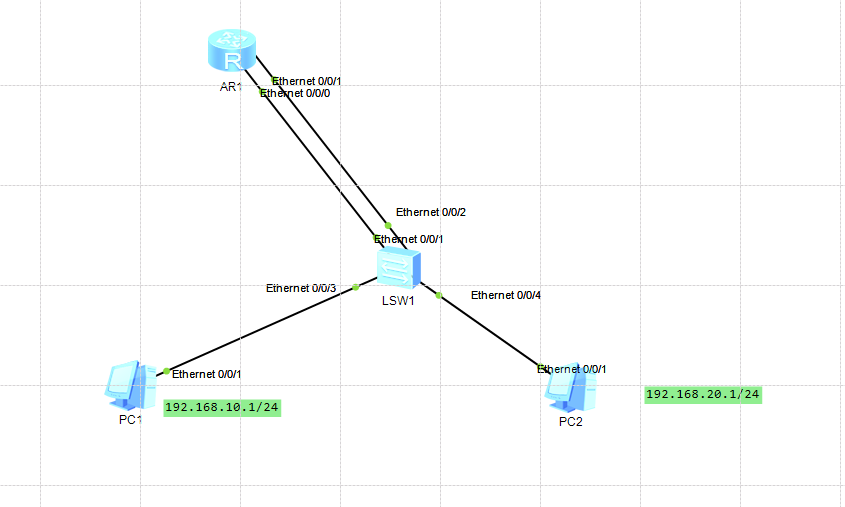
img

路由器的配置如下

[Huawei]dis current-configuration 
[V200R003C00]
#
 snmp-agent local-engineid 800007DB03000000000000
 snmp-agent 
#
 clock timezone China-Standard-Time minus 08:00:00
#
portal local-server load portalpage.zip
#
 drop illegal-mac alarm
#
vlan batch 10 20
#
 set cpu-usage threshold 80 restore 75
#
aaa 
 authentication-scheme default
 authorization-scheme default
 accounting-scheme default
 domain default 
 domain default_admin 
 local-user admin password cipher %$%$K8m.Nt84DZ}e#<0`8bmE3Uw}%$%$
 local-user admin service-type http
#
firewall zone Local
 priority 15
#
interface Vlanif10
 ip address 192.168.10.254 255.255.255.0 
#
interface Vlanif20
 ip address 192.168.20.254 255.255.255.0 
#
interface Ethernet0/0/0
 port link-type trunk
 port trunk allow-pass vlan 10
#
interface Ethernet0/0/1
 port link-type trunk
 port trunk allow-pass vlan 20
#
interface Ethernet0/0/2
#
interface Ethernet0/0/3
#
interface Ethernet0/0/4
#
interface Ethernet0/0/5
#
interface Ethernet0/0/6
#
interface Ethernet0/0/7
#
interface GigabitEthernet0/0/0
#
interface GigabitEthernet0/0/1
#
interface NULL0
#
user-interface con 0
 authentication-mode password
user-interface vty 0 4
user-interface vty 16 20
#
wlan ac
#
return


交换机配置命令如下

[Huawei]dis current-configuration 
#
sysname Huawei
#
vlan batch 10 20
#
cluster enable
ntdp enable
ndp enable
#
drop illegal-mac alarm
#
diffserv domain default
#
drop-profile default
#
aaa
 authentication-scheme default
 authorization-scheme default
 accounting-scheme default
 domain default
 domain default_admin
 local-user admin password simple admin
 local-user admin service-type http
#
interface Vlanif1
#
interface MEth0/0/1
#
interface Ethernet0/0/1
 port link-type trunk
 port trunk allow-pass vlan 10
#
interface Ethernet0/0/2
 port link-type trunk
 port trunk allow-pass vlan 20
#
interface Ethernet0/0/3
 port link-type access
 port default vlan 10
#
interface Ethernet0/0/4
 port link-type access
 port default vlan 20
#
interface Ethernet0/0/5
#
interface Ethernet0/0/6
#
interface Ethernet0/0/7
#
interface Ethernet0/0/8
#
interface Ethernet0/0/9
#
interface Ethernet0/0/10
#
interface Ethernet0/0/11
#
interface Ethernet0/0/12
#
interface Ethernet0/0/13
#
interface Ethernet0/0/14
#
interface Ethernet0/0/15
#
interface Ethernet0/0/16
#
interface Ethernet0/0/17
#
interface Ethernet0/0/18
#
interface Ethernet0/0/19
#
interface Ethernet0/0/20
#
interface Ethernet0/0/21
#
interface Ethernet0/0/22
#
interface GigabitEthernet0/0/1
#
interface GigabitEthernet0/0/2
#
interface NULL0
#
user-interface con 0
user-interface vty 0 4
#
return

配置完成之后

PC1能够ping通192.168.10.254和192.168.20.254,不能ping通192.168.20.1
PC2不能ping通192.168.20.254

这个是怎么回事?

  • 写回答

1条回答 默认 最新

  • 檀越@新空间 2026-02-04 20:49
    关注

    晚上好🌙🌙🌙
    本答案参考通义千问

    根据您提供的信息,您的网络拓扑结构和配置中存在一些潜在的问题。以下是关键问题的分析与解决方案


    一、问题描述

    • PC1 能够 ping 通 192.168.10.254(Vlanif10)和 192.168.20.254(Vlanif20),但不能 ping 通 192.168.20.1
    • PC2 不能 ping 通 192.168.20.254

    这表明:

    • PC1 可以访问路由器的两个网关接口,但无法访问某个特定 IP(192.168.20.1)。
    • PC2 无法访问路由器的 Vlanif20 接口。

    二、可能原因分析

    1. IP 地址分配或 VLAN 配置错误

    • 检查 PC1 和 PC2 的 IP 地址是否属于正确的 VLAN。
    • 如果 PC1 属于 VLAN10,而它尝试访问 VLAN20 中的设备(如 192.168.20.1),则需要确保路由器已正确配置了 VLAN 间的路由。

    2. 交换机配置问题

    • 在交换机上,Ethernet0/0/3Ethernet0/0/4 是 Access 端口,分别被分配到 VLAN10 和 VLAN20。
    • 但没有看到任何关于 VLAN20 内部通信的配置,或者是否有其他设备连接到了 VLAN20。

    3. 路由器未启用 VLAN 间路由

    • 当前路由器的配置中,只启用了 VLAN10 和 VLAN20 的 IP 地址,但没有启用 VLAN 间路由功能。
    • 即使在路由器上设置了多个 VLAN 接口,如果未开启 IP 路由功能,VLAN 之间将无法通信。

    4. 防火墙或 ACL 阻止通信

    • 虽然当前配置中没有看到 ACL 或防火墙规则,但建议检查是否存在默认阻止策略。

    三、解决方案

    1. 启用 IP 路由功能

    • 在路由器上启用 IP 路由功能是 VLAN 间通信的前提。
    [Huawei]ip routing-enable
    

    注意: 在华为设备中,ip routing-enable 是启用 IP 路由的命令,确保该命令已执行。


    2. 检查 PC 的 IP 地址和子网掩码

    • 确保 PC1 和 PC2 的 IP 地址和子网掩码与对应的 VLAN 网段匹配。
    • 例如:
      • VLAN10: 192.168.10.x/24
      • VLAN20: 192.168.20.x/24

    3. 检查交换机的 VLAN 分配

    • 确认 Ethernet0/0/3Ethernet0/0/4 是否正确分配到 VLAN10 和 VLAN20。
    • 检查是否有其他设备连接到 VLAN20,并确认其 IP 地址是否为 192.168.20.1

    4. 检查 VLAN 间路由配置

    • 确保路由器上的 VLAN 接口配置正确,且已启用 IP 路由。

    5. 检查防火墙或 ACL 配置

    • 如果有 ACL 或防火墙规则,请检查是否阻止了 VLAN20 的流量。

    四、修改后的路由器配置示例

    [Huawei]dis current-configuration 
    [V200R003C00]
    #
     snmp-agent local-engineid 800007DB03000000000000
     snmp-agent 
    #
     clock timezone China-Standard-Time minus 08:00:00
    #
    portal local-server load portalpage.zip
    #
     drop illegal-mac alarm
    #
    vlan batch 10 20
    #
     set cpu-usage threshold 80 restore 75
    #
    aaa 
     authentication-scheme default
     authorization-scheme default
     accounting-scheme default
     domain default 
     domain default_admin 
     local-user admin password cipher %$%$K8m.Nt84DZ}e#<0`8bmE3Uw}%$%$
     local-user admin service-type http
    #
    firewall zone Local
     priority 15
    #
    interface Vlanif10
     ip address 192.168.10.254 255.255.255.0 
    #
    interface Vlanif20
     ip address 192.168.20.254 255.255.255.0 
    #
    interface Ethernet0/0/0
     port link-type trunk
     port trunk allow-pass vlan 10
    #
    interface Ethernet0/0/1
     port link-type trunk
     port trunk allow-pass vlan 20
    #
    interface Ethernet0/0/2
    #
    interface Ethernet0/0/3
    #
    interface Ethernet0/0/4
    #
    interface Ethernet0/0/5
    #
    interface Ethernet0/0/6
    #
    interface Ethernet0/0/7
    #
    interface GigabitEthernet0/0/0
    #
    interface GigabitEthernet0/0/1
    #
    interface NULL0
    #
    user-interface con 0
     authentication-mode password
    user-interface vty 0 4
    user-interface vty 16 20
    #
    wlan ac
    #
    ip routing-enable  # 增加此行以启用 IP 路由
    #
    return
    

    五、总结

    | 问题 | 解决方案 | |------|----------| | 未启用 IP 路由 | 在路由器上执行 ip routing-enable | | VLAN 间通信失败 | 确保 VLAN 间路由已启用,并且 PC 的 IP 地址配置正确 | | 交换机配置错误 | 检查交换机的 VLAN 分配和端口配置 | | ACL 或防火墙限制 | 检查是否有 ACL 或防火墙规则阻止了 VLAN20 的流量 |


    如果您能提供更多关于 PC1、PC2 的 IP 地址以及它们连接的端口信息,我可以进一步帮助您定位具体问题。

    评论

报告相同问题?

问题事件

  • 创建了问题 2月4日