
问题遇到的现象和发生背景
KEIL 打开tool 报错无法加载一下来源的扩展程序
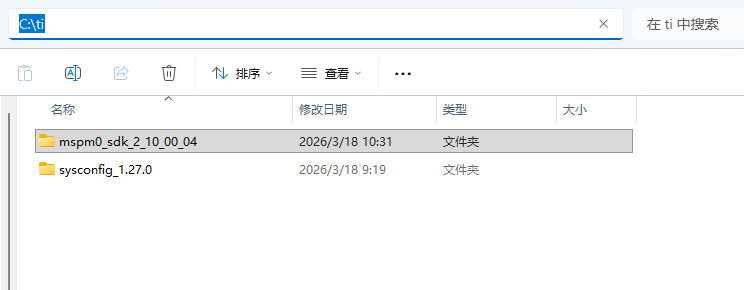
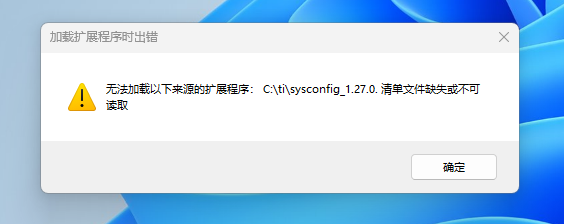
操作环境、软件版本等信息
keil V5.38a,
MspM0 SDK 2.10.00.04
Sysconfig V1.27.0
C:\ti\mspm0_sdk_2_10_00_04\tools\keil\syscfg.bat 信息如下
@echo off

set SYSCFG_PATH="C:\ti\sysconfig_1.27.0\sysconfig_cli.bat"

if not exist "%SYSCFG_PATH%" (
    echo.
    echo Couldn't find Sysconfig Tool %SYSCFG_PATH%
    echo "Update the file located at <sdk path>/tools/keil/syscfg.bat"
    echo.
    exit
)

echo Using Sysconfig Tool from %SYSCFG_PATH%
echo "Update the file located at <sdk path>/tools/keil/syscfg.bat to use a different version"

set PROJ_DIR=%~1
set PROJ_DIR=%PROJ_DIR:'=%

set SYSCFG_FILE=%~2
set SYSCFG_FILE=%SYSCFG_FILE:'=%

:: Search for the root of the SDK by going up one directory
:: However, if we don't find it after 20 times then give up
set SDK_ROOT=%PROJ_DIR%
set iter=0
:sdk_search_loop
if exist "%SDK_ROOT%\.metadata\product.json" (
    goto sdk_search_exit
) else if %iter% geq 20 (
    @echo "Couldn't find .metadata\product.json"
) else (
    set /a iter=%iter%+1
    set SDK_ROOT=%SDK_ROOT%..\
    goto sdk_search_loop
)
:sdk_search_exit

:: Search for the directory containing the project's syscfg file
:: Going up a directory atleast 5 times but then give up
set SYSCFG_DIR=%PROJ_DIR%
set iter=0
:syscfg_search_loop
if exist %SYSCFG_DIR%\*.syscfg (
    :: Remove the trailing slash if it exist since Keil doesn't like it
    IF %SYSCFG_DIR:~-1%==\ SET SYSCFG_DIR=%SYSCFG_DIR:~0,-1%
    goto syscfg_search_exit
) else if %iter% geq 5 (
    @echo "Couldn't find syscfg file"
) else (
    set /a iter=%iter%+1
    set SYSCFG_DIR=%SYSCFG_DIR%..\
    goto syscfg_search_loop
)
:syscfg_search_exit


%SYSCFG_PATH% -o "%SYSCFG_DIR%" -s "%SDK_ROOT%\.metadata\product.json" --compiler keil "%SYSCFG_DIR%\%SYSCFG_FILE%
C:\ti\mspm0_sdk_2_10_00_04\tools\keil\MSPM0_SDK_syscfg_menu_import.cfg信息如下
[Sysconfig v1.27.0 - MSPM0 SDK v2_10_00_04]
Command=C:\ti\sysconfig_1.27.0\nw\nw.exe C:\ti\sysconfig_1.27.0
Initial Folder=c:\ti\mspm0_sdk_2_10_00_04
Arguments=--compiler keil -s ".metadata\product.json" "#E"
Prompt for Arguments=0
Run Minimized=0
Run Independent=-1

C:\ti\sysconfig_1.27.0\sysconfig_cli.bat信息如下

```bash
@echo off
rem
rem Run the SysConfig command line tool
rem
rem For help, use -h or --help

set DIR=%~dp0

set NODEFLAGS=
if "%1" == "-g" (
    set NODEFLAGS=--inspect --debug-brk
)

set CCS_NODE="%DIR%..\..\tools\node\node.exe"
set STANDALONE_NODE="%DIR%nodejs\node.exe"

rem try to use standalone node, then CCS node, finally any node version available on the path
if exist %STANDALONE_NODE% (
    set NODE=%STANDALONE_NODE%
) else (
    if exist %CCS_NODE% (
        set NODE=%CCS_NODE%
    ) else (
        SET NODE=node
    )
)

%NODE% %NODEFLAGS% "%DIR%\dist\cli.js" %*
有没有遇到过的指点一下。谢谢!


