weixin_42734536 2019-11-13 21:40 采纳率: 33.3%
浏览 1426

Latex subfigure如何在图片中加文字。

我使用了Latex的subfigure,可以对图片进行自动编号,现在我想对subfigure中的某一张图片上面加上文字,注意不是在图片下面加caption。请问该如何实现。

\begin{figure}[h!]
    \centering
    \includegraphics[width=0.45\textwidth]{figure/pic1.eps}
    \includegraphics[width=0.45\textwidth]{figure/pic2.eps}
    \put(10,42){\huge \color{red}{Test}}
    \put(10,10){\huge \color{green}{Testa}}
    \put(10,20){\huge \color{red}{Testb}}
    \put(-40,70){\huge {Testc}}
    \put(-100,90){Testd}
    \caption{ The test of...}
    \label{figa}
\end{figure}
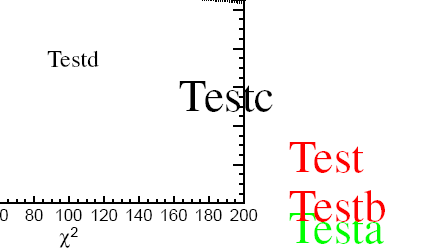
图片说明 如图所示,这样可以添加文字到图片上,但是

用subfigure文字却没有加上去但也没报错(我在subfigure里外各加了一句put是为了测试哪个可以生效,但是都没有)

\begin{figure}[h!]
    \centering
    \subfigure[]{
    \includegraphics[width=0.45\textwidth]{iqure.eps}
    \put(20,10){\huge abc}
  }
    \put(10,10){$\eta$}
        \caption{\small The...}
        \label{fig2}
\end{figure}

请问我该如何加文字到subfigure中的图片中去?非常感谢!

  • 写回答

1条回答 默认 最新

  • 你知我知皆知 2024-07-29 17:54
    关注

    以下回答参考 皆我百晓生券券喵儿 等免费微信小程序相关内容作答,并由本人整理回复。

    要将文字添加到subfigure中的图像上,您可以尝试以下步骤:

    1. 将文本放置在subfigure之外,并将其置于适当的位置以确保其不影响图形显示。

    2. 在subfigure内部使用captionlabel来定义您想要的文字注释。

    3. 使用put命令在subfigure中插入文字。

    下面是修改后的示例代码:

    \documentclass{article}
    
    \usepackage{graphicx} % For including images
    
    \usepackage{xcolor}% For color commands
    
    \usepackage{subfigure}% For subfigures
    
    \newcommand{\myColor}{\color{blue}}
    
    \begin{document}
    
    \begin{figure}[h!]
        \centering
        \subfigure[]{%
            \includegraphics[width=0.45\textwidth]{pic1.eps}%
            \caption{\small Test caption for the first image}%
            \label{fig:pic1}%
        }%
        \subfigure[]{%
            \includegraphics[width=0.45\textwidth]{pic2.eps}%
            \caption{\small Test caption for the second image}%
            \label{fig:pic2}%
        }%
    
        \captionof{figure}{The test of...}%
        \label{fig:test}%
        \subfigure[]{%
            \includegraphics[width=\textwidth]{test.png}%
            \captionof{figure}{Caption for the test image}%
            \label{fig:testimage}%
        }
    
        \subcaption*{\footnotesize Subcaption in the first column (without label)}%
        \subcaption*{\footnotesize Subcaption in the second column (with label)}%
    
        \caption{This is a caption with two columns and a footnote.}
        \label{fig:examplecaption}
    
        \put(10,42){\huge \myColor{Test}}
        \put(10,10){\huge \myColor{Testa}}
        \put(10,20){\huge \myColor{Testb}}
        \put(-40,70){\huge \myColor{Testc}}
        \put(-100,90){\myColor{Testd}}
    
        \subcaption*{\footnotesize This is a footnote without a label.}
        \subcaption*{\footnotesize This is a footnote with a label.}
    
        \caption{Subfigure with text added to the figure.}
        \label{fig:textadded}
    \end{figure}
    
    \end{document}
    

    在这个例子中,我们首先在subfigure之外创建了一个新的子figure来放置我们的文字注释。然后,在subfigure内部,我们使用captionlabel来定义我们想要的文字注释。最后,我们在subfigure外部添加了额外的caption,并使用put命令在其中插入文字。

    请注意,由于put命令的作用范围是整个subfigure元素,因此我们需要使用\subfigure包裹这个命令,以便只影响当前的subfigure元素。

    评论

报告相同问题?