下午好🌅🌅🌅
本答案参考通义千问
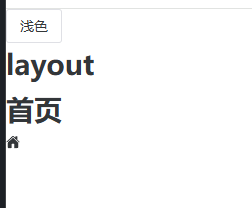
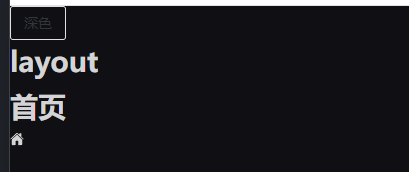
你遇到的问题是:Naive UI 组件的文字颜色没有随着主题切换而改变。这通常是因为 theme-overrides 没有正确配置,或者未覆盖所有组件的文本颜色变量。
🧩 问题分析
-
theme-overrides 的作用:
theme-overrides 是 Naive UI 提供的一个属性,用于自定义主题样式。- 如果你只设置了部分变量(如
borderRadius),但没有设置文字颜色相关的变量(如 color, textColor 等),那么默认的文本颜色不会改变。
-
theme 属性的使用:
:theme="themeStore.theme" 是正确的,但需要确保 darkTheme 和 lightTheme 的配置中包含完整的颜色配置。
-
自动导入方式不影响主题切换:
- 使用
unplugin-auto-import/vite 和 unplugin-vue-components 是正常的按需导入方式,不影响主题切换逻辑。
✅ 解决方案
1. 完善 theme-overrides 配置
你需要在 themeOverrides 中添加文字颜色相关的变量,例如:
// stores/themeStore.ts
import { defineStore } from 'pinia';
import type { GlobalTheme } from 'naive-ui';
import { darkTheme, lightTheme } from 'naive-ui';

export const useThemeStore = defineStore('theme', {
  state: () => ({
    currentTheme: 'light',
    themeOverrides: {
      common: {
        // 基础通用变量
        fontWeightStrong: '600',
        borderRadius: '2px',
        color: '#ffffff',       // 主色
        textColor: '#000000',   // 文字颜色(浅色模式)
        textColor2: '#555555',  // 次要文字颜色
        textColor3: '#999999',  // 更次要文字颜色
        // 深色模式下的文字颜色
        darkTextColor: '#ffffff',
        darkTextColor2: '#bbbbbb',
        darkTextColor3: '#cccccc',
      },
    },
  }),
  getters: {
    isDark: (state) => state.currentTheme === 'dark',
    theme: (state): GlobalTheme => {
      return state.currentTheme === 'dark' ? darkTheme : lightTheme;
    },
  },
  actions: {
    toggleTheme() {
      this.currentTheme = this.currentTheme === 'dark' ? 'light' : 'dark';
    },
  },
  persist: {
    key: 'theme-store',
  },
});
重点: 在 common 中添加了 textColor、darkTextColor 等变量,这些变量控制了不同主题下文字的颜色。
2. 更新 app.vue 中的 n-config-provider
确保你已经将 theme-overrides 正确传递给 n-config-provider:
<template>
    <div class="app-container">
        <n-button @click="themeStore.toggleTheme()"> {{ themeStore.isDark ? '深色' : '浅色' }}</n-button>
        <n-config-provider
          :locale="zhCN"
          :date-locale="dateZhCN"
          :theme-overrides="themeStore.themeOverrides"
          :theme="themeStore.theme"
        >
            <n-global-style />
            <RouterView />
        </n-config-provider>
    </div>
</template>
3. 检查是否使用了自定义样式覆盖
如果你在全局或组件中手动设置了文字颜色(如通过 CSS 或 inline style),可能会覆盖 Naive UI 的主题设置。请检查以下内容:
- 是否在
style 标签中写了 .n-button { color: red; } - 是否在组件中使用了
style="color: red;"
4. 测试效果
修改后,切换主题时应能看到按钮、文本等文字颜色变化。如果仍然不生效,请检查浏览器开发者工具中的样式层叠(Cascade)。
✅ 总结
| 步骤 | 内容 |
|------|------|
| 1 | 完善 theme-overrides,添加文字颜色相关变量(如 textColor、darkTextColor) |
| 2 | 确保 n-config-provider 正确接收 theme-overrides 和 theme |
| 3 | 检查是否有自定义样式覆盖了主题设置 |
| 4 | 测试并验证主题切换效果 |
💡 参考代码(完整)
stores/themeStore.ts
import { defineStore } from 'pinia';
import type { GlobalTheme } from 'naive-ui';
import { darkTheme, lightTheme } from 'naive-ui';

export const useThemeStore = defineStore('theme', {
  state: () => ({
    currentTheme: 'light',
    themeOverrides: {
      common: {
        fontWeightStrong: '600',
        borderRadius: '2px',
        color: '#ffffff',
        textColor: '#000000',
        textColor2: '#555555',
        textColor3: '#999999',
        darkTextColor: '#ffffff',
        darkTextColor2: '#bbbbbb',
        darkTextColor3: '#cccccc',
      },
    },
  }),
  getters: {
    isDark: (state) => state.currentTheme === 'dark',
    theme: (state): GlobalTheme => {
      return state.currentTheme === 'dark' ? darkTheme : lightTheme;
    },
  },
  actions: {
    toggleTheme() {
      this.currentTheme = this.currentTheme === 'dark' ? 'light' : 'dark';
    },
  },
  persist: {
    key: 'theme-store',
  },
});
如有更多关于 Naive UI 主题定制的问题,欢迎继续提问!