在Taro中使用Taro.createSelectorQuery()无法获取到Video的context,怎么处理?
Taro版本3.x
在自定义中间中使用,拿到的一直是null
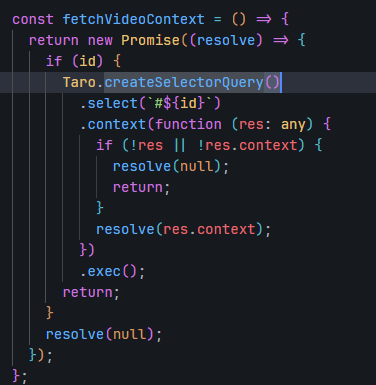
文档说的是组件内使用this.createSelectorQuery(),我使用函数式组件内有获取不到this
在类组件里使用this.createSelectorQuery().in(this)拿到的也是null
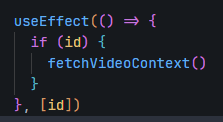
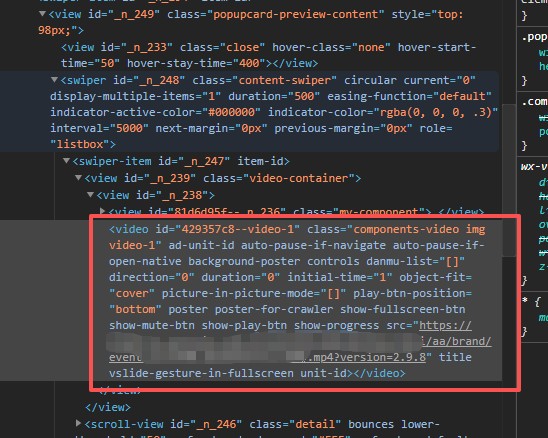
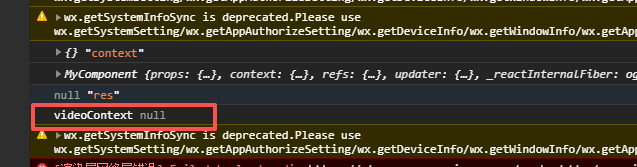
要怎么处理呀!

在Taro中使用Taro.createSelectorQuery()无法获取到Video的context,怎么处理?
Taro版本3.x
在自定义中间中使用,拿到的一直是null
文档说的是组件内使用this.createSelectorQuery(),我使用函数式组件内有获取不到this
在类组件里使用this.createSelectorQuery().in(this)拿到的也是null
要怎么处理呀!
 分享
分享
下午好🌅🌅🌅
本答案参考通义千问
在 Taro 框架中(尤其是 Taro 3.x),使用 this.createSelectorQuery().in(this) 时,如果获取不到 Video 组件的 context,通常是因为以下几个原因导致的:
createSelectorQuery() 需要确保目标组件已经挂载到 DOM 中。this.createSelectorQuery() 时,若 this 的上下文不正确,可能导致查询失败。this:函数式组件没有 this,所以不能使用 this.createSelectorQuery()。this:在类组件中,如果方法没有正确绑定,可能会导致 this 指向错误。在类组件中,建议将 createSelectorQuery() 放在 componentDidMount 或 useEffect(如果是函数式组件)中执行。
this.createSelectorQuery()import Taro, { Component } from '@tarojs/taro';
class MyComponent extends Component {
componentDidMount() {
const query = this.createSelectorQuery().in(this);
query.select('#video').boundingClientRect(res => {
console.log(res); // 打印 Video 元素信息
}).exec();
}
render() {
return (
<View>
<Video id="video" src="your-video-url.mp4" />
</View>
);
}
}
重点说明:
- 必须在组件生命周期(如
componentDidMount)中调用createSelectorQuery(),否则可能因组件未渲染完成而获取不到元素。- 确保
id="video"与查询的#video匹配。
useRef 和 createSelectorQuery在函数式组件中,可以结合 useRef 来引用节点,并通过 Taro.createSelectorQuery() 查询:
import Taro, { useRef, useEffect } from '@tarojs/taro';

const MyComponent: React.FC = () => {
  const videoRef = useRef<HTMLVideoElement>(null);

  useEffect(() => {
    if (videoRef.current) {
      const query = Taro.createSelectorQuery();
      query.in(videoRef.current).select('#video').boundingClientRect(res => {
        console.log(res); // 获取 Video 信息
      }).exec();
    }
  }, []);

  return (
    <View>
      <Video ref={videoRef} id="video" src="your-video-url.mp4" />
    </View>
  );
};

export default MyComponent;
重点说明:
- 函数式组件中不能使用
this,因此需要使用ref来获取组件实例或 DOM 节点。Taro.createSelectorQuery()是全局方法,不是this的方法。
检查 id 是否匹配:
Video 组件是否设置了 id="video"?.select('#video')?检查组件是否渲染成功:
Video 组件在页面中被正确渲染。检查是否在正确的生命周期中执行查询:
componentDidMount。useEffect 中。检查是否使用了 Taro.createSelectorQuery() 而非 this.createSelectorQuery():
this,而是直接调用 Taro.createSelectorQuery()。| 场景 | 解决方案 |
|------|----------|
| 类组件中获取不到 this | 使用 componentDidMount 中调用 this.createSelectorQuery() |
| 函数式组件中获取不到 this | 使用 useRef + Taro.createSelectorQuery() |
| 查询结果始终为 null | 确保组件已渲染、id 匹配、查询时机正确 |
如有更多关于 Taro 框架的问题,欢迎继续提问!
分享 已结题
(查看结题原因) 4月9日
创建了问题
4月1日
已结题
(查看结题原因) 4月9日
创建了问题
4月1日

