为什么python代码这样输出系统显示这样的红字报错了?求解答一下谢谢!

为什么python代码这样输出系统显示这样的红字报错了?求解答一下谢谢!
 分享
分享
我帮你把这两个报错分开说清楚,你一看就懂了
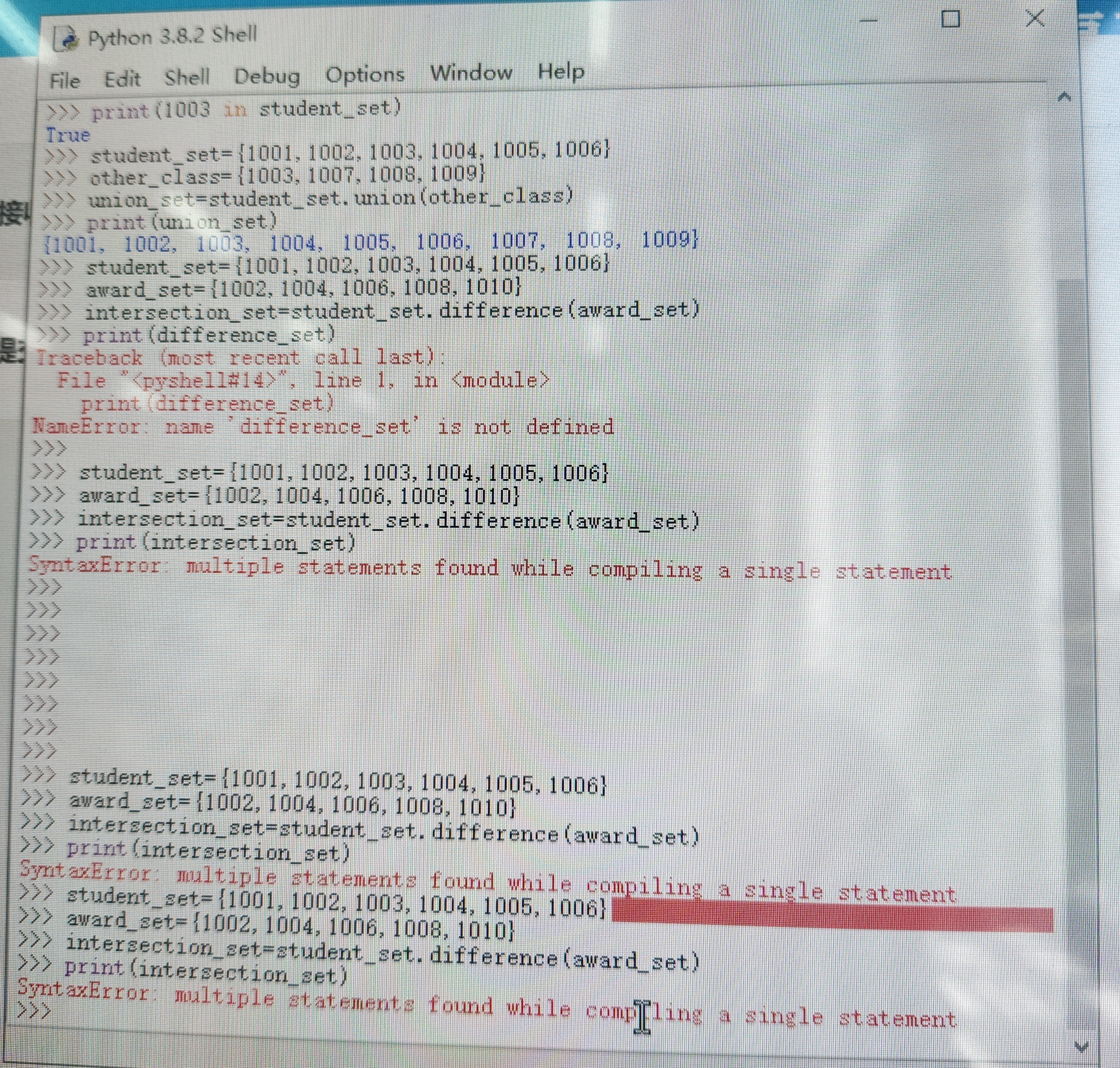
NameError: name 'difference_set' is not defined>>> print(difference_set)
NameError: name 'difference_set' is not defined
你在定义 difference_set 之前,就先执行了 print(difference_set),Python 找不到这个变量,就会报“未定义”的错误。
看你的代码顺序:
>>> award_set={1002,1004,1006,1008,1010}
>>> intersection_set=student_set.difference(award_set)
>>> print(difference_set)  # 这里的变量名写错了,应该是 intersection_set
intersection_set,但打印时用了不存在的 difference_set。NameError。把打印语句改成你实际定义的变量名:
print(intersection_set)
SyntaxError: multiple statements found while compiling a single statement这个错误是你在 IDLE 的 Shell 里,把多行代码一次性粘贴进去了。
比如你一次性输入了:
student_set={1001,1002,1003,1004,1005,1006}
award_set={1002,1004,1006,1008,1010}
intersection_set=student_set.difference(award_set)
print(intersection_set)
IDLE 的交互 Shell(就是 >>> 这个界面)不支持一次执行多行代码,它会把这几行当成一条语句解析,自然会报语法错误。
>>> student_set={1001,1002,1003,1004,1005,1006}
>>> award_set={1002,1004,1006,1008,1010}
>>> intersection_set=student_set.difference(award_set)
>>> print(intersection_set)
.py 文件里,再运行文件(推荐,方便调试和保存)。# 1. 定义集合
student_set = {1001, 1002, 1003, 1004, 1005, 1006}
award_set = {1002, 1004, 1006, 1008, 1010}
# 2. 计算差集(student_set - award_set)
difference_set = student_set.difference(award_set)
# 3. 打印结果
print(difference_set)
执行结果:{1001, 1003, 1005}
分享 已采纳回答
5月9日
创建了问题
4月21日
已采纳回答
5月9日
创建了问题
4月21日


