安卓开发的桌面小组件如何隐藏底部的文字,没有找到有相关的教程,类似下面的搜索组件不显示底部的文字。
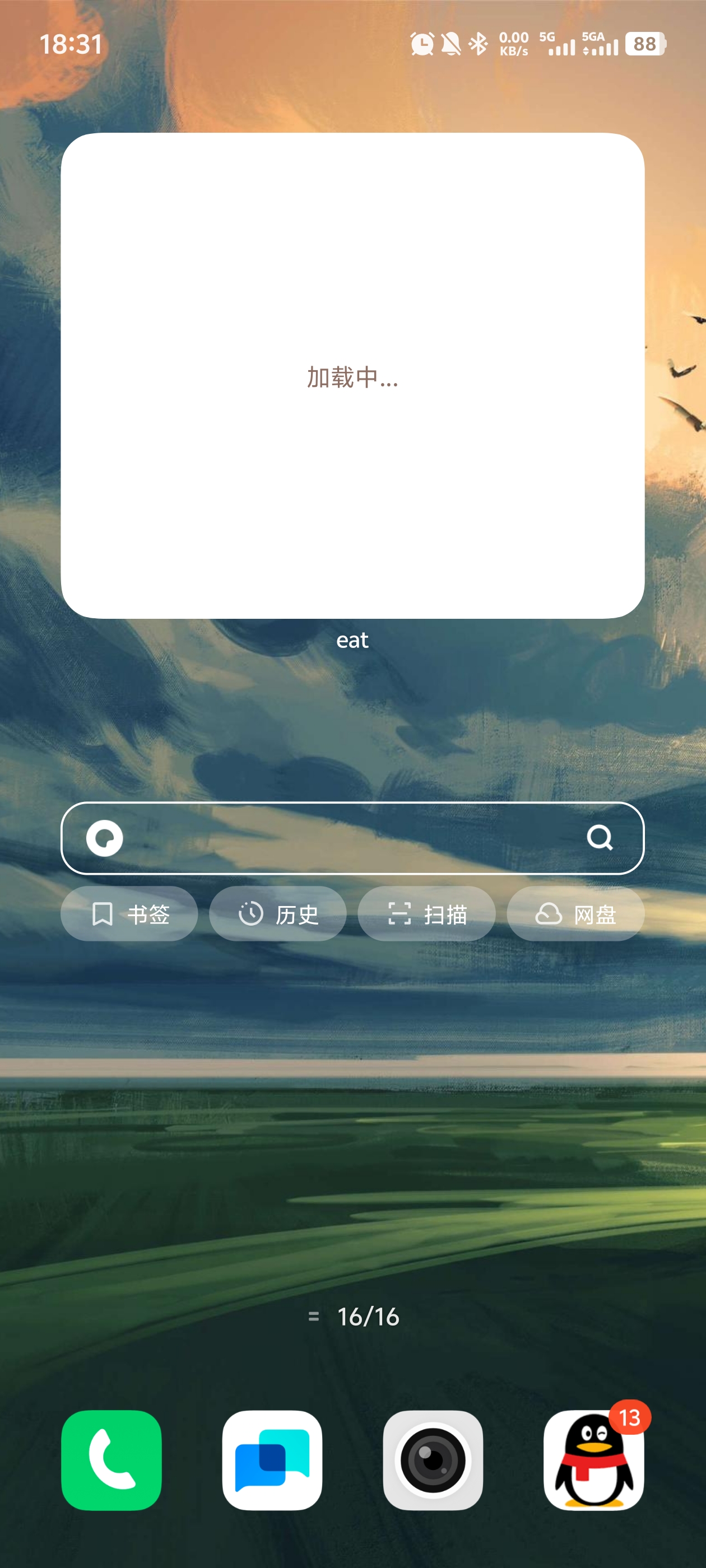

安卓开发的桌面小组件如何隐藏底部的文字,没有找到有相关的教程,类似下面的搜索组件不显示底部的文字。
 分享
分享
晚上好🌙🌙🌙
本答案参考通义千问
在安卓开发中,桌面小组件(App Widget) 是一种可以放置在主屏幕上的小应用组件。如果你希望隐藏 小组件底部的文字(比如默认的“点击打开”或“应用名称”等),通常需要通过自定义布局和样式来实现。
你提到的“底部的文字”可能是指以下几种情况之一:
如果是第一种情况(系统默认显示的文字),这通常是无法直接通过代码隐藏的,因为这是 Android 系统行为。但如果是第二种或第三种情况,可以通过修改布局文件和样式进行隐藏。
如果你在 appwidget.xml 布局文件中添加了 TextView 或其他带有文字的控件,可以直接删除或隐藏它们。
步骤如下:
res/layout/appwidget.xml 文件。TextView 或类似控件。android:visibility="gone"。示例代码:
<!-- appwidget.xml -->
<LinearLayout xmlns:android="http://schemas.android.com/apk/res/android"
    android:layout_width="match_parent"
    android:layout_height="match_parent"
    android:orientation="vertical">

    <!-- 假设这里有你想隐藏的 TextView -->
    <TextView
        android:id="@+id/tv_hidden_text"
        android:layout_width="wrap_content"
        android:layout_height="wrap_content"
        android:text="This is hidden text" />

</LinearLayout>
修改后:
<!-- 修改后的 appwidget.xml -->
<LinearLayout xmlns:android="http://schemas.android.com/apk/res/android"
    android:layout_width="match_parent"
    android:layout_height="match_parent"
    android:orientation="vertical">

    <!-- 隐藏该 TextView -->
    <TextView
        android:id="@+id/tv_hidden_text"
        android:layout_width="wrap_content"
        android:layout_height="wrap_content"
        android:text="This is hidden text"
        android:visibility="gone" />

</LinearLayout>
如果你指的是系统默认的“点击打开”文字(例如,在某些设备上,小组件下方会显示“点击打开”),这通常是由系统决定的,不能直接通过代码移除。不过你可以尝试以下方式减少其影响:
appwidget.xml 中使用全屏布局,避免留出空白区域。如果你希望完全自定义小组件外观,可以考虑使用 RemoteViews 和 AppWidgetProvider 来控制所有界面元素,包括隐藏文字。
示例代码:
public class MyAppWidgetProvider extends AppWidgetProvider {
    @Override
    public void onUpdate(Context context, AppWidgetManager appWidgetManager, int[] appWidgetIds) {
        for (int appWidgetId : appWidgetIds) {
            RemoteViews views = new RemoteViews(context.getPackageName(), R.layout.appwidget);

            // 隐藏特定控件
            views.setViewVisibility(R.id.tv_hidden_text, View.GONE);

            appWidgetManager.updateAppWidget(appWidgetId, views);
        }
    }
}
| 问题类型 | 解决方案 |
|----------|----------|
| 自定义布局中的文字 | 删除或设置 android:visibility="gone" |
| 系统默认文字(如“点击打开”) | 无法直接隐藏,可通过布局优化减少影响 |
| 小组件底部文字 | 检查是否为布局中控件,建议通过 RemoteViews 控制 |
RemoteViews 方法,避免依赖非官方 API。如你有具体的布局文件或代码片段,我可以进一步帮助你定位并隐藏相关文字。
分享 创建了问题
5月6日
创建了问题
5月6日

