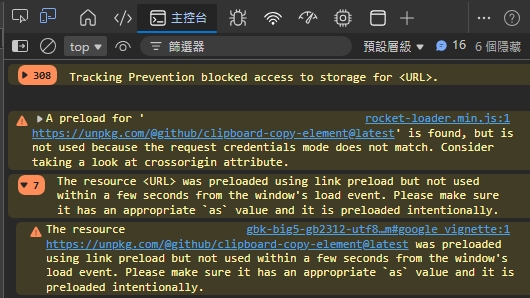
以下是 JS 複杂按钮的代码,在使用浏览器检测功能,发现出现错误信息,请问如何修復这个问题?
GitHub开源项目:https://github.github.io/clipboard-copy-element
浏览器:
01. rocket-loader.min.js:1 A preload for 'https://unpkg.com/@github/clipboard-copy-element@latest'@github/clipboard-copy-element@latest' is found, but is not used because the request credentials mode does not match. Consider taking a look at crossorigin attribute.
The resource was preloaded using link preload but not used within a few seconds from the window's load event. Please make sure it has an appropriate
asvalue and it is preloaded intentionally.The resource https://unpkg.com/@github/clipboard-copy-element@latest@github/clipboard-copy-element@latest was preloaded using link preload but not used within a few seconds from the window's load event. Please make sure it has an appropriate
asvalue and it is preloaded intentionally.helloweb.htm#google_vignette:1 Tracking Prevention blocked access to storage for https://unpkg.com/@github/clipboard-copy-element@latest@github/clipboard-copy-element@latest.
代码:
<script type="module" src="https://unpkg.com/@github/clipboard-copy-element@latest"></script>
<script type="text/javascript">
  document.addEventListener('clipboard-copy', function (event) {
   const clipboardne = event.target.querySelector('.clipboardne')
    announcetws.setAttribute('aria-label', 'Copied');
     clipboardne.hidden = false
      setTimeout(function () {
       announcetws.setAttribute('aria-label', '');
        clipboardne.hidden = true
         }, 1000)
          });
</script>
<div aria-live="polite" id="announcetws"><!-- Copy --></div>
<input type="text" id="url" name="url" autocomplete="off" value="https://" />
<input type="submit" name="submit" value="产生!" />
<clipboard-copy for="url">复制<span class="clipboardne" hidden>成功</span></clipboard-copy>
<form name="biggbks">
<textarea name="text" id="text" rows="" cols="" style="width:160px;height:50px;display:block;"></textarea>
<clipboard-copy for="text">复制<span class="clipboardne" hidden>成功</span></clipboard-copy>
</form>