关注
码龄
粉丝数
原力等级 --
被采纳
被点赞
采纳率
The_Answer2018
2019-11-19 18:59
采纳率: 0%
浏览 5280
首页
Python
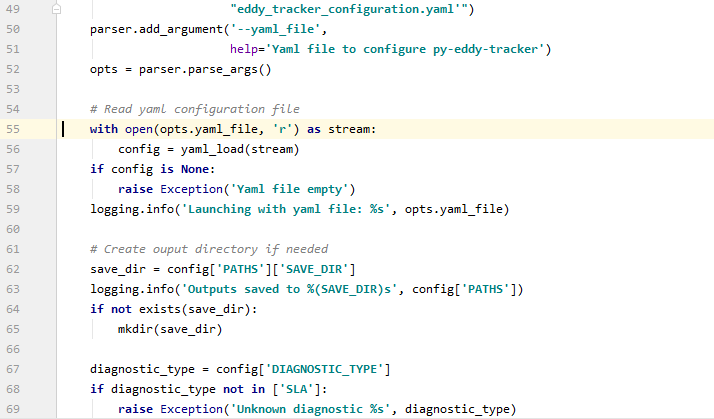
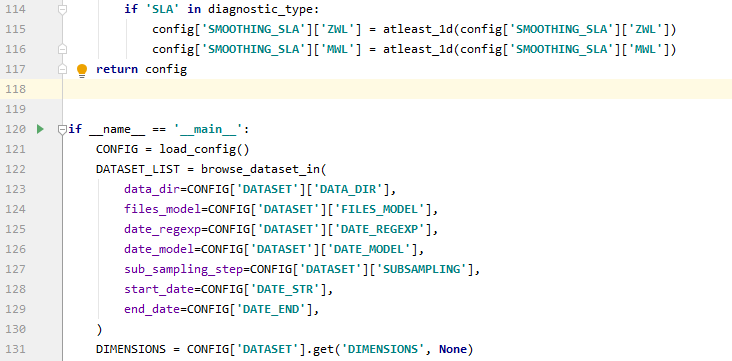
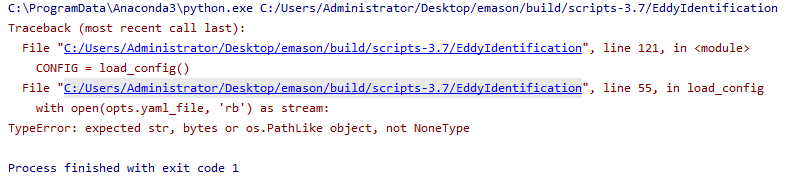
python-----TypeError: expected str, bytes or os.PathLike object, not NoneType
python
收起
写回答
好问题
0
提建议
关注问题
微信扫一扫
点击复制链接
分享
邀请回答
编辑
收藏
删除
结题
收藏
举报
2
条回答
默认
最新
关注
码龄
粉丝数
原力等级 --
被采纳
被点赞
采纳率
阿姆斯特浪
2021-07-05 17:32
关注
你好,请问你的问题解决了吗,我的问题你一样
本回答被题主选为最佳回答
, 对您是否有帮助呢?
本回答被专家选为最佳回答
, 对您是否有帮助呢?
本回答被题主和专家选为最佳回答
, 对您是否有帮助呢?
解决
无用
评论
打赏
微信扫一扫
点击复制链接
分享
举报
评论
按下Enter换行,Ctrl+Enter发表内容
查看更多回答(1条)
向“C知道”追问
报告相同问题?
提交
关注问题
Python
笔记-from xxx import xxx时
TypeError
:
expected
str
,
byte
s or
os
.
Path
Like
object
, not
NoneType
2025-01-06 08:24
IT1995的博客
Python
笔记-from xxx import xxx时
TypeError
:
expected
str
,
byte
s or
os
.
Path
Like
object
, not
NoneType
(项目实施时容易出现的问题)
yolo报错
TypeError
:
expected
str
,
byte
s or
os
.
Path
Like
object
, not
NoneType
2024-07-24 13:50
Young Fault的博客
在自己创建的数据集下面,将训练集、测试集、验证集改为如图所示的名称,注意,一个字都不能变。然后,删除cache文件,重新运行代码即可。
django项目运行报错
TypeError
:
expected
str
,
byte
s or
os
.
Path
Like
object
, not
NoneType
2024-04-19 17:28
热风intentions的博客
启动django项目时 运行报错 :
TypeError
:
expected
str
,
byte
s or
os
.
Path
Like
object
, not
NoneType
解决办法: 目录 migrationgs文件夹下,少了一个__init__.py文件。 新建上去后,再次启动,成功。
解决:
TypeError
:
expected
str
,
byte
s or
os
.
Path
Like
object
, not int报错
2024-12-11 17:48
初窺门径的博客
在使用pip的时候遇到报错,导致pip完全不能使用解决方法报错:
TypeError
:
expected
str
,
byte
s or
os
.
Path
Like
object
, not int。
TypeError
:
expected
str
,
byte
s or
os
.
Path
Like
object
, not
NoneType
2024-03-09 15:38
qq_46795454的博客
最近在env=gym.make('PongNoFrameskip-v4')遇到上面的报错,解决方法是:按照这篇文章。
Vscode ssh远程连接服务器报错:
TypeError
:
expected
str
,
byte
s or
os
.
Path
Like
object
, not
NoneType
2024-08-26 10:08
Andrewuuuu的博客
VSCode使用SSH远程连接服务器时Conda报错:
TypeError
:
expected
str
,
byte
s or
os
.
Path
Like
object
, not
NoneType
pyinstaller打包Django报错:
TypeError
:
expected
str
,
byte
s or
os
.
Path
Like
object
, not
NoneType
2023-08-23 21:38
lspjuzi的博客
为了方便管理应用我是把所有应用放在apps的文件里,简单的办法就是把settings的我定义的这个配置删掉然后把各个app拿出来放到根目录下,如果你用的是pycharm会自动...我就觉得这个
os
.
path
看着眼熟,好像在哪里见过。
pip安装pyautogui时报错:
TypeError
:
expected
str
,
byte
s or
os
.
Path
Like
object
, not
NoneType
2023-07-18 21:10
zhouqiesheng的博客
根据报错信息进入源码打印排查,发现有一个
path
参数为None,该
path
参数是–trusted-h
os
t,所以估计还是跟源有关,把安装源的配置文件(pip.ini)移除,使用默认源尝试,结果竟然安装成功。trusted-h
os
t = ...
pip安装库包遇到错误:
TypeError
:
expected
str
,
byte
s or
os
.
Path
Like
object
, not int 的解决方法
2024-11-22 20:51
点亮~黑夜的博客
2、我的
python
3是在系统环境中安装的,并不知anaconda中安装的
python
3。1、安装库包的时候,用指定的
python
版本进行安装。这样安装的就是
python
3的库包。,这个主要是由于pip版本导致的!2、之后就可以正常使用pip了...
pip安装包报错
TypeError
:
expected
str
,
byte
s or
os
.
Path
Like
object
, not int
2023-07-11 15:55
qq_40396104的博客
pip安装包时遇到错误:
TypeError
:
expected
str
,
byte
s or
os
.
Path
Like
object
, not int 已解决 在安装的时候设置 --no-cache-dir pip install package --no-cache-dir 也可以更新pip pip install --upgrade pip --...
Python
在用 Pyinstaller封装exe-
TypeError
:
expected
str
,
byte
s or
os
.
Path
Like
object
, not
NoneType
解决方法!
2020-10-17 15:02
wangchaoqi1985的博客
Python
在用 Pyinstaller封装exe-
TypeError
:
expected
str
,
byte
s or
os
.
Path
Like
object
, not
NoneType
解决方法!
【
python
】
TypeError
:
expected
str
,
byte
s or
os
.
Path
Like
object
, not
NoneType
2023-10-29 18:30
elzza_的博客
家人们怎么解决啊。
labelImg报错
TypeError
:
expected
str
,
byte
s or
os
.
Path
Like
object
, not
NoneType
闪退、无法更改文件路径
2023-03-13 17:11
交大鹏于晏的博客
labelImg更改路径闪退,报错
TypeError
:
expected
str
,
byte
s or
os
.
Path
Like
object
, not
NoneType
pip下载任何库都报
TypeError
:
expected
str
,
byte
s or
os
.
Path
Like
object
, not int
2024-07-19 00:25
忙忙碌碌的肥物二&的博客
2.运行pip install --upgrade pip ,若仍然报错,运行
python
-m pip install --upgrade pip --no-cache-dir来升级pip即可解决问题。1.通过conda list检查pip版本。大概率是pip版本问题。
labelImg改设置后保存闪退
TypeError
:
expected
str
,
byte
s or
os
.
Path
Like
object
, not
NoneType
2023-04-20 10:49
The Great LY的博客
labelImg点击保存后闪退问题
TypeError
:
expected
str
,
byte
s or
os
.
Path
Like
object
, not
NoneType
报错解决
2024-06-06 11:18
两只程序猿的博客
File "/root/autodl-tmp/miniconda3/envs/Sherpa3D/lib/
python
3.9/
path
lib.py", line 691, in _parse_args a =
os
.fs
path
(a)
TypeError
:
expected
str
,
byte
s or
os
.
Path
Like
object
, not
NoneType
观察发现,似乎是...
在anaconda中pip安装库报错:
TypeError
:
expected
str
,
byte
s or
os
.
Path
Like
object
, not int
2023-11-24 01:53
[略略略]的博客
更新pip后,再用pip安装需要的库。
没有解决我的问题,
去提问
向专家提问
向AI提问
付费问答(悬赏)服务下线公告
◇ 用户帮助中心
◇ 新手如何提问
◇ 奖惩公告

 分享
分享

