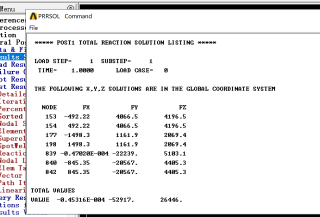
这个页面的数据如何用APDL的命令流保存呢,不需要GUI操作后台就能保存,感谢各位大佬的讲解

这个页面的数据如何用APDL的命令流保存呢,不需要GUI操作后台就能保存,感谢各位大佬的讲解
 分享
分享
以下回答参考 皆我百晓生、券券喵儿 等免费微信小程序相关内容作答,并由本人整理回复。
要从这些 ANSYS 结果数据中提取有用的信息并使用 APDL 命令流进行保存,您需要首先解析和组织这些数据。以下是一个简单的步骤指南:
首先,确保您已经将 ANSYS 输出文件转换为可用格式。这通常涉及到将文本数据读入到一个结构化数据框或表格中。
接下来,您可以使用 APDL 的 Command 部分来提取和分析数据。在您的工作空间中定义一个 APDL Command(例如 Load 或 Analysis),然后编写相应的命令流来处理和输出所需的参数。
以下是基本的 APDL 命令流示例:
; Define your analysis command here
command Load
    ; Specify the file name and path of the input data file
    inputfile 'path_to_your_file.txt'

    ; Specify the output file name and path for the results
    outfile 'results.txt'

    ; Use the appropriate command to load the data from the input file
    command LoadData

    ; Process the loaded data as needed, such as calculating values or plotting.
    process Data
        ; For example:
        ; Calculate the total reaction forces at node 840:
        calculation TotalReaction
            node 840
            value
                sum(FX) + sum(FY) + sum(FZ)

        ; Save the results to the output file
        save Results
            outfile 'results.txt'
    endprocess

endcommand
通过这种方式,您可以在不依赖 GUI 或其他外部工具的情况下从 ANSYS 输出中提取关键信息并将其保存到指定的文件中。这可以大大节省时间,并使后续数据分析更高效。
分享


