
1.项目引入依赖包
</dependencies>
    <dependency>
        <groupId>edu.cmu.sphinx</groupId>
        <artifactId>sphinx4-core</artifactId>
        <version>5prealpha-SNAPSHOT</version>
    </dependency>
</dependencies>
<repositories>
    <repository>
        <id>snapshots-repo</id>
        <url>https://oss.sonatype.org/content/repositories/snapshots</url>
        <releases>
            <enabled>false</enabled>
        </releases>
        <snapshots>
            <enabled>true</enabled>
        </snapshots>
    </repository>
</repositories>
2.下载最新的中文声学模型和字典
https://sourceforge.net/projects/cmusphinx/files/Acoustic%20and%20Language%20Models/Mandarin/
cmusphinx-zh-cn-5.2.tar.gz
3.解压cmusphinx-zh-cn-5.2.tar.gz,并加入到项目resources目录。
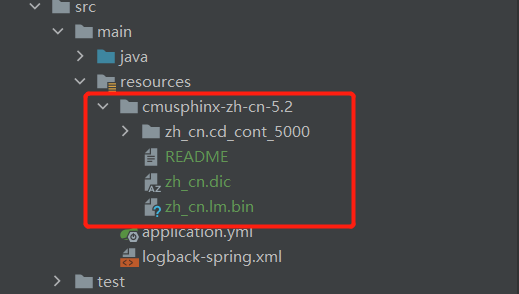
4.执行代码
public class Speech2Text {
    public static void main(String[] args) throws IOException {
        Configuration configuration = new Configuration();
        configuration.setAcousticModelPath("resource:/cmusphinx-zh-cn-5.2/zh_cn.cd_cont_5000");
        configuration.setDictionaryPath("resource:/cmusphinx-zh-cn-5.2/zh_cn.dic");
        configuration.setLanguageModelPath("resource:/cmusphinx-zh-cn-5.2/zh_cn.lm.bin");
        StreamSpeechRecognizer recognizer = new StreamSpeechRecognizer(configuration);
        InputStream stream = new FileInputStream("E:/collection_0.wav");
        recognizer.startRecognition(stream);

        SpeechResult result;
        while ((result = recognizer.getResult()) != null) {
            System.out.format("Hypothesis: %s\n", result.getHypothesis());
        }
    }
}
E:/collection_0.wav是一段教学音频文件,程序运行,能识别并输出中文文本,但就是识别率太低了。


