RT,被QQ音乐或者其他音视频App打断音乐播放之后,我重新进入我的App重新播放音乐时,无法更新mPNowPlayingInfoCenter 显示
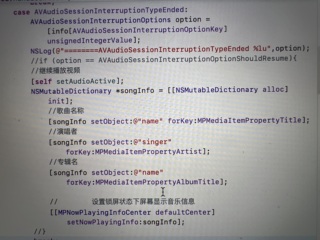

RT,被QQ音乐或者其他音视频App打断音乐播放之后,我重新进入我的App重新播放音乐时,无法更新mPNowPlayingInfoCenter 显示
 分享
分享
基于new Bing 和ChatGPT的回答:
在 iOS 应用中,MPNowPlayingInfoCenter 是用于管理锁屏界面和控制中心的媒体信息的类,用于显示当前播放的音频的信息,包括歌曲名、歌手名、专辑名、歌曲封面等。在应用程序进入后台或被打断时,如果想要在回到应用程序后更新媒体信息,可以调用 MPNowPlayingInfoCenter 的 nowPlayingInfo 属性来更新当前播放的音频信息。例如:
import MediaPlayer

// 更新媒体信息
let nowPlayingInfoCenter = MPNowPlayingInfoCenter.default()
nowPlayingInfoCenter.nowPlayingInfo = [
    MPMediaItemPropertyTitle: "歌曲名",
    MPMediaItemPropertyArtist: "歌手名",
    MPMediaItemPropertyAlbumTitle: "专辑名",
    MPMediaItemPropertyArtwork: MPMediaItemArtwork(boundsSize: CGSize(width: 100, height: 100)) { (_) -> UIImage in
        return UIImage(named: "cover")!
    }
]
在应用程序被打断或进入后台时,需要在应用程序回到前台时重新更新媒体信息。可以在 AppDelegate.swift 中的 applicationWillEnterForeground(_:) 方法中调用更新媒体信息的代码,例如:
import UIKit
import MediaPlayer

@UIApplicationMain
class AppDelegate: UIResponder, UIApplicationDelegate {

    func applicationWillEnterForeground(_ application: UIApplication) {
        // 更新媒体信息
        let nowPlayingInfoCenter = MPNowPlayingInfoCenter.default()
        nowPlayingInfoCenter.nowPlayingInfo = [
            MPMediaItemPropertyTitle: "歌曲名",
            MPMediaItemPropertyArtist: "歌手名",
            MPMediaItemPropertyAlbumTitle: "专辑名",
            MPMediaItemPropertyArtwork: MPMediaItemArtwork(boundsSize: CGSize(width: 100, height: 100)) { (_) -> UIImage in
                return UIImage(named: "cover")!
            }
        ]
    }
}
这样,在应用程序重新进入前台时,MPNowPlayingInfoCenter 的 nowPlayingInfo 属性就会被更新,并在锁屏界面和控制中心显示最新的媒体信息。
分享 系统已结题
4月10日
系统已结题
4月10日 修改了问题
4月2日
赞助了问题酬金15元
4月2日
创建了问题
4月2日
修改了问题
4月2日
赞助了问题酬金15元
4月2日
创建了问题
4月2日

