该问题来自社区帖: https://bbs.csdn.net/topics/616030101.为符合问答规范, 该问题经过ChatGPT优化
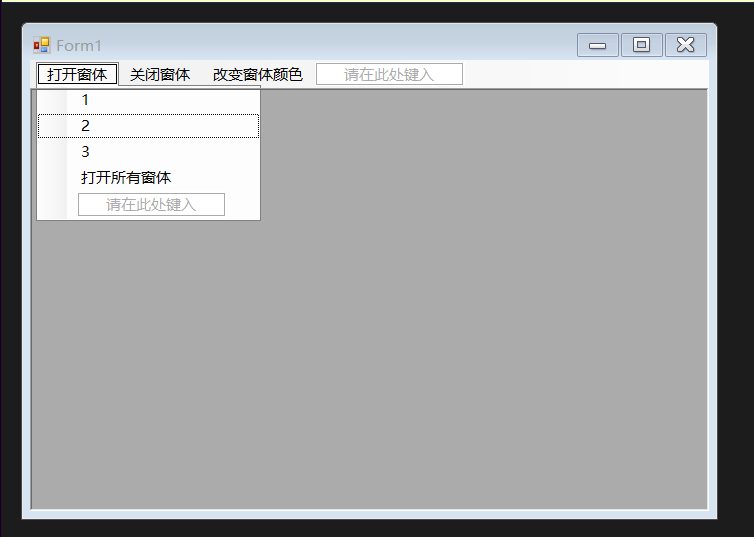
换肤功能实现问题 如何让打开的mdi子窗体对应改变颜色?我已设置三种颜色,每个子窗体都应该能修改三种颜色。以下为实际效果图:
换肤功能实现问题 如何让打开的mdi子窗体对应改变颜色?我已设置三种颜色,每个子窗体都应该能修改三种颜色。以下为实际效果图:


 分享
分享
在Java Swing中,要实现打开的MDI子窗体对应改变颜色,可以在所有子窗体的构造函数中注册监听器,然后在父窗体的activeChildChanged()方法中根据当前激活子窗体的不同,设置子窗体的颜色。
下面是一个示例程序,演示如何实现在MDI主窗体中切换子窗体并改变其颜色。在这个示例程序中,我们创建了3个子窗体,并为每个子窗体设置了不同的背景颜色。当切换到新的子窗体时,它的颜色将更改为红色,其他子窗体的颜色将更改为灰色。
import javax.swing.*;
import java.awt.*;
import java.awt.event.*;

public class MDIFrame extends JFrame implements ActionListener {

    private JDesktopPane desktopPane = new JDesktopPane();

    public MDIFrame() {
        super("MDI Frame");
        setDefaultCloseOperation(JFrame.EXIT_ON_CLOSE);

        // 创建多个子窗体
        createFrame(Color.RED);
        createFrame(Color.GRAY);
        createFrame(Color.GRAY);

        // 设置ContentPane并注册监听器
        setContentPane(desktopPane);
        desktopPane.addVetoableChangeListener(JInternalFrame.ACTIVATED_CHANGED_PROPERTY, this);

        // 初始化界面
        setLocationRelativeTo(null);
        setSize(640, 480);
        setVisible(true);
    }

    // 创建子窗体
    public void createFrame(Color color) {
        JInternalFrame frame = new JInternalFrame();
        frame.setBackground(color);
        frame.setDefaultCloseOperation(JFrame.DISPOSE_ON_CLOSE);
        frame.setSize(200, 200);
        frame.setLocation((int) (Math.random() * (getWidth() - frame.getWidth())),
                (int) (Math.random() * (getHeight() - frame.getHeight())));
        frame.setVisible(true);
        desktopPane.add(frame);
    }

    // 监听器实现
    public void actionPerformed(ActionEvent e) {
        JInternalFrame[] frames = desktopPane.getAllFrames();
        for (int i = 0; i < frames.length; i++) {
            if (frames[i].isSelected()) {
                frames[i].setBackground(Color.RED);
            } else {
                frames[i].setBackground(Color.GRAY);
            }
        }
    }

    // 切换子窗体
    public void activeChildChanged() {
        JInternalFrame[] frames = desktopPane.getAllFrames();
        for (int i = 0; i < frames.length; i++) {
            if (frames[i].isSelected()) {
                frames[i].setBackground(Color.RED);
            } else {
                frames[i].setBackground(Color.GRAY);
            }
        }
    }

    // 主方法
    public static void main(String[] args) {
        new MDIFrame();
    }
}
在上面的示例程序中,我们首先创建了一个JDesktopPane,并在其中创建了3个子窗体,并为每个子窗体设置了不同的背景颜色。然后,我们为JDesktopPane注册了一个侦听器,以便在切换激活的子窗体时更新其颜色。
在activeChildChanged()方法中,我们首先获取所有的子窗体,然后遍历它们,并为当前被选中的子窗体设置为红色,其他子窗体设置为灰色。该方法会在MDI主窗体中的子窗体被选中时自动调用。
需要注意的是,我们使用JInternalFrame的setBackground()方法来设置子窗体的颜色,而不是使用JFrame的setBackground()方法。这是因为JInternalFrame是特殊的JPanel,用于在MDI主窗体中创建子窗体。
分享 创建了问题
6月16日
创建了问题
6月16日


