
在使用pytesseract进行数据识别提取的时候遇到同一屏幕截取的两张图片,能识别其中一张,但是另一张却不能正确识别。

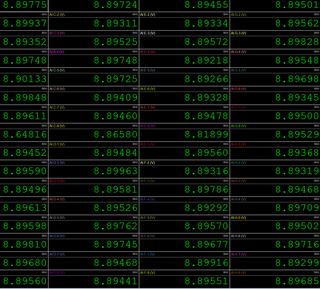

使用pillow第三方包如何对上面两张图片进行预处理,可以实现对数据的识别提取。
import os
from PIL import Image
import pytesseract
import openpyxl
import re


def preprocess_image(image_path):
    img = Image.open(image_path)
    img = img.convert("L")  # Convert image to grayscale
    img = img.point(lambda x: 0 if x <100 else 255, "1")  # Binarize the image using a threshold of 128
    return img


def extract_text(image):
    text = pytesseract.image_to_string(image, config=custom_config)
    return text


# Main function
def main(image_path):
    # Preprocess the image
    preprocessed_image = preprocess_image(image_path)
    # Extract text from the preprocessed image
    extracted_text = extract_text(preprocessed_image)
    # Print the extracted text
    extracted_text_list = [extracted_text]  # Convert extracted text to a list
    # Extract the decimal numbers with 5 decimal places
    decimal_numbers = re.findall(r'\d+\.\d{5}', extracted_text_list[0])

    # Print the extracted decimal numbers
    for number in decimal_numbers:
        float_number = float(number)
        worksheet.append([image_name, float_number])


image_folder_path = r'C:\Desktop\新建文件夹' #图片文件所在的路径
output_xlsx_path = os.path.join(image_folder_path, "{}.xlsx".format(image_folder_path.split('\\')[-1]))
custom_config = r'--oem 3 --psm 6'


#  初始化XLSX工作簿和工作表
workbook = openpyxl.Workbook()
worksheet = workbook.active

# 遍历文件夹及其子文件夹
for root, dirs, files in os.walk(image_folder_path):
    for file in files:
        if file.endswith('.jpeg'):
            image_path = os.path.join(root, file)
            image_name = os.path.splitext(file)[0]
            # 对图像进行OCR识别
            main(image_path)

# 保存数据文件
workbook.save(output_xlsx_path)

print("完成数据识别并将数据保存!")


