




 关注
关注引自免费微信小程序:皆我百晓生
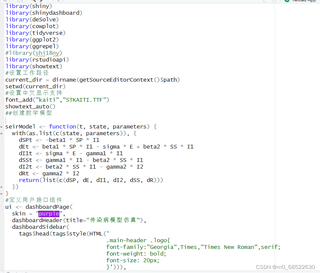
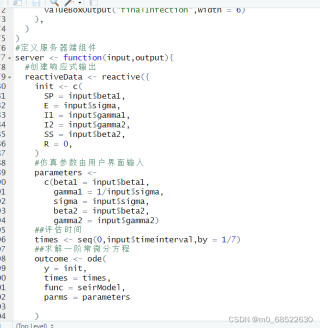
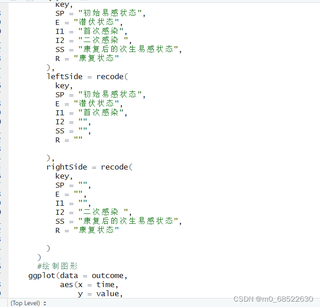
在分析您的代码后,我发现错误出现在第110行,即renderPlot()函数中的数据处理部分。问题出在对数据框进行重塑操作时,由于某些原因,可能某些输入值未被正确设置,导致pivot_longer()函数接收到的数据列不足7个。
为了解决这个问题,我们可以先检查输入值是否有效,然后再执行重塑操作。这里我会提供一个修改过的代码片段,用于替换您在app.R文件中的相关部分。我们将添加一个条件语句,确保在进行pivot_longer()之前,数据框至少包含7列。
# 修改后的renderPlot()函数
output$outcomeplot <- renderPlot({
  outcome <- reactiveData()

  # 检查数据框的列数
  if(ncol(outcome) >= 7) {
    outcome_pivot <- outcome %>%
      pivot_longer(cols = -time, names_to = "key", values_to = "value")

    outcome_pivot <- outcome_pivot %>%
      mutate(
        id = row_number(),
        infection_status = recode(
          key,
          SP = "初始易感状态",
          E = "潜伏状态",
          I1 = "首次感染",
          I2 = "二次感染",
          SS = "康复后的次生易感状态",
          R = "康复状态"
        ),
        left_side = recode(
          key,
          SP = "初始易感状态",
          E = "潜伏状态",
          I1 = "首次感染",
          I2 = "二次感染",
          SS = "康复后的次生易感状态",
          R = "康复状态"
        ),
        right_side = recode(
          key,
          SP = "初始易感状态",
          I1 = "首次感染",
          I2 = "二次感染",
          SS = "康复后的次生易感状态",
          R = "康复状态"
        )
      )

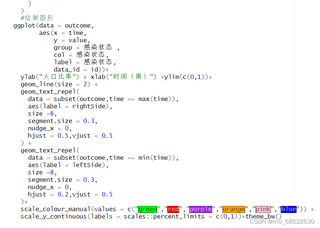
    # 绘制图形
    ggplot(data = outcome_pivot,
           aes(x = time, y = value, group = infection_status, col = infection_status, label = infection_status, data_id = id)) +
      ylab("人口比率") +
      xlab("时间(周)") +
      ylim(c(0, 1)) +
      geom_line(size = 2) +
      geom_text_repel(
        data = subset(outcome_pivot, time == max(time)),
        aes(label = right_side),
        size = 8,
        segment.size = 0.3,
        nudge_x = 0,
        hjust = 0.5,
        vjust = 0.5
      ) +
      geom_text_repel(
        data = subset(outcome_pivot, time == min(time)),
        aes(label = left_side),
        size = 8,
        segment.size = 0.3,
        nudge_x = 0,
        hjust = 0.2,
        vjust = 0.5
      ) +
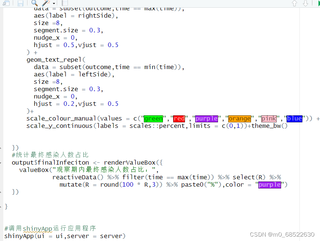
      scale_color_manual(values = c("green", "red", "purple", "orange", "pink", "blue")) +
      scale_y_continuous(labels = scales::percent, limits = c(0, 1)) +
      theme_bw()
  } else {
    # 如果数据框列数不足,可以在此处添加备用绘图或错误提示
    ggplot(data = data.frame(time = c(0, 1), value = c(0, 1)),
           aes(x = time, y = value)) +
      geom_line(color = "grey") +
      ylab("人口比率") +
      xlab("时间(周)") +
      theme_bw()
  }
})
这个修改版的renderPlot()会在执行重塑操作前检查数据框的列数,如果列数少于7,则会绘制一条简单的灰色线作为备用图形。您可以将这段代码替换原代码,并重新运行程序,看看是否解决了“7元素是空的”警告。
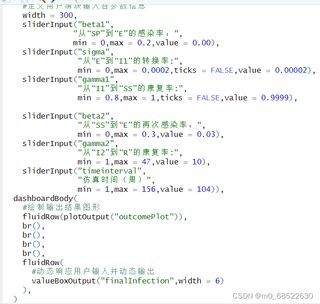
另外,为了排除其他潜在问题,建议您检查一下所有输入的范围和默认值,确保它们都是有效的数值,且不会导致数据框列数不足的情况。
 分享
分享 创建了问题
6月4日
创建了问题
6月4日


