
我在学习车牌识别的过程中,遇到了难题,下面是我的代码
import cv2
from matplotlib import pyplot as plt
import os
import numpy as np
from paddleocr import PaddleOCR, draw_ocr
from PIL import Image, ImageDraw, ImageFont

#利用paddelOCR进行文字扫描,并输出结果
def text_scan(img_path):
    ocr = PaddleOCR(use_angle_cls=True, use_gpu=False)
    #img_path = r'test image/license_plate1.jpg'
    result = ocr.ocr(img_path, cls=True)
    for line in result:
    #print(line)
     return result

#在图片中写入将车牌信息
def infor_write(img,rect,result):
    text=result[1][0]
    cv2img = cv2.cvtColor(img, cv2.COLOR_BGR2RGB)  # cv2和PIL中颜色的hex码的储存顺序不同
    pilimg = Image.fromarray(cv2img)
    #PIL图片上打印汉字
    draw = ImageDraw.Draw(pilimg)  # 图片上打印
    font = ImageFont.truetype("simhei.ttf",20, encoding="utf-8")  # 参数1:字体文件路径,参数2:字体大小
    draw.text((rect[2], rect[1]), str(text), (0,255,0), font=font)  # 参数1:打印坐标,参数2:文本,参数3:字体颜色,参数4:字体
    #PIL图片转cv2 图片
    cv2charimg = cv2.cvtColor(np.array(pilimg), cv2.COLOR_RGB2BGR)
    return cv2charimg


#图像去噪灰度处理
def gray_guss(img):
    img=cv2.GaussianBlur(img,(1,1),0)
    gray=cv2.cvtColor(img,cv2.COLOR_BGR2GRAY)
    return gray

#图像尺寸变换
def img_resize(img):
    a=400*img.shape[0]/img.shape[1]
    a=int(a)
    img=cv2.resize(img,(400,a))
    return img

#Sobel检测,x方向上的边缘检测(增强边缘信息)
def Sobel_detec(img):
    Sobel_x = cv2.Sobel(img, cv2.CV_16S, 1, 0)
    absX = cv2.convertScaleAbs(Sobel_x)
    return absX

#寻找某区域最大外接矩形框4点坐标
def find_retangle(contour):
    y,x=[],[]
    for p in contour:
        y.append(p[0][0])
        x.append(p[0][1])
    return [min(y),min(x),max(y),max(x)]

#寻找并定位车牌轮廓位置
def locate_license(img):
    blocks=[]
    contours,hierarchy=cv2.findContours(img,cv2.RETR_EXTERNAL,cv2.CHAIN_APPROX_SIMPLE)
    for c in contours:
        x,y,w,h=cv2.boundingRect(c)
        r=find_retangle(c)
        a=(r[2]-r[0])*(r[3]-r[1])#r=[min(y),min(x),max(y),max(x)]
        s=(r[2]-r[0])/(r[3]-r[1])

    #根据轮廓形状特点,确定车牌的轮廓位置并截取图像
    if (w> (h * 3)) and (w < (h * 5)):
        # img=oriimg[y:y+h,x:x+w]
        # cv2.rectangle(oriimg, (x, y), (x+w, y+h), (0, 255, 0), 2)
        blocks.append([r, a, s])

    # 选出面积最大的3个区域
    blocks = sorted(blocks, key=lambda b: b[1])[-3:]  # 按照blocks第3个元素大小进行排序

    # 使用颜色识别判断出最像车牌的区域

    maxweight, maxindex = 0, -1

    # 划分ROI区域
    for i in range(len(blocks)):
        b = oriimg[blocks[i][0][1]:blocks[i][0][3], blocks[i][0][0]:blocks[i][0][2]]

    # RGB转HSV
    hsv = cv2.cvtColor(b, cv2.COLOR_BGR2HSV)

   # 蓝色车牌范围
    lower = np.array([100, 50, 50])
    upper = np.array([140, 255, 255])

    mask = cv2.inRange(hsv, lower, upper)

     # 统计权值
    w1 = 0
    for m in mask:
        w1 += m / 255
    w2 = 0
    for w in w1:
        w2 += w

    # 选出最大权值的区域
    if w2 > maxweight:
        maxindex = i
        maxweight = w2

    # print(blocks[maxindex][0])
        return blocks[maxindex][0]#blocks[maxindex][0]即为车牌轮廓位置理想外轮廓


#图像预处理+车牌轮廓位置检测
def fine_lisecenpts(img):
    # 图像去噪灰度处理
    guss = gray_guss(img)

    # Sobel检测,增强边缘信息
    sobel = Sobel_detec(guss)

    # 图像阈值化操作——获得二值化图
    ret, threshold = cv2.threshold(sobel, 0, 255, cv2.THRESH_OTSU)

    # # 对二值化图像进行边缘检测(可选,通过边缘检测后,最终进行形态学运算得到的轮廓面积更大)
    # threshold=cv2.Canny(threshold,threshold.shape[0],threshold.shape[1])

    #形态学运算(从图像中提取对表达和描绘区域形状有意义的图像分量)——闭操作
    kernelX = cv2.getStructuringElement(cv2.MORPH_RECT, (30, 10))
    closing = cv2.morphologyEx(threshold, cv2.MORPH_CLOSE, kernelX, iterations=1)

    # 腐蚀(erode)和膨胀(dilate)
    kernelX=cv2.getStructuringElement(cv2.MORPH_RECT,(50,1))
    kernelY=cv2.getStructuringElement(cv2.MORPH_RECT,(1,20))

    #x方向上进行闭操作(抑制暗细节)
    img=cv2.dilate(closing,kernelX)
    img=cv2.erode(img,kernelX)

    #y方向上进行开操作
    img=cv2.erode(img,kernelY)
    img=cv2.dilate(img,kernelY)

    #进行中值滤波去噪
    Blur=cv2.medianBlur(img,15)

    #寻找轮廓
    rect=locate_license(Blur)

    return rect,Blur


#车牌字符识别
def seg_char(rect_list,img):
    img=oriimg[rect_list[1]:rect_list[3], rect_list[0]:rect_list[2]]

    # 图像去噪灰度处理
    gray=gray_guss(img)

    # 图像阈值化操作-获得二值化图(可选)
  #ret,charimage=cv2.threshold(gray,0,255,cv2.THRESH_BINARY_INV+cv2.THRESH_OTSU)

    #图像进行闭运算
    k1 = np.ones((1, 1), np.uint8)
    close = cv2.morphologyEx(gray, cv2.MORPH_CLOSE, k1)
    cv2.imshow('close', close)
    cv2.imwrite('test image/Char_img.jpg',close)
    cv2.waitKey()

    res=text_scan(r'test image/Char_img.jpg')

    return res

#主函数区
if __name__ == '__main__':
    img=cv2.imread('D:/license_plate1.jpg')
    # 改变图像尺寸
    img=img_resize(img)
    oriimg=img.copy()
    #寻找到车牌外轮廓矩形坐标
    rect, img=fine_lisecenpts(img)
    #利用车牌轮廓坐标划分ROI区域用于字符识别,利用OCR识别车牌字符并返回字符串内容
    result=seg_char(rect,oriimg)
    #循环读取车牌字符串并写入到图片中
    for list in result:
        oriimg=infor_write(oriimg, rect, list)
    cv2.rectangle(oriimg, (rect[0], rect[1]), (rect[2], rect[3]), (0, 255, 0), 2)
    cv2.imshow('oriimg',oriimg)
    cv2.waitKey()

This is the problem encountered:
[enter image description here](https://i.sstatic.net/CXD1fFrk.png)
这是遇到的问题:
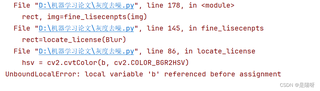
希望大家可以提出宝贵的意见,感谢!


