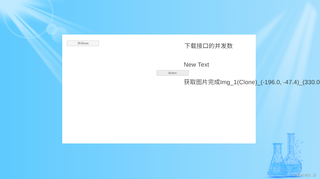
我从腾讯云的对象存储中下载图片加载到unity中去显示,为什么有的机型可以正常显示(魅族),有的机型不能正常显示我的图片(华为)
代码如下,图片是png格式,同一网络下测试
using UnityEngine;
using UnityEngine.UI;
using System.IO;
using System.Threading.Tasks;
using UnityEngine.EventSystems;
using COSXML;
using COSXML.Auth;
using COSXML.Model.Object;
using COSXML.Transfer;

using System.Collections.Generic;

public class Dowlongd_show : MonoBehaviour
{
    public Button uploadButton;
    public RawImage rawImagePrefab; // 引用RawImage预制体
    public Canvas canvas;

    private CosXml cosXml;
    private List<string> imageNames = new List<string>(); // 添加一个列表存储要下载的图片名字

    public Text myText7;//测试
    public Text myText8;//测试
    public Text myText9;//测试

    void Start()
    {
        uploadButton.onClick.AddListener(OnUploadButtonClick);

        //初始化 CosXmlConfig
        CosXmlConfig config = new CosXmlConfig.Builder()
             .IsHttps(true)  //设置默认 HTTPS 请求
            .SetRegion("ap-nanjing") // 替换为实际的COS地域简称->设置一个默认的存储桶地域
            .SetDebugLog(true)  //显示日志
            .Build();

        string secretId = "AKIDOk1C##############zKuU8ocaejo2H"; // 替换为实际的SecretId
        string secretKey = "IUrGjO8xw3###################xZChZ"; // 替换为实际的SecretKey
        long durationSecond = 600;//每次请求签名有效时长,单位为秒

        QCloudCredentialProvider qCloudCredentialProvider = new DefaultQCloudCredentialProvider(secretId, secretKey, durationSecond);

        cosXml = new CosXmlServer(config, qCloudCredentialProvider);// 初始化 CosXmlServer

        // 假设要下载以下三张图片,实际使用时请替换为您的图片名字列表
        imageNames.Add("image/Img_1(Clone)_(-196.0, -47.4)_(330.0, 80.0).png");
        imageNames.Add("image/Img_2(Clone)_(72.5, -47.4)_(125.9, 80.0).png");
        imageNames.Add("image/Img_3(Clone)_(-296.4, -182.4)_(129.2, 80.0).png");
        //myText9.text = "初始化完成";
    }

    private async void OnUploadButtonClick()//下载指定路径的对象
    {
        string bucket = "chem1-13###958"; //  //存储桶,格式:BucketName-APPID
        //string cosPath = "image/1.png"; //对象在存储桶中的位置标识符,即称对象键
        string localDir = System.IO.Path.GetTempPath();//本地文件夹
        //string localFileName = "2858.bmp"; //指定本地保存的文件名


        // 初始化 TransferConfig
        TransferConfig transferConfig = new TransferConfig();
        // 手动设置高级下载接口的分块阈值为 20MB(默认为20MB),
        transferConfig.DivisionForDownload = 20 * 1024 * 1024;
        // 手动设置高级下载接口的分块大小为 10MB(默认为5MB),不建议此处设置过小的分块值,可能导致频繁重试或下载速度不合预期
        transferConfig.SliceSizeForDownload = 10 * 1024 * 1024;


        TransferManager transferManager = new TransferManager(cosXml, transferConfig);// 初始化 TransferManager
        //myText9.text = "初始化transferManager完成";
        int i = 1;
        foreach (string imageName in imageNames)
        {
            //myText7.text = "进入循环";
            string localFileName = Path.GetFileName(imageName); // 获取图片在本地保存的文件名
                                                                // print(localFileName);
            myText9.text = "获取图片完成"+ localFileName;
            // 下载对象
            COSXMLDownloadTask downloadTask = new COSXMLDownloadTask(bucket, imageName, localDir, localFileName);
            myText7.text = "downloadTask";
            downloadTask.SetMaxTasks(10); // 手动设置高级下载接口的并发数 (默认为5)
            myText7.text = "下载接口的并发数";
            await transferManager.DownloadAsync(downloadTask);//批量下载时打开
            myText9.text = "批量下载时打开";
            // print("开始下载");

            myText7.text = "开始下载"+i;

            // 实例化RawImage预制体
            RawImage downloadedImage = Instantiate(rawImagePrefab);
            RectTransform downloadedImage_rct = downloadedImage.GetComponent<RectTransform>();
            myText8.text = "实例化完成" + i;
           // print("实例化完成");

            // 加载下载的图像到Texture2D对象
            Texture2D downloadedTexture = LoadTextureFromFilePath(Path.Combine(localDir, localFileName));
            downloadedImage_rct.SetParent(canvas.transform, false);
            downloadedImage_rct.anchoredPosition = new Vector2(0, 0);

            if (downloadedTexture != null)
            {
                // 将Texture2D赋值给RawImage的texture属性
                downloadedImage.texture = downloadedTexture;
            }
            else
            {
                Debug.LogError("Failed to load downloaded image as Texture2D.");
            }
            i=i+1;

        }
    }

    // 用于从文件路径加载图像到Texture2D对象
    private Texture2D LoadTextureFromFilePath(string filePath)
    {
        if (!File.Exists(filePath))
        {
            Debug.LogError($"File not found: {filePath}");
            return null;
        }

        byte[] imageBytes = File.ReadAllBytes(filePath);
        Texture2D texture = new Texture2D(2, 2);
        if (texture.LoadImage(imageBytes))
        {
            return texture;
        }
        else
        {
            Debug.LogError($"Failed to load image from bytes: {filePath}");
            return null;
        }
    }
}
腾讯云的sdk指导链接如下
正常效果

bug效果