让道友老李来帮你解答,本回答参考通义千问qwen-plus编写提供,如果还有疑问可以评论或留言
### 问题分析
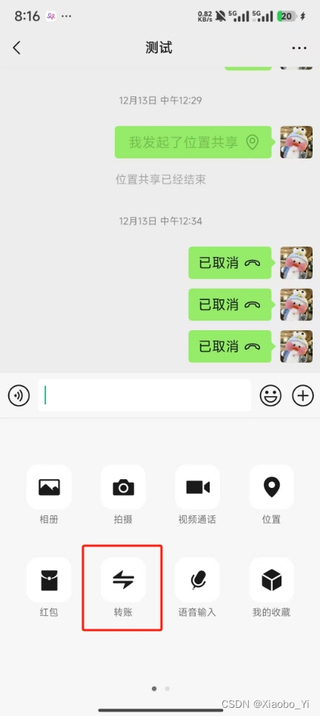
在使用安卓无障碍服务实现类似李跳跳真实好友的微信转账功能时,遇到了点击【转账】按钮无效的问题。根据描述,不仅是【转账】按钮,整个弹窗上的所有功能(包括相册、视频通话和位置等)都无法通过无障碍服务进行点击。
可能的原因
- 权限问题:无障碍服务可能没有获得足够的权限来操作某些控件。
- 控件属性问题:某些控件可能被设置为不可点击或不可见,导致无障碍服务无法识别和操作。
- 系统限制:某些手机系统或应用版本可能对无障碍服务进行了限制。
- 代码实现问题:无障碍服务的代码实现可能存在逻辑错误或不完善的地方。
解决方案
1. 检查权限
确保无障碍服务已经获得了所有必要的权限。可以在无障碍服务的配置页面中检查权限设置。
2. 检查控件属性
使用 AccessibilityNodeInfo 的 isClickable() 和 isVisibleToUser() 方法检查目标控件是否可点击和可见。
AccessibilityNodeInfo nodeInfo = ...; // 获取目标控件的 AccessibilityNodeInfo
if (nodeInfo != null && nodeInfo.isClickable() && nodeInfo.isVisibleToUser()) {
    nodeInfo.performAction(AccessibilityNodeInfo.ACTION_CLICK);
}
3. 使用 dispatchGesture
如果 performAction 无效,可以尝试使用 dispatchGesture 来模拟触摸事件。
Path path = new Path();
path.moveTo(x, y); // 设置点击位置
GestureDescription.Builder builder = new GestureDescription.Builder();
builder.addStroke(new GestureDescription.StrokeDescription(path, 0, 100));
getAccessibilityService().dispatchGesture(builder.build(), new AccessibilityService.GestureResultCallback() {
    @Override
    public void onCompleted(GestureDescription gestureDescription) {
        super.onCompleted(gestureDescription);
        Log.d("TAG", "Gesture completed");
    }

    @Override
    public void onCancelled(GestureDescription gestureDescription) {
        super.onCancelled(gestureDescription);
        Log.d("TAG", "Gesture cancelled");
    }
}, null);
4. 模拟触摸事件
如果上述方法仍然无效,可以尝试使用 Instrumentation 类来模拟触摸事件。
Instrumentation inst = new Instrumentation();
inst.sendPointerSync(MotionEvent.obtain(SystemClock.uptimeMillis(), SystemClock.uptimeMillis(), MotionEvent.ACTION_DOWN, x, y, 0));
inst.sendPointerSync(MotionEvent.obtain(SystemClock.uptimeMillis(), SystemClock.uptimeMillis(), MotionEvent.ACTION_UP, x, y, 0));
示例代码
以下是一个完整的示例代码,展示了如何使用 AccessibilityNodeInfo 和 dispatchGesture 来实现点击操作:
public class MyAccessibilityService extends AccessibilityService {

    @Override
    public void onAccessibilityEvent(AccessibilityEvent event) {
        if (event.getEventType() == AccessibilityEvent.TYPE_WINDOW_STATE_CHANGED) {
            AccessibilityNodeInfo rootNode = getRootInActiveWindow();
            if (rootNode != null) {
                List<AccessibilityNodeInfo> nodes = rootNode.findAccessibilityNodeInfosByText("转账");
                for (AccessibilityNodeInfo node : nodes) {
                    if (node != null && node.isClickable() && node.isVisibleToUser()) {
                        node.performAction(AccessibilityNodeInfo.ACTION_CLICK);
                        break;
                    } else {
                        // 如果 performAction 无效,尝试 dispatchGesture
                        Rect bounds = new Rect();
                        node.getBoundsInScreen(bounds);
                        int x = bounds.centerX();
                        int y = bounds.centerY();

                        Path path = new Path();
                        path.moveTo(x, y);
                        GestureDescription.Builder builder = new GestureDescription.Builder();
                        builder.addStroke(new GestureDescription.StrokeDescription(path, 0, 100));
                        dispatchGesture(builder.build(), new AccessibilityService.GestureResultCallback() {
                            @Override
                            public void onCompleted(GestureDescription gestureDescription) {
                                super.onCompleted(gestureDescription);
                                Log.d("TAG", "Gesture completed");
                            }

                            @Override
                            public void onCancelled(GestureDescription gestureDescription) {
                                super.onCancelled(gestureDescription);
                                Log.d("TAG", "Gesture cancelled");
                            }
                        }, null);
                    }
                }
            }
        }
    }

    @Override
    public void onInterrupt() {
        // 处理中断事件
    }
}
结论
通过以上方法,可以尝试解决无障碍服务在点击【转账】按钮时无效的问题。如果问题依然存在,建议进一步检查微信应用的版本和手机系统的兼容性,或者联系微信官方获取更多支持。