大家有没有遇到过,在使用opencvsharp通过UBS连接相机时,如果初始设置为低分辨率,在相机启动后再提高分辨率会报错
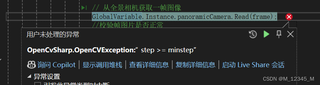

大家有没有遇到过,在使用opencvsharp通过UBS连接相机时,如果初始设置为低分辨率,在相机启动后再提高分辨率会报错
 分享
分享
 关注
关注让【道友老李】来帮你解答,本回答参考通义千问大模型编写,并整理提供,如果还有疑问可以点击头像关注私信或评论。
如果答案让您满意,请采纳、关注,非常感谢!在使用OpenCvSharp通过USB连接相机时,如果初始设置为低分辨率,在相机启动后再提高分辨率可能会遇到问题。这通常是因为相机的硬件限制或驱动程序不允许在运行过程中动态更改分辨率。为了确保操作成功,建议在初始化相机时就设置所需的最高分辨率。
以下是一个示例代码,展示了如何在初始化时设置分辨率,并提供了一个方法来重新初始化摄像头以更改分辨率。
using OpenCvSharp;
using System;

public class CameraResolutionExample
{
    private VideoCapture _capture;
    private Mat _frame;

    public void InitializeCamera(int width, int height)
    {
        // 初始化摄像头
        _capture = new VideoCapture(0); // 0 表示默认摄像头

        if (!_capture.IsOpened())
        {
            Console.WriteLine("无法打开摄像头");
            return;
        }

        // 设置分辨率
        _capture.Set(VideoCaptureProperties.FrameWidth, width);
        _capture.Set(VideoCaptureProperties.FrameHeight, height);

        // 检查设置是否成功
        double actualWidth = _capture.Get(VideoCaptureProperties.FrameWidth);
        double actualHeight = _capture.Get(VideoCaptureProperties.FrameHeight);

        if (actualWidth != width || actualHeight != height)
        {
            Console.WriteLine($"无法设置分辨率为 {width}x{height}, 实际分辨率为 {actualWidth}x{actualHeight}");
        }
        else
        {
            Console.WriteLine($"摄像头分辨率已设置为 {width}x{height}");
        }
    }

    public void ReinitializeCamera(int width, int height)
    {
        // 释放当前摄像头资源
        _capture?.Release();

        // 重新初始化摄像头
        InitializeCamera(width, height);
    }

    public void StartCapture()
    {
        while (true)
        {
            _capture.Read(_frame);
            if (_frame.Empty())
            {
                Console.WriteLine("无法读取帧");
                break;
            }

            // 显示帧
            Cv2.ImShow("Camera Feed", _frame);
            if (Cv2.WaitKey(1) == 27) // 按 ESC 键退出
            {
                break;
            }
        }

        // 释放资源
        _capture.Release();
        Cv2.DestroyAllWindows();
    }

    public static void Main(string[] args)
    {
        var example = new CameraResolutionExample();

        // 初始设置为低分辨率
        example.InitializeCamera(640, 480);
        example.StartCapture();

        // 重新初始化为高分辨率
        example.ReinitializeCamera(1280, 720);
        example.StartCapture();
    }
}
_capture.GetSupportedFrameSizes()方法获取支持的分辨率列表。通过以上方法,可以在初始化时设置所需的分辨率,或者在必要时重新初始化摄像头以更改分辨率。这样可以避免在视频流已经开始后更改分辨率带来的问题。
分享 创建了问题
12月24日
创建了问题
12月24日


