AnythingLLM 使用的时候提示:
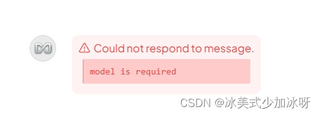
Could not respond to message.
model is required
这个提示应该怎么解决呀

AnythingLLM 使用的时候提示:
Could not respond to message.
model is required
这个提示应该怎么解决呀
 分享
分享
 关注
关注让阿豪来帮你解答,本回答参考chatgpt3.5编写提供,如果还有疑问可以评论或留言遇到提示 “Could not respond to message. model is required” 的问题时,通常表示在使用 AnythingLLM 进行模型交互时,没有指定所需的模型参数。以下是解决该问题的一些步骤和建议:
import requests
url = "API_ENDPOINT"  # 替换为实际的 API 网址
headers = {
   "Authorization": "Bearer YOUR_API_KEY",  # 替换为您的 API 密钥
   "Content-Type": "application/json"
}
data = {
   "model": "YOUR_MODEL_NAME",  # 确保这里填写了正确的模型名称
   "prompt": "Hello, how are you?",
   "max_tokens": 50
}
response = requests.post(url, headers=headers, json=data)
if response.status_code == 200:
   print(response.json())
else:
   print("Error:", response.status_code, response.text)
以下是一段示例代码,显示如何用 Python 调用 API,包括模型参数的设置:
import requests
def call_anything_llm(prompt):
    url = "https://your.api.endpoint/v1/chat"  # 替换为实际 API 端点
    api_key = "your_api_key"  # 替换为您的 API 密钥
    model_name = "gpt-3.5-turbo"  # 替换为所需模型
    headers = {
        "Authorization": f"Bearer {api_key}",
        "Content-Type": "application/json"
    }
    data = {
        "model": model_name,
        "prompt": prompt,
        "max_tokens": 150
    }
    response = requests.post(url, headers=headers, json=data)
    if response.status_code == 200:
        return response.json()
    else:
        print("Error:", response.status_code, response.text)
        return None
# 测试函数
result = call_anything_llm("What is the weather like today?")
print(result)
出现 “model is required” 的提示时,通常是因为请求中缺少必需的模型参数。通过检查代码、确认模型名称及 API 配置,并完善错误处理,通常可以有效解决该问题。希望这能帮助您顺利使用 AnythingLLM,如有进一步问题,欢迎随时询问。
分享 报错:anythingllm无法导入文件,显示Error: 1 documents failed to add. Ollama Failed to embed: fetch failed...如何解决
 创建了问题
2月5日
创建了问题
2月5日
