蛋糕小茄 2025-05-22 11:14 采纳率: 28.6%
浏览 18

怎么解决torch.OutOfMemoryError: CUDA out of memory.

怎么解决torch.OutOfMemoryError: CUDA out of memory.

【报错信息】
torch.OutOfMemoryError: CUDA out of memory. Tried to allocate 1.18 GiB. GPU 0 has a total capacity of 23.70 GiB of which 263.69 MiB is free. Including non-PyTorch memory, this process has 23.44 GiB memory in use. Of the allocated memory 21.80 GiB is allocated by PyTorch, and 240.61 MiB is reserved by PyTorch but unallocated. If reserved but unallocated memory is large try setting PYTORCH_CUDA_ALLOC_CONF=expandable_segments:True to avoid fragmentation. See documentation for Memory Management (https://pytorch.org/docs/stable/notes/cuda.html#environment-variables)
【问题描述】
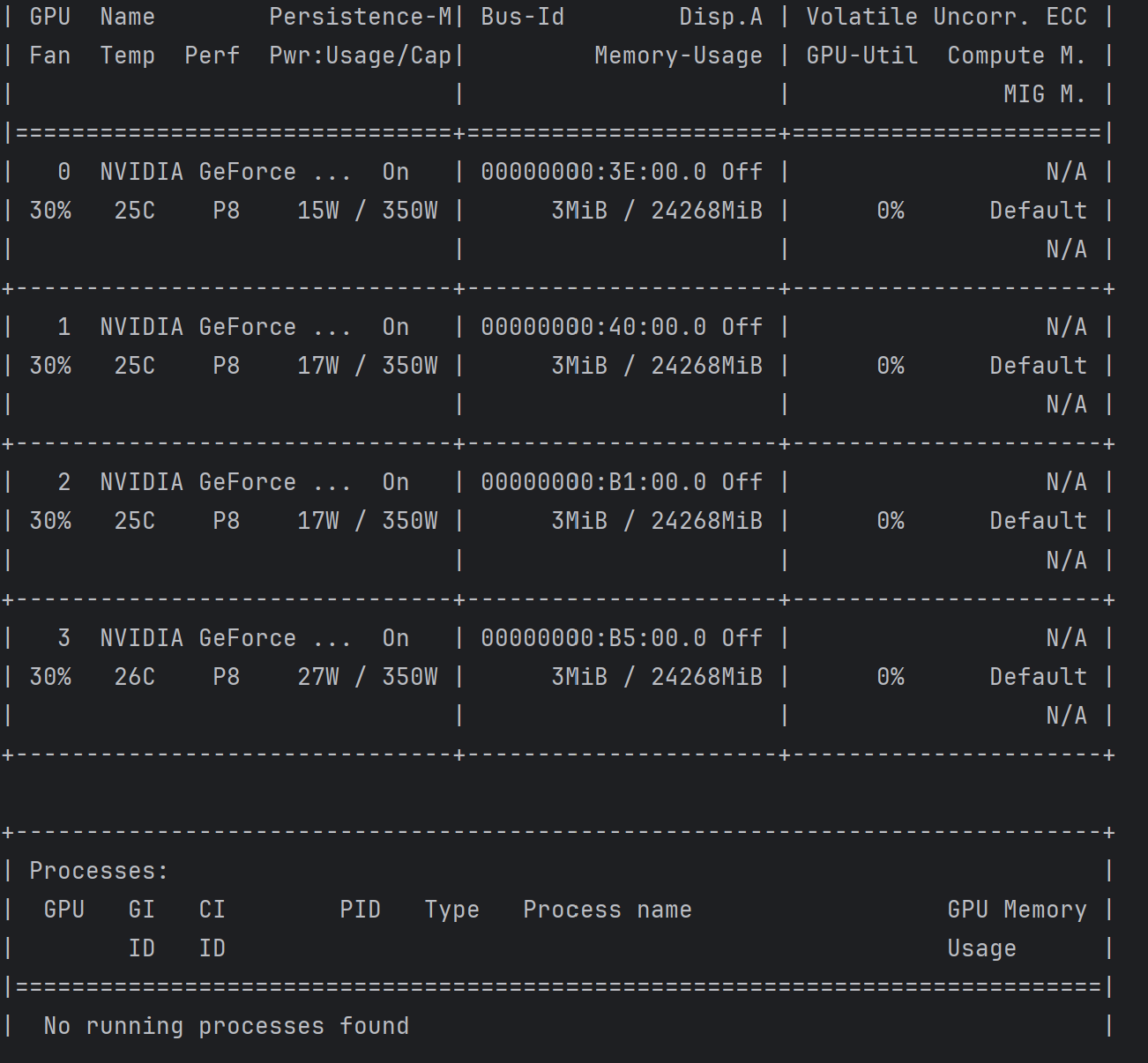
在服务器上运行程序时,会报上述错误,显示CUDA out of memory。通过nvidia-smi查看,服务器上并没有程序在运行,这是为什么?应该怎么解决呢?
img

  • 写回答

5条回答 默认 最新

  • 阿里嘎多学长 2025-05-22 11:14
    关注

    阿里嘎多学长整理AIGC生成,因移动端显示问题导致当前答案未能完全显示,请使用PC端查看更加详细的解答过程

    解决 CUDA out of memory 问题

    torch.OutOfMemoryError: CUDA out of memory 是 PyTorch 在使用 CUDA 加速时出现的错误,表示 CUDA 内存不足无法继续执行。以下是一些可能解决该问题的方法:

    1. 检查服务器的内存情况:确保服务器的内存足够大,可以使用 free -m 命令查看当前的内存使用情况。
    2. 调整 PyTorch 的内存使用:可以使用 torch.cuda.set_device(device_id) 函数设置 CUDA 设备的 ID,或者使用 torch.cuda.empty_cache() 函数释放 CUDA 内存。
    3. 减少模型的大小:如果模型太大,可以尝试减少模型的大小,例如使用 pruning 或 quantization 等技术。
    4. 使用数据并行:如果模型太大,可以尝试使用数据并行来分配数据到多个 GPU 上执行。
    5. 使用 GPU 的 swap space:如果服务器的内存不足,可以尝试使用 GPU 的 swap space,例如使用 nvidia-smi 命令设置 GPU 的 swap space。

    以下是一个示例代码,演示如何使用 torch.cuda.empty_cache() 函数释放 CUDA 内存:

    import torch
    
    # 释放 CUDA 内存
    torch.cuda.empty_cache()
    

    如果您仍然无法解决该问题,可以尝试查看 PyTorch 的日志文件,了解错误的详细信息。

    评论

报告相同问题?

问题事件

  • 创建了问题 5月22日