weixin_44354553 2026-02-14 12:05 采纳率: 50%
浏览 9

做cellchat画图时自环的角度颠倒

做cellchat画图时自环的角度颠倒,如何解决,cellchat版本为2.2,ggplot2为4.0.2

library(CellChat)

data.input <- LayerData(scRNA.tumor, layer = "data")
identity <- subset(scRNA.tumor@meta.data, select = c("celltype.4","orig.ident"))
colnames(identity) <- c("celltype.4", "samples")
identity$samples <- factor(identity$samples)
# 创建cellchat对象
cellchat <- createCellChat(object = data.input, 
                           meta = identity,  
                           group.by = "celltype.4")

# 可选CellChatDB.human(人类配体-受体知识库), CellChatDB.mouse
CellChatDB <- CellChatDB.human

# 查看可以选择的interaction的类型标签
unique(CellChatDB$interaction$annotation)
# 画数据库分类统计图(主要用于了解数据库构成)
showDatabaseCategory(CellChatDB)

# 把选定的数据库写入对象
cellchat@DB <- CellChatDB

# 将信号基因的表达数据进行子集化,只保留信号相关基因,以节省计算成本
cellchat <- subsetData(cellchat)

# 计算策略改串联,之前用的8核并行报错(内存可能不够)
future::plan("sequential") 

# 识别过表达基因
cellchat <- identifyOverExpressedGenes(cellchat,
                                       thresh.pc = 0.05,   # 一个基因在某细胞群中,至少有 5% 的细胞表达
                                       thresh.fc = 0.0,    # 不要求fold-change(差异倍数),只要满足其它条件就保留
                                       thresh.p  = 0.05
)

# 识别过表达配体-受体对
cellchat <- identifyOverExpressedInteractions(cellchat)

##相互作用推断
# 计算通信概率推断细胞互作的通信网络,每个LR的“通信概率/强度”
cellchat <- computeCommunProb(cellchat, raw.use = T) # 用原始表达(counts)或更接近原始的层

# 如果特定细胞群中只有少数细胞,则过滤掉细胞间的通信,celltype少于3个细胞则会被过滤
cellchat <- filterCommunication(cellchat, min.cells = 3)

# 提取推断出的细胞互作的通信网络数据框,我们提供了一个subsetCommunication 函数,
# 可以方便地访问感兴趣的推断的细胞间通信。
# 返回一个数据框,包含所有推断的配体/受体级别的细胞-细胞通信。
# 设置slot.name = "netP"以访问信令路径级别的推断通信
df.net.1 <- subsetCommunication(cellchat, slot.name = "netP")# 提取通路层面的通信
df.net.2 <- subsetCommunication(cellchat )

## 提取
levels(cellchat@idents)

##2、在信号通路水平上推断细胞间的通讯
cellchat <- computeCommunProbPathway(cellchat)
# 汇总通信概率来计算细胞间的聚合通信网络。
cellchat <- aggregateNet(cellchat)

##3、计算聚合细胞互作通信网络
groupSize <- as.numeric(table(cellchat@idents))
par(mfrow = c(1,2), xpd=TRUE) # xpd允许绘图超出绘图区边界

netVisual_circle(cellchat@net$count, 
                 vertex.weight = groupSize, # 节点大小 ∝ 细胞数
                 weight.scale = T,          # 把边权重做缩放映射到边宽
                 label.edge= F,             # 不在边上写数值
                 title.name = "Number of interactions")


netVisual_circle(cellchat@net$weight, 
                 vertex.weight = groupSize, 
                 weight.scale = T, 
                 label.edge= F, 
                 title.name = "Interaction weights/strength")
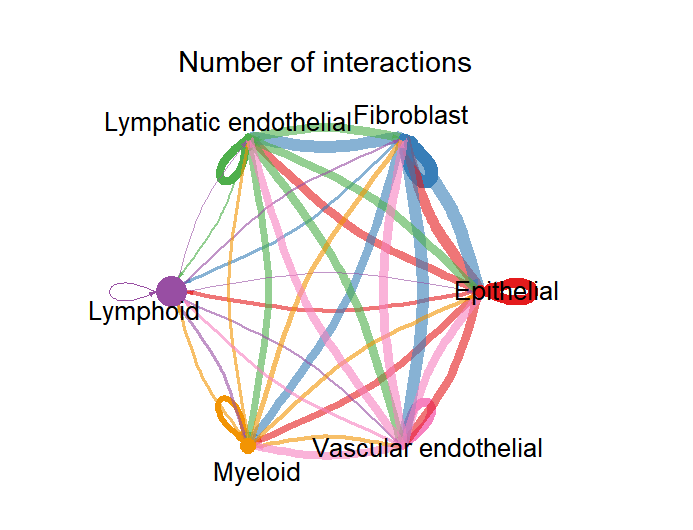

img

  • 写回答

3条回答 默认 最新

  • 杨利杰YJlio 优质创作者: 操作系统技术领域 2026-02-16 22:28
    关注

    我是YJlio杨利杰让我来给你回答,以下回答来自ChatGpt5.2 Thinking 深度思考

    结论

    netVisual_circle() 的“自环角度颠倒”本质是绘图层面的 loop(自环)朝向计算/坐标系方向问题:CellChat 在 netVisual_circle 里基于节点坐标手动计算并写入 igraph::E(g)$loop.angle,当布局坐标方向与你预期相反时,自环就会看起来“翻转”。CellChat 的 netVisual_circle() 并没有对外暴露 loop.angle / self.loop 这种参数(网上一些回答写的参数是对不上的)。(rdrr.io)

    原因

    1. netVisual_circle() 实际是用 igraph 的 base plot 画的(不是 ggplot2),并且在函数内部给自环边设置 loop.angle。(rdrr.io)
    2. CellChat 源码里 loop.angle 的计算依赖 layout 产生的坐标(coords_scale),然后把计算结果写到自环边上:
    • loop.angle <- ifelse(x>0, -atan(y/x), pi-atan(y/x))
    • 再把自环边的 E(g)$loop.angle[...] <- loop.angle[...]
      所以只要布局坐标(或坐标方向)发生变化,自环的朝向就可能“看起来颠倒”。(rdrr.io)
    1. igraph 本身支持 loop.angle 这个绘图参数/属性,用来控制自环绘制角度。(r.igraph.org)

    步骤

    1)先确认是不是“自环”导致(排除数据问题)

    # 自环强度/数量(count/weight 都可以看)
    sum(diag(cellchat@net$count) > 0)
    sum(diag(cellchat@net$weight) > 0)
    
    # 看看哪些细胞群存在自环
    which(diag(cellchat@net$count) > 0)
    

    2)如果你并不需要自环:直接去掉(最快、最稳)

    net1 <- cellchat@net$count
    net2 <- cellchat@net$weight
    
    diag(net1) <- 0
    diag(net2) <- 0
    
    par(mfrow = c(1,2), xpd = TRUE)
    netVisual_circle(net1, vertex.weight = as.numeric(table(cellchat@idents)),
                     weight.scale = TRUE, label.edge = FALSE,
                     title.name = "Number of interactions (no self-loop)")
    netVisual_circle(net2, vertex.weight = as.numeric(table(cellchat@idents)),
                     weight.scale = TRUE, label.edge = FALSE,
                     title.name = "Interaction weights (no self-loop)")
    

    3)保留自环但修正“翻转”:给 netVisual_circle() 传自定义 layout(推荐)

    因为 CellChat 的自环角度来自 layout 坐标,你可以通过翻转/旋转坐标来把自环方向“翻回来”。

    方案A:上下翻转(最常用)

    library(igraph)
    
    layout_flip_y <- function(g) {
      xy <- layout_in_circle(g)
      xy[,2] <- -xy[,2]      # 翻转Y轴
      xy
    }
    
    par(mfrow = c(1,2), xpd = TRUE)
    netVisual_circle(cellchat@net$count, vertex.weight = as.numeric(table(cellchat@idents)),
                     weight.scale = TRUE, label.edge = FALSE,
                     title.name = "count (flip y)", layout = layout_flip_y)
    
    netVisual_circle(cellchat@net$weight, vertex.weight = as.numeric(table(cellchat@idents)),
                     weight.scale = TRUE, label.edge = FALSE,
                     title.name = "weight (flip y)", layout = layout_flip_y)
    

    方案B:旋转90/180度(如果翻Y不够)

    library(igraph)
    
    layout_rotate <- function(theta) {
      function(g) {
        xy <- layout_in_circle(g)
        rot <- matrix(c(cos(theta), -sin(theta),
                        sin(theta),  cos(theta)), ncol = 2, byrow = TRUE)
        xy %*% rot
      }
    }
    
    layout_rot180 <- layout_rotate(pi)
    
    netVisual_circle(cellchat@net$count, vertex.weight = as.numeric(table(cellchat@idents)),
                     weight.scale = TRUE, label.edge = FALSE,
                     title.name = "count (rot 180)", layout = layout_rot180)
    

    说明:CellChat 允许传入 layout = in_circle() 这种布局参数;源码也显示它就是用 layout_(g, layout) 拿坐标,再算自环角度。(rdrr.io)

    4)要“从根上”修:自己重画 igraph(可精确控制 loop.angle)

    当你想严格控制自环角度(例如用 atan2),就不要直接用 netVisual_circle(),而是复刻它的核心流程:建图 → 布局 → 手动给自环边设 loop.angleplot()

    下面给一个最小可用示例(只演示自环角度控制):

    library(igraph)
    
    net <- cellchat@net$count
    g <- graph_from_adjacency_matrix(net, mode = "directed", weighted = TRUE)
    
    xy <- scale(layout_in_circle(g))
    
    # 用 atan2 计算每个点的极角(更稳的象限处理)
    ang <- atan2(xy[,2], xy[,1])
    
    E(g)$loop.angle <- 0
    ed <- ends(g, E(g), names = FALSE)
    is_loop <- ed[,1] == ed[,2]
    E(g)$loop.angle[is_loop] <- ang[ed[is_loop, 1]]
    
    plot(g, layout = xy, edge.curved = 0.2)
    

    这里用到的 loop.angle 是 igraph 支持的绘图参数/属性。(r.igraph.org)

    验证

    1. 对比前后图:自环是否从“内侧/反向”变成你期望的“外侧/同向”。
    2. 打印自环的 loop.angle 看是否随 layout 改变而改变:
    library(igraph)
    g <- graph_from_adjacency_matrix(cellchat@net$count, mode="directed", weighted=TRUE)
    xy1 <- scale(layout_in_circle(g))
    xy2 <- xy1; xy2[,2] <- -xy2[,2]
    
    ang1 <- atan2(xy1[,2], xy1[,1])
    ang2 <- atan2(xy2[,2], xy2[,1])
    
    head(ang1); head(ang2)
    

    补充

    1. 你截图里提到的 “CellChat 2.2 + ggplot2 4.0.2”——netVisual_circle() 这张图来说,它走的是 igraph/base plot,不是 ggplot2,所以更应优先排查:layout 坐标方向、igraph 版本更新带来的绘图行为变化。(rdrr.io)
    2. CellChat v2 已迁移到新仓库 jinworks/CellChat,旧仓库不再维护;如果你怀疑是已修复的绘图问题,可对照你当前安装版本与新仓库版本差异。(GitHub)
    评论

报告相同问题?

问题事件

  • 创建了问题 2月14日