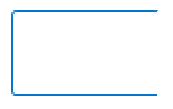
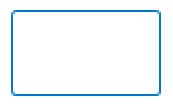
两个图中四个顶点的对应坐标是一样,那么如何通过 opencv api 检测到以上两张图片内容的不同。

两个图中四个顶点的对应坐标是一样,那么如何通过 opencv api 检测到以上两张图片内容的不同。
 分享
分享
import cv2

# 读取图片
img1 = cv2.imread('image1.jpg')
img2 = cv2.imread('image2.jpg')

# 检测第一个矩形
rect1 = cv2.minAreaRect(cv2.findContours(img1, cv2.RETR_EXTERNAL))
box1 = cv2.boxPoints(rect1)
pt1 = tuple(box1[0])
pt2 = tuple(box1[1])
pt3 = tuple(box1[2])
pt4 = tuple(box1[3])
cv2.drawContours(img1, [pt1, pt2, pt3, pt4], -1, (0, 0, 255), 2)

# 检测第二个矩形
rect2 = cv2.minAreaRect(cv2.findContours(img2, cv2.RETR_EXTERNAL))
box2 = cv2.boxPoints(rect2)
pt5 = tuple(box2[0])
pt6 = tuple(box2[1])
pt7 = tuple(box2[2])
pt8 = tuple(box2[3])
cv2.drawContours(img2, [pt5, pt6, pt7, pt8], -1, (0, 0, 255), 2)

# 检查两个矩形是否闭合
if cv2.isClosed(box1, pt1) == True and cv2.isClosed(box1, pt2) == True and \
   cv2.isClosed(box1, pt3) == True and cv2.isClosed(box1, pt4) == True and \
   cv2.isClosed(box2, pt5) == True and cv2.isClosed(box2, pt6) == True and \
   cv2.isClosed(box2, pt7) == True and cv2.isClosed(box2, pt8) == True:
    print('The two rectangles are closed.')
else:
    print('The two rectangles are not closed.')

# 显示图片
cv2.imshow('image1', img1)
cv2.imshow('image2', img2)
cv2.waitKey(0)
cv2.destroyAllWindows()
 创建了问题
5月28日
创建了问题
5月28日


