Flutter assets will be downloaded from https://storage.flutter-io.cn. Make sure you trust this source!
Launching lib\main.dart on V2166BA in debug mode...
Running Gradle task 'assembleDebug'...

FAILURE: Build failed with an exception.

* What went wrong:
A problem occurred configuring root project 'android'.
> Could not resolve all files for configuration ':classpath'.
   > Could not resolve com.android.tools.build:gradle:7.3.0.
     Required by:
         project :
      > Could not resolve com.android.tools.build:gradle:7.3.0.
         > Could not get resource 'https://dl.google.com/dl/android/maven2/com/android/tools/build/gradle/7.3.0/gradle-7.3.0.pom'.
            > Could not GET 'https://dl.google.com/dl/android/maven2/com/android/tools/build/gradle/7.3.0/gradle-7.3.0.pom'.
               > Connect to 127.0.0.1:9910 [/127.0.0.1] failed: Connection refused: no further information
      > Could not resolve com.android.tools.build:gradle:7.3.0.
         > Could not get resource 'https://repo.maven.apache.org/maven2/com/android/tools/build/gradle/7.3.0/gradle-7.3.0.pom'.
            > Could not GET 'https://repo.maven.apache.org/maven2/com/android/tools/build/gradle/7.3.0/gradle-7.3.0.pom'.
               > Connect to 127.0.0.1:9910 [/127.0.0.1] failed: Connection refused: no further information
   > Could not resolve org.jetbrains.kotlin:kotlin-gradle-plugin:1.7.10.
     Required by:
         project :
      > Could not resolve org.jetbrains.kotlin:kotlin-gradle-plugin:1.7.10.
         > Could not get resource 'https://dl.google.com/dl/android/maven2/org/jetbrains/kotlin/kotlin-gradle-plugin/1.7.10/kotlin-gradle-plugin-1.7.10.pom'.
            > Could not GET 'https://dl.google.com/dl/android/maven2/org/jetbrains/kotlin/kotlin-gradle-plugin/1.7.10/kotlin-gradle-plugin-1.7.10.pom'.
               > Connect to 127.0.0.1:9910 [/127.0.0.1] failed: Connection refused: no further information
      > Could not resolve org.jetbrains.kotlin:kotlin-gradle-plugin:1.7.10.
         > Could not get resource 'https://repo.maven.apache.org/maven2/org/jetbrains/kotlin/kotlin-gradle-plugin/1.7.10/kotlin-gradle-plugin-1.7.10.pom'.
            > Could not GET 'https://repo.maven.apache.org/maven2/org/jetbrains/kotlin/kotlin-gradle-plugin/1.7.10/kotlin-gradle-plugin-1.7.10.pom'.
               > Connect to 127.0.0.1:9910 [/127.0.0.1] failed: Connection refused: no further information

* Try:
> Run with --stacktrace option to get the stack trace.
> Run with --info or --debug option to get more log output.
> Run with --scan to get full insights.

* Get more help at https://help.gradle.org

BUILD FAILED in 17s
Retrying Gradle Build: #1, wait time: 100ms
[!] Gradle threw an error while downloading artifacts from the network.
Running Gradle task 'assembleDebug'...

FAILURE: Build failed with an exception.

* What went wrong:
A problem occurred configuring root project 'android'.
> Could not resolve all files for configuration ':classpath'.
   > Could not resolve com.android.tools.build:gradle:7.3.0.
     Required by:
         project :
      > Could not resolve com.android.tools.build:gradle:7.3.0.
         > Could not get resource 'https://dl.google.com/dl/android/maven2/com/android/tools/build/gradle/7.3.0/gradle-7.3.0.pom'.
            > Could not GET 'https://dl.google.com/dl/android/maven2/com/android/tools/build/gradle/7.3.0/gradle-7.3.0.pom'.
               > Connect to 127.0.0.1:9910 [/127.0.0.1] failed: Connection refused: no further information
      > Could not resolve com.android.tools.build:gradle:7.3.0.
         > Could not get resource 'https://repo.maven.apache.org/maven2/com/android/tools/build/gradle/7.3.0/gradle-7.3.0.pom'.
            > Could not GET 'https://repo.maven.apache.org/maven2/com/android/tools/build/gradle/7.3.0/gradle-7.3.0.pom'.
               > Connect to 127.0.0.1:9910 [/127.0.0.1] failed: Connection refused: no further information
   > Could not resolve org.jetbrains.kotlin:kotlin-gradle-plugin:1.7.10.
     Required by:
         project :
      > Could not resolve org.jetbrains.kotlin:kotlin-gradle-plugin:1.7.10.
         > Could not get resource 'https://dl.google.com/dl/android/maven2/org/jetbrains/kotlin/kotlin-gradle-plugin/1.7.10/kotlin-gradle-plugin-1.7.10.pom'.
            > Could not GET 'https://dl.google.com/dl/android/maven2/org/jetbrains/kotlin/kotlin-gradle-plugin/1.7.10/kotlin-gradle-plugin-1.7.10.pom'.
               > Connect to 127.0.0.1:9910 [/127.0.0.1] failed: Connection refused: no further information
      > Could not resolve org.jetbrains.kotlin:kotlin-gradle-plugin:1.7.10.
         > Could not get resource 'https://repo.maven.apache.org/maven2/org/jetbrains/kotlin/kotlin-gradle-plugin/1.7.10/kotlin-gradle-plugin-1.7.10.pom'.
            > Could not GET 'https://repo.maven.apache.org/maven2/org/jetbrains/kotlin/kotlin-gradle-plugin/1.7.10/kotlin-gradle-plugin-1.7.10.pom'.
               > Connect to 127.0.0.1:9910 [/127.0.0.1] failed: Connection refused: no further information

* Try:
> Run with --stacktrace option to get the stack trace.
> Run with --info or --debug option to get more log output.
> Run with --scan to get full insights.

* Get more help at https://help.gradle.org

BUILD FAILED in 8s
[!] Gradle threw an error while downloading artifacts from the network.
Exception: Gradle task assembleDebug failed with exit code 1

新建的flutter,运行项目就报错

- 写回答
- 好问题 0 提建议
- 关注问题
 分享
分享- 邀请回答
-

2条回答 默认 最新

 关注
关注【相关推荐】
- 这有个类似的问题, 你可以参考下: https://ask.csdn.net/questions/7489038
- 这篇博客也不错, 你可以看下第一次运行flutter项目遇到的的坑
- 您还可以看一下 亢少军老师的flutter高仿微信项目实战课程中的 消息模块实现小节, 巩固相关知识点
- 除此之外, 这篇博客: flutter(二)开发工具的介绍和安装,运行项目中的 5.升级flutter 部分也许能够解决你的问题, 你可以仔细阅读以下内容或跳转源博客中阅读:
我们在开发flutter中 肯定需要升级,因为flutter的版本更新也很快,下面提供两种升级方式:
- 使用终端中flutter upgrade,进入安装目录执行或者直接执行(配置过环境变量)
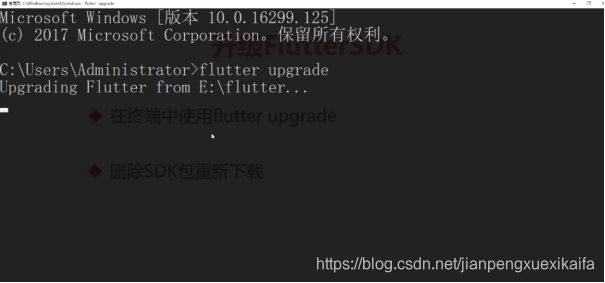
- 删除sdk包重新下载,重新配置环境变量
- 使用终端中flutter upgrade,进入安装目录执行或者直接执行(配置过环境变量)
如果你已经解决了该问题, 非常希望你能够分享一下解决方案, 写成博客, 将相关链接放在评论区, 以帮助更多的人 ^-^解决评论 打赏无用 1举报 分享
- 2021-03-08 08:26笨鸟先飞1003的博客 flutter开发环境问题 报错: Exception in thread "main" java.util.zip.ZipException: error in opening zip file at java.util.zip.ZipFile.open(Native Method) at java.util.zip.ZipFile.<init>(ZipFile...
- 2024-04-30 17:35huaqianzkh的博客 是Google开源的构建用户界面(UI)工具包,帮助开发者通过一套代码库高效构建多平台精美应用,支持移动、Web、桌面和嵌入式平台。Flutter 开源、免费,拥有宽松的开源协议,适合商业项目。
- 2023-06-19 22:53允澄的博客 1.找到flutter工程里面的iOS工程里面的podfile文件。3.增加的代码,放置的位置如下(放在第一个end之后)最后记得clean以下再运行,就OK了!arc提取码 d7g6。
- 2022-10-11 22:20余生爱静的博客 创建Flutter项目以及项目结构配置
- 2024-05-04 18:002401_84149557的博客 因为Flutter除了Andorid、iOS,还可以在PC上运行,所以一直想试试以下在PC上的跨平台效果如何。发现Flutter想在PC上跑起来还不太简单。现在开始。这个是支持Flutter在Windows, macOS, and Linux上运行的库:github....
- 2020-11-21 03:19weixin_39948277的博客 Flutter是Google用以帮助开发者在Ios和Android两个平台开发高质量原生应用的全新移动UI框架优势:热重载。利用Android Studio直接一个ctrl+s就可以保存并重载,模拟器立马就可以看见效果。一切皆为 Widget 的理念。...
- 2021-04-15 10:30Xiao冰同学的博客 从零开发一个Android高德地图插件
- 2020-09-06 17:34三须鳗鱼的博客 代码参考:从零开始的Flutter之旅: MethodChannel 需求:用户在首页点击返回按钮不关闭应用 实现:重写onWillPop 坑点:①中文网提供的有问题,②网络资源大部分都基于java 先贴一下中文网的写法:点击看看 import...
- 2024-01-03 15:08俞方风潇残-一个不甘寂寞的程序员的博客 详细其它的样式修改可查看 : https://pub-web.flutter-io.cn/packages/flutter_easyloading。注意:使用 flutter 的时候一定要把数据放在父组件中(主要是指...3、入口函数加上两句话,不然报错。1、创建 store 仓库。
- 2020-11-21 03:19weixin_39881513的博客 简介Flutter作为谷歌推出的跨平台开发框架,一经推出便吸引了不少注意。关于Flutter,目前我们知道它是一个跨平台开发框架。但是它本身并不止于此,例如Fuchsia、Dart等,我们也都需要去了解。Android面试真题+技术...
- 没有解决我的问题, 去提问

问题事件
 创建了问题
10月5日
创建了问题
10月5日