用python实现A*算法
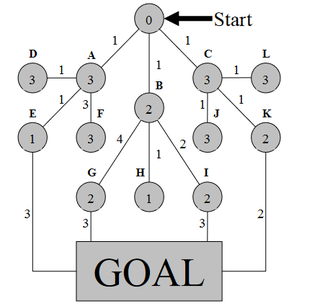
如下图所示,用A*算法寻找start点到Goal的最短路径。
线上的数字表示路径,圆圈中的数字表示启发式函数的值。

用python实现A*算法
如下图所示,用A*算法寻找start点到Goal的最短路径。
线上的数字表示路径,圆圈中的数字表示启发式函数的值。
 分享
分享
 关注
关注【以下回答由 GPT 生成】
我可以提供关于如何用Python实现A*算法的帮助。
要实现A*算法,你可以按照以下步骤进行:
创建一个节点类,包含节点的属性,如位置信息和评估函数的值。
实现A*算法的主要逻辑:
循环结束后,检查是否找到了路径:
实现地图和节点的可视化(可选):
下面是一个简单的示例代码,用Python实现了A*算法:
import heapq

class Node:
    def __init__(self, position):
        self.position = position
        self.g = float('inf')
        self.f = float('inf')
        self.parent = None

    def __lt__(self, other):
        return self.f < other.f

def astar(start, end, grid):
    open_list = []
    closed_list = set()
    heapq.heappush(open_list, start)
    start.g = 0
    start.f = heuristic(start, end)

    while open_list:
        current_node = heapq.heappop(open_list)
        closed_list.add(current_node)
        if current_node == end:
            return construct_path(current_node)

        for neighbor in get_neighbors(current_node, grid):
            if neighbor in closed_list:
                continue

            tentative_g = current_node.g + distance(current_node, neighbor)
            if tentative_g < neighbor.g:
                neighbor.parent = current_node
                neighbor.g = tentative_g
                neighbor.f = tentative_g + heuristic(neighbor, end)
                if neighbor not in open_list:
                    heapq.heappush(open_list, neighbor)

    return None

def heuristic(node, end):
    return abs(node.position[0] - end.position[0]) + abs(node.position[1] - end.position[1])

def distance(node1, node2):
    return abs(node1.position[0] - node2.position[0]) + abs(node1.position[1] - node2.position[1])

def get_neighbors(node, grid):
    neighbors = []
    x, y = node.position
    if x > 0:
        neighbors.append(grid[x-1][y])
    if x < len(grid)-1:
        neighbors.append(grid[x+1][y])
    if y > 0:
        neighbors.append(grid[x][y-1])
    if y < len(grid[0])-1:
        neighbors.append(grid[x][y+1])
    return neighbors

def construct_path(node):
    path = []
    while node:
        path.append(node.position)
        node = node.parent
    return path[::-1]

# 创建地图和节点
grid = [[Node((i, j)) for j in range(5)] for i in range(5)]
start = grid[0][0]
end = grid[4][4]

# 执行A*算法
path = astar(start, end, grid)
if path:
    print("最短路径:", path)
else:
    print("未找到路径")
这个示例实现了一个简单的网格地图(5x5),起始点为左上角,目标点为右下角。地图上的节点包含位置信息,每个节点之间的距离都是1。你可以根据需要修改地图的大小和节点之间的距离。
希望以上解决方案对你有帮助,如果你还有任何问题或者需要进一步的帮助,请随时提问。
【相关推荐】
分享 Python 实现各类机器学习算法全解析
Python 语言实现机器学习算法合集
基于 Python 的机器学习算法实现方法
机器学习算法的 Python 语言实现方案
Python 编程实现各类机器
Python 实现各类机器学习算法全解析
Python 语言实现机器学习算法合集
基于 Python 的机器学习算法实现方法
机器学习算法的 Python 语言实现方案
Python 编程实现各类机器 创建了问题
10月31日
创建了问题
10月31日

