
m0_74320701 2023-12-17 15:19 采纳率: 100%
浏览 51
已结题

数字图像处理opencv,交叉物体计数

img


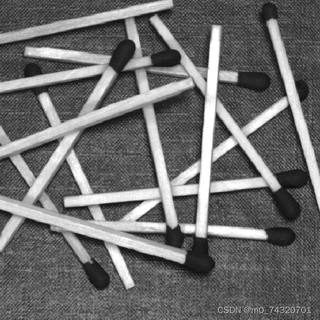
数字图像处理,如何准确计数火柴的数量,而不受火柴交叉的干扰,
现有思路有直线检测,轮廓检测,都无法实现,该怎么处理
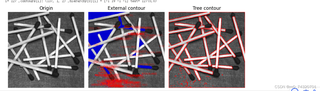
img

import cv2
from matplotlib import pyplot as plt
# 12.2 绘制轮廓
img = cv2.imread("/content/matches-random.tif", flags=1)
gray = cv2.cvtColor(img, cv2.COLOR_BGR2GRAY)  # 灰度图像
_, binary = cv2.threshold(gray, 127, 255, cv2.THRESH_OTSU + cv2.THRESH_BINARY_INV)

plt.figure(figsize=(9, 6))

# 12.3 绘制原始图像
plt.subplot(131), plt.axis('off'), plt.title("Origin")
plt.imshow(cv2.cvtColor(img, cv2.COLOR_BGR2RGB))

# 12.4 寻找二值化图中的轮廓
if cv2.__version__.startswith('3'):
    contours, hierarchy = cv2.findContours(binary, cv2.RETR_TREE, cv2.CHAIN_APPROX_SIMPLE)  # OpenCV3
else:
    contours, hierarchy = cv2.findContours(binary, cv2.RETR_TREE, cv2.CHAIN_APPROX_SIMPLE)  # OpenCV4~

# 12.5 绘制最内层轮廓
contourEx = img.copy()
for i in range(len(contours)):
    if hierarchy[0][i][2] == -1:
        x, y, w, h = cv2.boundingRect(contours[i])
        text = "{}({},{})".format(i, x, y)
        contourEx = cv2.drawContours(contourEx, contours, i, (205, 0, 0), thickness=-1)
        contourEx = cv2.putText(contourEx, text, (x, y), cv2.FONT_HERSHEY_SIMPLEX, 0.6, (0, 0, 255))
        print("i=", i, ",contours[i]:", contours[i].shape, ",hierarchy[0][i] =", hierarchy[0][i], "text=", text)

# 12.6 绘制全部轮廓
contourTree = img.copy()
contourTree = cv2.drawContours(contourTree, contours, -1, (0, 0, 255), 2)

# 12.7 显示绘制结果
plt.subplot(132), plt.axis('off'), plt.title("External contour")
plt.imshow(cv2.cvtColor(contourEx, cv2.COLOR_BGR2RGB))
plt.subplot(133), plt.axis('off'), plt.title("Tree contour")
plt.imshow(cv2.cvtColor(contourTree, cv2.COLOR_BGR2RGB))
plt.tight_layout()
plt.show()
  • 写回答

11条回答 默认 最新

  • 专家-赤兔[在线] 优质创作者: 编程框架技术领域 2023-12-17 15:20
    关注

    引自强大而免费的微信小程序:皆我知道

    以下是使用OpenCV进行火柴数量计数的代码示例:

    import cv2
    import numpy as np
    
    def count_matches(image):
        # 图像预处理
        gray = cv2.cvtColor(image, cv2.COLOR_BGR2GRAY)
        blurred = cv2.GaussianBlur(gray, (5, 5), 0)
        ret, threshold = cv2.threshold(blurred, 100, 255, cv2.THRESH_BINARY_INV)
    
        # 边缘检测
        edges = cv2.Canny(threshold, 70, 150)
    
        # 霍夫直线检测
        lines = cv2.HoughLines(edges, 1, np.pi/180, 100)
    
        # 统计交叉点
        matches = 0
        for i in range(len(lines)):
            for j in range(i+1, len(lines)):
                rho1, theta1 = lines[i][0]
                rho2, theta2 = lines[j][0]
                if abs(theta1 - theta2) > np.pi/4:  # 保证两条线不平行
                    intersect_x = int((rho2*np.sin(theta1) - rho1*np.sin(theta2)) / np.sin(theta1 - theta2))
                    intersect_y = int((rho1 - intersect_x*np.cos(theta1)) / np.sin(theta1))
                    if intersect_x > 0 and intersect_x < image.shape[1] and intersect_y > 0 and intersect_y < image.shape[0]:
                        matches += 1
    
        return matches
    
    # 读取图像
    image = cv2.imread('gunzi.jpeg')
    
    # 计数火柴数量
    match_count = count_matches(image)
    
    # 显示结果
    cv2.putText(image, 'Match count: {}'.format(match_count), (10, 30), cv2.FONT_HERSHEY_SIMPLEX, 0.9, (0, 0, 255), 2)
    cv2.imshow('Count Matches', image)
    cv2.waitKey(0)
    cv2.destroyAllWindows()
    

    这段代码首先读取名为"gunzi.jpeg"的图像,然后进行一系列的图像处理操作。首先将图像转为灰度图像,然后进行高斯模糊以减少噪声。接下来通过二值化操作将图像转化为黑白图像,便于边缘检测。使用Canny算子进行边缘检测后,使用Hough直线变换检测出图像中的直线。最后,统计交叉点的数量来计算火柴的数量。

    在代码中使用cv2.putText函数将计数结果绘制在图像上并显示出来。

    请注意,该方法可能对火柴的交叉情况和图像质量有一定的要求,对于较为复杂的火柴交叉场景可能会有一定的误差。如果需要更精确的结果,可能需要使用更高级的算法或手动处理。

    本回答被题主选为最佳回答 , 对您是否有帮助呢?
    评论 编辑记录
查看更多回答(10条)

报告相同问题?

问题事件

  • 系统已结题 12月28日
  • 已采纳回答 12月20日
  • 创建了问题 12月17日