梦忆墨染 2024-05-11 21:03 采纳率: 53.8%
浏览 12
已结题

绘制雷达图时,出错,改了很久都 改不回来

绘制雷达时出错

import pandas as pd
import numpy as np
from sklearn.preprocessing import StandardScaler
from sklearn.cluster import KMeans
import matplotlib.pyplot as plt
data=pd.read_csv(r'D:\Job saving\Spyder\air_data\air_data.csv',encoding='gb18030')
L=pd.to_datetime(data['LOAD_TIME']) - pd.to_datetime(data['FFP_DATE'])
L=L.astype('str').str.split().str[0]
L=L.astype('int')/30
features=pd.concat((L,data[['LAST_TO_END','FLIGHT_COUNT','SEG_KM_SUM','avg_discount']]),axis=1)
features.columns=['L','R','F','M','C']
print(features)
#数据标准化处理
features.describe()
scaler=StandardScaler()
features_scaler=scaler.fit_transform(features)
#模型构建
Inertia=[]
for k in range(1,9):
    estimator=KMeans(n_clusters=k)
    estimator.fit(features_scaler)
    Inertia.append(estimator.inertia_)
X = range(1,9)
plt.xlabel('k')
plt.ylabel('inertia')
plt.plot(X,Inertia,'o-')
plt.show()
#构建K-means模型
kmodel=KMeans(n_clusters=5)
kmodel.fit(features_scaler)
print(kmodel.labels_)
r1=pd.Series(kmodel.labels_).value_counts()
r2=pd.DataFrame(kmodel.cluster_centers_)
max=r2.values.max()
min=r2.values.min()
r=pd.concat([r2,r1],axis=1)


plt.rcParams['font.sans-serif']='SImHei'
plt.rcParams['font.size']=12.0
plt.rcParams['axes.unicode_minus']=False
fig=plt.figure(figsize=(10,8))

ax=fig.add_subplot(111,polar=True)
center_num=r.values
feature=["L入会时间长度","R最近乘机距离的时间长度","M飞行总里程","F飞行次数","C平均折扣率"]
N=len(feature)
for i, v in enumerate(center_num):
    angles=np.linspace(0, 2*np.pi, N, endpoint=False).tolist() 
    center=np.concatenate((v[:-1],[v[0]]))
    angles=np.concatenate((angles,[angles[0]]))
    ax.plot(angles, center,'o-', linewidth=2,label="第%d簇人群,%d人"% (i+1,v[-1]))
    ax.fill(angles,center,alpha=0.25)
    ax.set_thetagrids(angles * 180/np.pi, feature, fontsize=15)  
    ax.set_ylim(min-0.1, max+0.1)
    plt.title('客户群特征分析图',fontsize=20)
    ax.grid(True)
    plt.legend(loc='upper right', bbox_to_anchor=(1.3,1.0),ncol=1,fancybox=True,shadow=True)
plt.show() 

ValueError: The number of FixedLocator locations (6), usually from a call to set_ticks, does not match the number of labels (5).
img

img


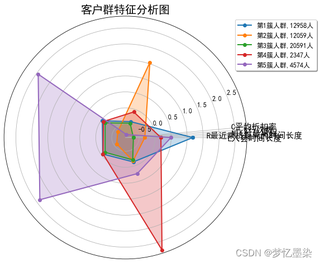
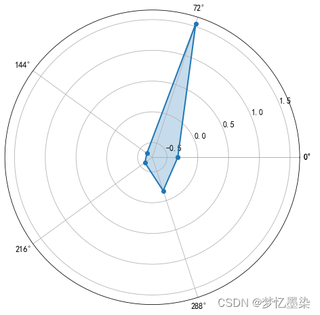
需求就是下面两张图的结合

img

img

  • 写回答

3条回答 默认 最新

  • 笑面虎 2024-05-11 21:03
    关注

    以下内容由CHATGPT及笑面虎共同生成、有用望采纳:


    【您想要解决的问题】: 您的问题在于使用Python中的matplotlib库绘制雷达图(也称为蜘蛛网图或星形图)时遇到了错误。您尝试将K-means聚类分析的结果以雷达图的形式展示,但是程序运行时抛出了一个ValueError,指出固定定位器的位置数(6)与标签数(5)不匹配。

    【图片内容】:

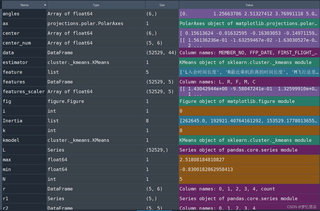
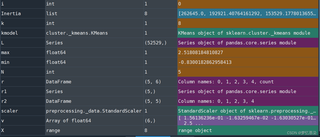
    1. 第一张图片显示了您代码中使用的数据结构和对象,包括数组、DataFrame、KMeans对象等。
    2. 第二张图片展示了在尝试绘制雷达图时程序抛出的错误信息。
    3. 第三张图片是您希望结合的雷达图的一个示例,显示了不同人群的特征分析。
    4. 第四张图片是另一个雷达图的示例,您希望将类似这样的图结合起来。

    【问题出现原因】: 错误发生的原因是在设置雷达图的角度标签时,标签的数量和角度的数量不匹配。在您的代码中,set_thetagrids函数接收了两个参数:角度数组和特征标签数组。由于您在创建角度数组时使用了N个元素,但是特征标签数组只有N-1个元素,这导致了不匹配的问题。

    【问题解决方案】: 要解决这个问题,您需要确保角度数组和标签数组的长度相同。在您的代码中,您可以通过调整center数组和angles数组来确保它们的长度匹配。此外,您需要确保set_thetagrids函数接收到正确数量的标签。

    【提供代码】: 以下是修改后的代码,它应该能够解决您遇到的问题:

    import pandas as pd
    import numpy as np
    from sklearn.preprocessing import StandardScaler
    from sklearn.cluster import KMeans
    import matplotlib.pyplot as plt
    
    # ... [您的数据加载和处理代码] ...
    
    # 假设您已经有了kmodel, r1, r2, features等变量
    
    plt.rcParams['font.sans-serif'] = 'SimHei'
    plt.rcParams['font.size'] = 12.0
    plt.rcParams['axes.unicode_minus'] = False
    
    fig = plt.figure(figsize=(10, 8))
    ax = fig.add_subplot(111, polar=True)
    
    # 确保center_num是二维数组,每行代表一个簇的中心点
    center_num = np.array(r2.values).T  # 转置矩阵以匹配特征数量
    
    # 特征名称
    feature = ["L入会时间长度", "R最近乘机距离的时间长度", "M飞行总里程", "F飞行次数", "C平均折扣率"]
    
    N = len(feature)
    angles = np.linspace(0, 2 * np.pi, N, endpoint=False).tolist()
    
    for i, v in enumerate(center_num):
        ax.plot(angles, v, 'o-', linewidth=2, label="第%d簇人群, %d人" % (i + 1, r1[i]))
        ax.fill(angles, v, alpha=0.25)
    
    # 设置雷达图的标签和角度
    ax.set_thetagrids(np.degrees(angles), feature, fontsize=15)
    
    # 设置雷达图的范围
    max_value = np.max(center_num, axis=0).max() + 0.1
    min_value = np.min(center_num, axis=0).min() - 0.1
    ax.set_ylim(min_value, max_value)
    
    plt.title('客户群特征分析图', fontsize=20)
    ax.grid(True)
    plt.legend(loc='upper right', bbox_to_anchor=(1.3, 1.0), ncol=1, fancybox=True, shadow=True)
    plt.show()
    

    【代码运行方式】: 您需要有Python环境,并且安装了pandas、numpy、sklearn和matplotlib库。您可以将上述代码保存为.py文件,并在命令行或IDE中运行。

    【代码预期运行结果】: 代码将绘制一个雷达图,图中将展示每个簇的特征中心点,并且每个特征的标签将正确显示在雷达图的外围。

    【推荐相关链接】:

    本回答被题主选为最佳回答 , 对您是否有帮助呢?
    评论 编辑记录
查看更多回答(2条)

报告相同问题?

问题事件

  • 系统已结题 5月20日
  • 已采纳回答 5月12日
  • 创建了问题 5月11日