LVI-SAM里面的深度图怎么生成,就下面这个图,在LVI-SAM这个项目里面实现,跑那个手持的handheld数据集
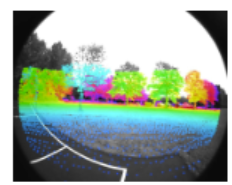

LVI-SAM里面的深度图怎么生成,就下面这个图,在LVI-SAM这个项目里面实现,跑那个手持的handheld数据集
 分享
分享
 关注
关注让 “紫雾凌寒” 来帮你回答,本回答结合 DeepSeek
如果还有问题,请评论或点击头像私信,如果有帮助到您, 请关注、采纳、点赞
#include <ros/ros.h>
#include <sensor_msgs/PointCloud2.h>
#include <pcl_conversions/pcl_conversions.h>
#include <pcl/point_types.h>
#include <pcl/filters/statistical_outlier_removal.h>

void pointCloudCallback(const sensor_msgs::PointCloud2ConstPtr& cloud_msg)
{
    pcl::PointCloud<pcl::PointXYZ> cloud;
    pcl_conversions::toPCL(*cloud_msg, cloud);

    // 统计滤波去除离群点
    pcl::StatisticalOutlierRemoval<pcl::PointXYZ> sor;
    sor.setInputCloud(cloud.makeShared());
    sor.setMeanK(50);
    sor.setStddevMulThresh(1.0);
    pcl::PointCloud<pcl::PointXYZ> filtered_cloud;
    sor.filter(filtered_cloud);

    // 计算深度值并输出
    for (const auto& point : filtered_cloud.points)
    {
        double depth = sqrt(point.x * point.x + point.y * point.y + point.z * point.z);
        ROS_INFO("Depth: %f", depth);
    }
}

int main(int argc, char** argv)
{
    ros::init(argc, argv, "depth_calculation");
    ros::NodeHandle nh;

    ros::Subscriber sub = nh.subscribe("/velodyne_points", 1, pointCloudCallback);

    ros::spin();

    return 0;
}
需要注意的是,上述代码只是一个简单的示例,实际在LVI - SAM项目中集成时需要根据项目的具体结构和要求进行更深入的调整和优化。
希望以上解答对您有所帮助。如果您有任何疑问,欢迎在评论区提出。
分享 已结题
(查看结题原因) 1月20日
创建了问题
1月13日
已结题
(查看结题原因) 1月20日
创建了问题
1月13日

