下午好🌅🌅🌅
本答案参考通义千问
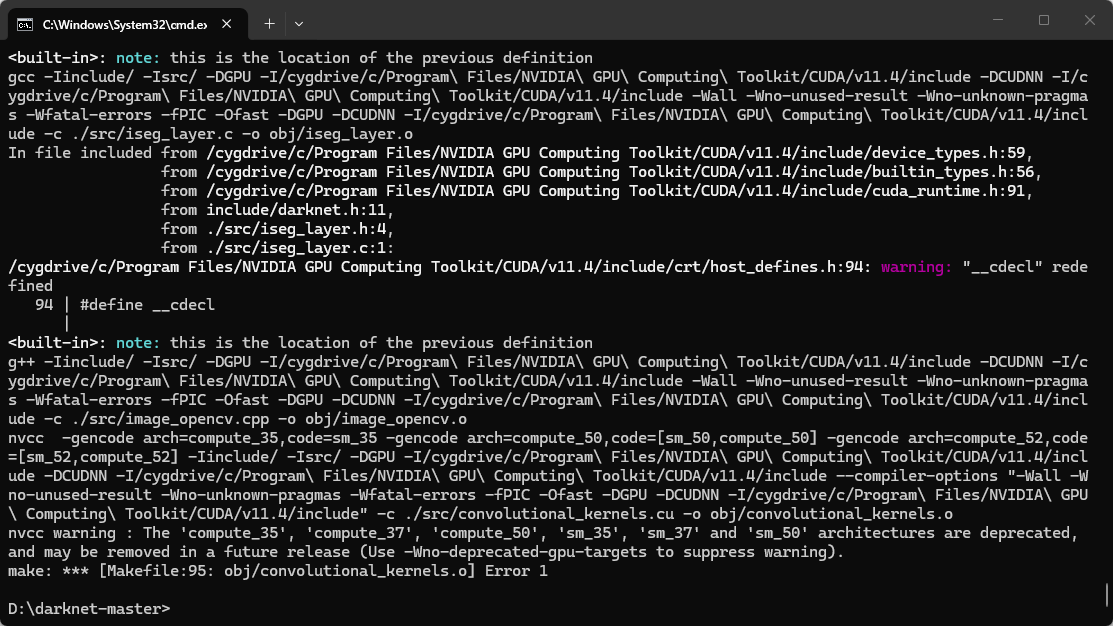
你遇到的错误信息是:
nvcc warning : The 'compute_35', 'compute_37', 'compute_50', 'sm_35', 'sm_37' and 'sm_50' architectures are deprecated, and may be removed in a future release (Use -Wno-deprecated-gpu-targets to suppress warning).
make: *** [Makefile:95: obj/convolutional_kernels.o] Error 1
这个错误主要由两个部分组成:
- CUDA 的架构警告:
compute_35, compute_37, compute_50 等是旧版 GPU 架构,现在已被弃用。 - 编译失败:由于 CUDA 编译器(
nvcc)报错,导致 make 停止。
✅ 问题分析
- 你使用的是较新的 CUDA 版本(比如 11.x 或以上),而你的 Makefile 中仍然指定了过时的 GPU 架构。
- 在较新的 CUDA 版本中,这些架构被标记为 已弃用(deprecated),但如果你不修改 Makefile,编译会失败。
🛠️ 解决方案
第一步:检查你的 GPU 架构
你需要知道你使用的 GPU 是什么型号,例如:
| GPU 型号 | 支持的 compute architecture |
|----------|-----------------------------|
| GTX 1060 | compute_75 |
| RTX 2070 | compute_75 |
| RTX 3060 | compute_86 |
| RTX 4090 | compute_89 |
你可以通过以下命令查看你的 GPU 支持的 compute architecture:
nvidia-smi
或者运行:
deviceQuery
(需要安装 CUDA 工具包)
第二步:修改 Makefile 文件
找到 Darknet 的 Makefile 文件,通常在项目根目录下,打开它并修改如下内容:
修改前(默认配置):
GPU=1
CUDADIR=/usr/local/cuda
NVCC = $(CUDADIR)/bin/nvcc
ARCH = -gencode arch=compute_35,code=sm_35 \
        -gencode arch=compute_37,code=sm_37 \
        -gencode arch=compute_50,code=sm_50 \
        -gencode arch=compute_52,code=sm_52 \
        -gencode arch=compute_60,code=sm_60 \
        -gencode arch=compute_61,code=sm_61 \
        -gencode arch=compute_70,code=sm_70 \
        -gencode arch=compute_75,code=sm_75
修改后(根据你的 GPU 架构):
假设你的 GPU 是 RTX 3060,支持 compute_86,则修改为:
GPU=1
CUDADIR=/usr/local/cuda
NVCC = $(CUDADIR)/bin/nvcc
ARCH = -gencode arch=compute_86,code=sm_86
注意:如果你的 GPU 支持多个架构,可以添加多个 -gencode 参数,例如:
ARCH = -gencode arch=compute_86,code=sm_86 \
        -gencode arch=compute_89,code=sm_89
第三步:重新编译
保存修改后的 Makefile,然后运行:
make clean
make
这将重新编译 Darknet,生成 darknet.exe(Windows 下)或 darknet(Linux 下)。
第四步(可选):抑制警告
如果你不想看到 CUDA 架构已弃用的警告,可以在 Makefile 中添加以下参数:
NVCCFLAGS += -Wno-deprecated-gpu-targets
这样可以避免显示警告信息。
📌 总结
重点步骤如下:
- 确认你的 GPU 型号及支持的 compute architecture。
- 修改
Makefile 中的 ARCH 配置,使用你 GPU 支持的架构。 - 清除旧编译文件并重新编译。
- 可选:添加
-Wno-deprecated-gpu-targets 抑制警告。
💡 示例代码(修改后的 Makefile)
GPU=1
CUDADIR=/usr/local/cuda
NVCC = $(CUDADIR)/bin/nvcc
NVCCFLAGS += -Wno-deprecated-gpu-targets
ARCH = -gencode arch=compute_86,code=sm_86
如有更多关于编译过程的问题,欢迎继续提问!