niuwa冲 2020-03-04 19:29 采纳率: 0%
浏览 615

opencv的drawContours没有作用

为什么我的drawContours没有作用?

    Utils.bitmapToMat(srcBitmap, rgbMat);  
        Imgproc.cvtColor(rgbMat, grayMat, Imgproc.COLOR_RGB2GRAY);
        Imgproc.medianBlur(grayMat,grayMat,17);
        Imgproc.Canny(grayMat,grayMat,2,50,3);
        Imgproc.adaptiveThreshold(grayMat,grayMat,255,ADAPTIVE_THRESH_MEAN_C,THRESH_BINARY_INV,9,10);
        Mat structuringElement = Imgproc.getStructuringElement(MORPH_RECT, new Size(5,5));
        Imgproc.dilate(grayMat,grayMat,structuringElement,new Point(1,1),5);
                List<MatOfPoint> Contours = new ArrayList<MatOfPoint>();
        Mat hierarchy = new Mat();

        Imgproc.findContours(grayMat,Contours,hierarchy,RETR_EXTERNAL,CHAIN_APPROX_SIMPLE);
        Imgproc.drawContours(grayMat,Contours,-1, new Scalar(255,0,255),1,8,hierarchy);
        Utils.matToBitmap(grayMat, grayBitmap);
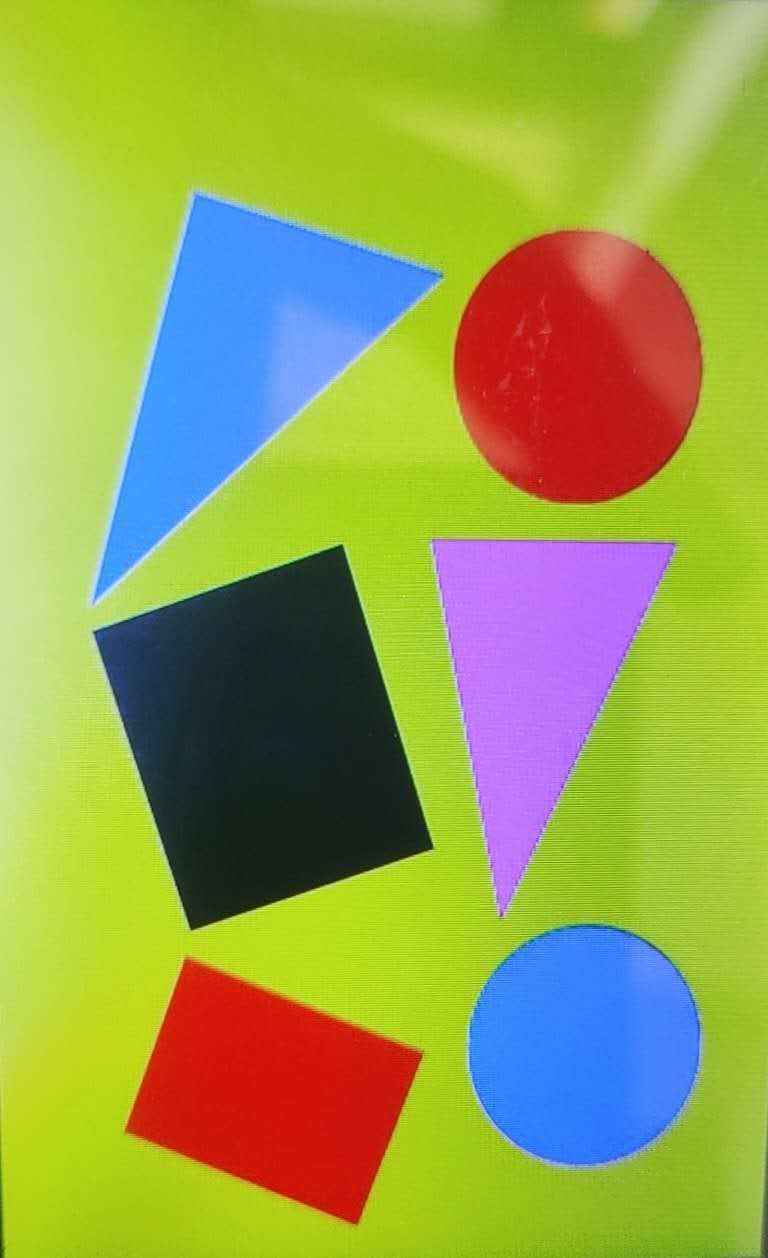
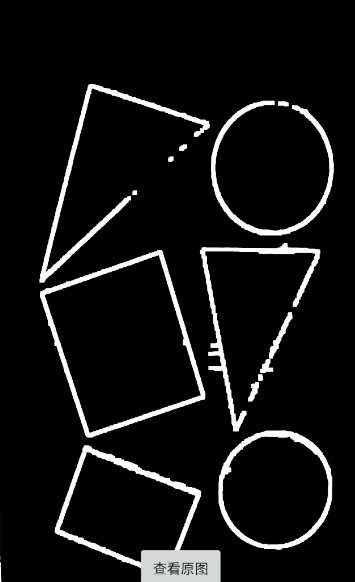
图片说明图片说明
效果只到了膨胀阶段

谢谢!!!

  • 写回答

1条回答 默认 最新

  • 码农阿豪@新空间 优质创作者: Java、后端开发技术领域 2024-07-25 18:52
    关注
    让阿豪来帮你解答,本回答参考chatgpt3.5编写提供,如果还有疑问可以评论或留言
    问题分析:根据代码中的操作流程,可以看出你是想要在grayMat上绘制轮廓,但是最终效果只到了膨胀阶段,没有成功绘制轮廓。可能原因包括:
    1. 在findContours函数中可能没有正确识别到轮廓;
    2. drawContours函数中的参数传递可能有误;
    3. 绘制的轮廓颜色可能与背景颜色相似,造成视觉上无法观察到。 解决方案:
    4. 可以先尝试打印Contours列表,查看是否成功识别到轮廓,确保findContours函数正常工作。
    5. 确保drawContours函数中的参数传递正确,特别是轮廓索引要明确传入-1表示绘制所有轮廓,确保参数无误。
    6. 可以尝试修改绘制的轮廓颜色,确保与背景颜色对比明显。 示例代码:
    // 假设已经完成前面的代码操作,包括findContours等步骤
    // 检查Contours列表是否已经成功识别轮廓
    for (int i = 0; i < Contours.size(); i++) {
        // 打印每个轮廓的点数
        System.out.println("Contour " + i + " points: " + Contours.get(i).toList().size());
    }
    // 确保drawContours函数中的参数传递正确
    Imgproc.drawContours(grayMat,Contours,-1, new Scalar(255,255,255),1,8,hierarchy);
    // 更新grayBitmap
    Utils.matToBitmap(grayMat, grayBitmap);
    

    通过以上步骤,可以先确认是否成功识别到轮廓,然后确保正确绘制轮廓,最后确保可视化效果明显。希望能解决你的问题,如果有其他疑问欢迎继续提出。

    评论

报告相同问题?