让阿豪来帮你解答,本回答参考chatgpt3.5编写提供,如果还有疑问可以评论或留言
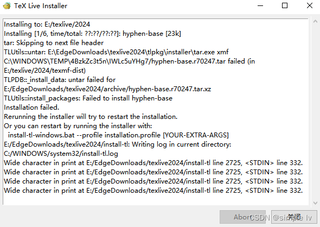
问题:安装TexLive失败,提示无法安装hyphen-base。
解决方案:
- 确认网络连接正常,可以尝试使用VPN。
- 尝试更新TexLive的镜像源:
tlmgr option repository ctan
tlmgr update --self --all
- 如果上述方法仍然不行,则尝试手动安装hyphen-base,步骤如下: (1)在下载地址 https://ctan.org/tex-archive/language/hyphen-base 下载hyphen-base的压缩包。 (2)将压缩包解压后放置在TexLive的安装目录下的
texmf-dist目录下(例如:C:\texlive\2021\texmf-dist) (3)运行命令:
tlmgr conf texmf TEXMFHOME "~/texmf:!!/usr/local/share/texmf:!!/usr/share/texmf:!!/usr/local/texlive/texmf-local:!!/usr/local/texlive/2021/texmf-dist"
(4)重新运行TexLive安装程序,或者使用命令行参数--force强制重新安装TexLive。
install-tl-windows.bat --force
注意:强制重新安装会删除之前的所有组件并重新安装,可能会耗费较长时间。 4. 如果仍然无法解决问题,请尝试联系TexLive的官方支持或者在相关论坛寻求帮助。