
我在做庄懂十二课最后透明剪切投影修正出了问题
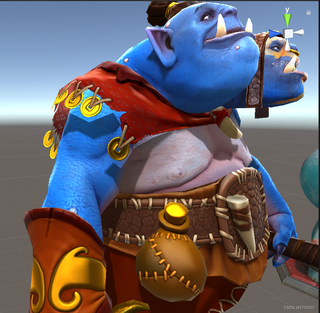
以下是我的代码
//Shader路径名
Shader "AP01/L12/OgreMagi_Code" {
    //材质面板参数
    Properties {
        [header(Texture)]
        _Maintex        ("RGB:颜色 A:透贴",2d) = "white"{}
        _MaskTex        ("R:高光强度 G:边缘光强度 B:高光染色 A:高光次幂",2d) = "balck"{}
        _NormalTex      ("RGB:法线贴图",2d) = "bump"{}
        _MetalnessMask  ("金属度遮罩",2d) = "black"{}
        _EmissionMask   ("自发光遮罩",2d) = "black"{}
        _DiffWarpTex    ("颜色Warp图",2d) = "gray"{}
        _FresWarpTex    ("菲涅尔Warp图",2d) = "gray"{}
        _Cubemap        ("环境球",cube) = "_Skybox"{}
        [header(LightDiff)]
        _LightCol       ("光颜色",Color) = (1,1,1,1)
        [header(LightSpec)]
        _SpecPow        ("高光次幂",Range(0,30.0)) = 5
        _SpecInt        ("高光强度",Range(0,10.0)) = 5
        [header(EnvDiff)]
        _EnvCol         ("环境光颜色",Color) = (1,1,1,1)
        [header(EnvSpec)]
        _EnvSpecInt     ("环境镜面反射强度",Range(0,10)) = 0.5
        [header(Rim)]
        [hdr] _RimCol   ("轮廓光颜色",Color) = (1,1,1,1)
        [header(Emit)]
        _EmitInt        ("自发光强度",Range(0,10)) = 1
        [HideInInspector]
        _Cutoff         ("Alpha cutoff", Range(0,1)) = 0.5
        [HideInInspector]
         _Color          ("Main Color", Color) = (1.0, 1.0, 1.0, 1.0)
    }
    SubShader {
        Tags {
            "RenderType"="Opaque"
        }
        Pass {
            Name "FORWARD"
            Tags {
                "LightMode"="ForwardBase"
            }
            Cull Off
            CGPROGRAM
            #pragma vertex vert
            #pragma fragment frag
            #include "UnityCG.cginc"
            #include "Lighting.cginc"
            #include "AutoLight.cginc"
            #pragma multi_compile_fwdbase_fullshadows
            #pragma target 3.0
            //输入参数
            uniform sampler2D _Maintex;
            uniform sampler2D _MaskTex;
            uniform sampler2D _NormalTex;
            uniform sampler2D _MetalnessMask;
            uniform sampler2D _EmissionMask;
            uniform sampler2D _DiffWarpTex;
            uniform sampler2D _FresWarpTex;
            uniform samplerCUBE _Cubemap;
            uniform half3 _LightCol;
            uniform half _SpecPow;
            uniform half _SpecInt;
            uniform half3 _EnvCol;
            uniform half _EnvSpecInt;
            uniform half3 _RimCol;
            uniform half _EmitInt;
            uniform half _Cutoff;
            //输入结构
            struct VertexInput {
                float4 vertex : POSITION;
                float2 uv : TEXCOORD0;
                float3 normal : NORMAL;
                float4 tangent : TANGENT;
            };
            //输出结构
            struct VertexOutput {
                float4 pos : SV_POSITION;
                float3 posWS : TEXCOORD0;
                float2 uv : TEXCOORD1;
                float3 nDirWS : TEXCOORD2;
                float3 tDirWS : TEXCOORD3;
                float3 bDirWS : TEXCOORD4;
                LIGHTING_COORDS(5,6)
            };
            //顶点Shader
            VertexOutput vert (VertexInput v) {
                VertexOutput o = (VertexOutput)0;
                o.pos = UnityObjectToClipPos( v.vertex );
                o.posWS = mul(unity_ObjectToWorld,v.vertex).xyz;
                o.uv = v.uv;
                o.nDirWS = normalize(UnityObjectToWorldNormal(v.normal));
                o.tDirWS = normalize(mul(unity_ObjectToWorld,float4(v.tangent.xyz,0)));
                o.bDirWS = normalize(cross(o.nDirWS,o.tDirWS) * v.tangent.w);
                TRANSFER_VERTEX_TO_FRAGMENT(o)
                return o;
            }
            //像素Shader
            float4 frag(VertexOutput i) : COLOR {
                //准备向量
                half3 nDirTS = UnpackNormal(tex2D(_NormalTex,i.uv));
                half3x3 TBN = half3x3(i.tDirWS,i.bDirWS,i.nDirWS);
                half3 nDirWS = normalize(mul(nDirTS,TBN));
                half3 vDirWS = normalize(_WorldSpaceCameraPos.xyz - i.posWS);
                half3 vrDirWS = normalize(reflect(-vDirWS,nDirWS));
                half3 lDirWS = normalize(_WorldSpaceLightPos0.xyz);
                half3 lrDirWS = normalize(reflect(-lDirWS,nDirWS));
                //中间向量
                half3 nDotl = dot(nDirWS,lDirWS);
                half3 nDotv = dot(nDirWS,vDirWS);
                half3 vDotlr = dot(vDirWS,lrDirWS);
                //纹理采样
                half4 var_Maintex = tex2D(_Maintex,i.uv);
                half4 var_MaskTex = tex2D(_MaskTex,i.uv);
                half var_MetalnessMask = tex2D(_MetalnessMask,i.uv).r;
                half var_EmissionMask = tex2D(_EmissionMask,i.uv).r;
                half3 var_FresWarpTex = tex2D(_FresWarpTex,nDotv).rgb;
                half3 var_Cubemap = texCUBElod(_Cubemap,float4(vrDirWS,lerp(8.0,0.0,var_MaskTex.a)));
                //提取信息
                half3 baseCol = var_Maintex.rgb;
                half opacity = var_Maintex.a;
                half specInt = var_MaskTex.r;
                half rimInt = var_MaskTex.g;
                half soecTint = var_MaskTex.b;
                half specPow = var_MaskTex.a;
                half metallic = var_MetalnessMask;
                half emitInt = var_EmissionMask;
                half3 envCube = var_Cubemap;
                half shadow = LIGHT_ATTENUATION(i);
                //光照模型
                    //漫反射颜色
                    half3 diffCol = lerp(baseCol,float3(0.0,0.0,0.0),metallic);
                    //镜面反射颜色
                    half3 specCol = lerp(baseCol,float3(0.3,0.3,0.3),soecTint)* specInt;
                    //菲涅尔
                    half3 fresnel = lerp(var_FresWarpTex,0,metallic);
                    half fresnelCol = var_FresWarpTex.r;
                    half fresnelRim = var_FresWarpTex.g;
                    half fresnelSpec = var_FresWarpTex.b;
                    //漫反射光源
                    half halflambert = nDotl * 0.5 + 0.5;
                    half3 var_DiffWarpTex = tex2D(_DiffWarpTex,half2 (halflambert,0.2));
                    half3 lightDiff = diffCol * var_DiffWarpTex * _LightCol;
                    //镜面反射光源
                    half phong = pow(max(0,vDotlr),specPow * _SpecPow);
                    half spec = phong * max(0,nDotl);
                    spec = max(spec,fresnelSpec);
                    spec = spec * _SpecInt;
                    half3 lightSpec = specCol * spec * _LightCol;
                    //漫反射环境
                    half3 envDiff = diffCol * _EnvCol;
                    //镜面反射环境
                    half reflectInt = max(fresnelSpec,metallic) * specInt;
                    half3 envSpec = specCol * reflectInt * envCube * _EnvSpecInt;
                    //轮廓光
                    half3 rimLight = _RimCol * fresnelRim * rimInt * max(0.0,nDirWS.g);
                    //自发光
                    half3 emission = diffCol * emitInt *_EmitInt;
                //混合
                half3 finalRGB = (lightDiff + lightSpec) * shadow + (envDiff + envSpec) + rimLight + emission;
                //透明剪切
                clip(opacity - _Cutoff);
                //返回值
                return float4(finalRGB,1.0);
            }
            ENDCG
        }
    }
    FallBack "Legacy Shaders/Transparent/Cutout/VertexLit"
}


