Intel OpenVino环境下 调用VideoCapture打开电脑摄像头,抛出异常 已触发一个断点 点击继续 仍可以打开摄像头 如下图 没有分 给大家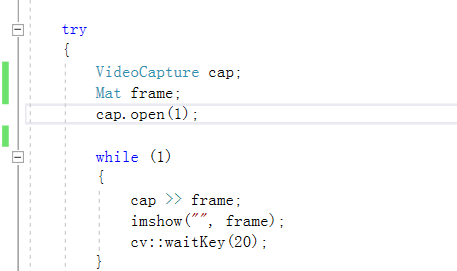
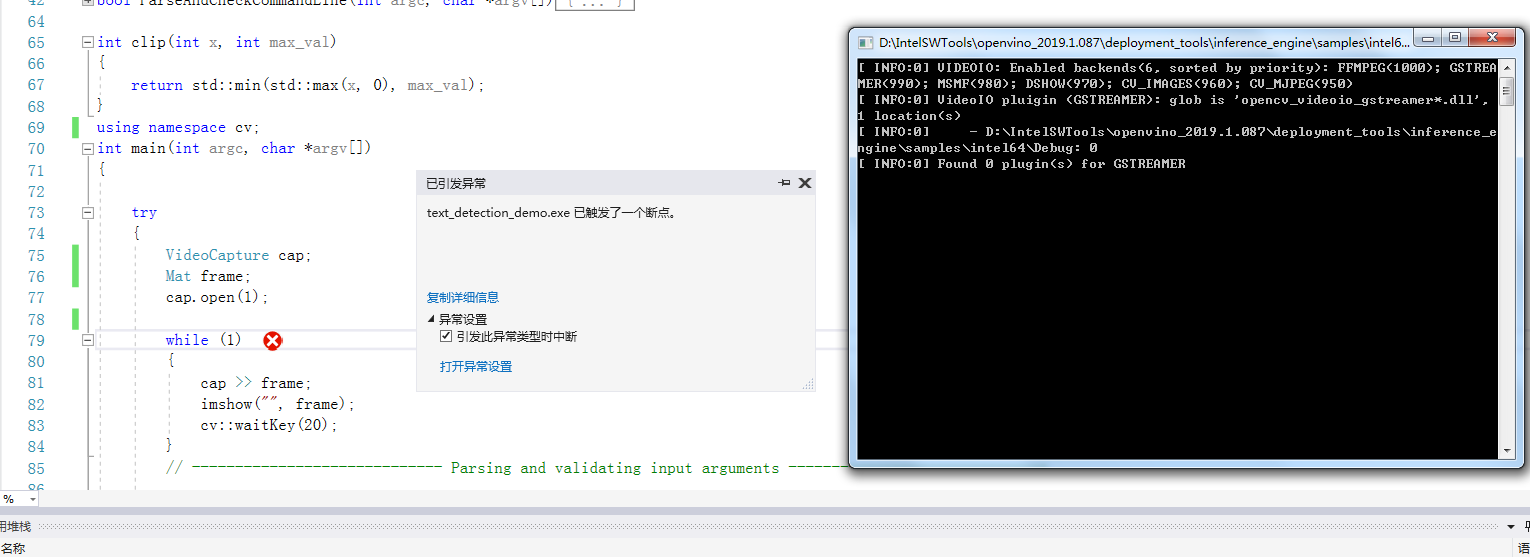
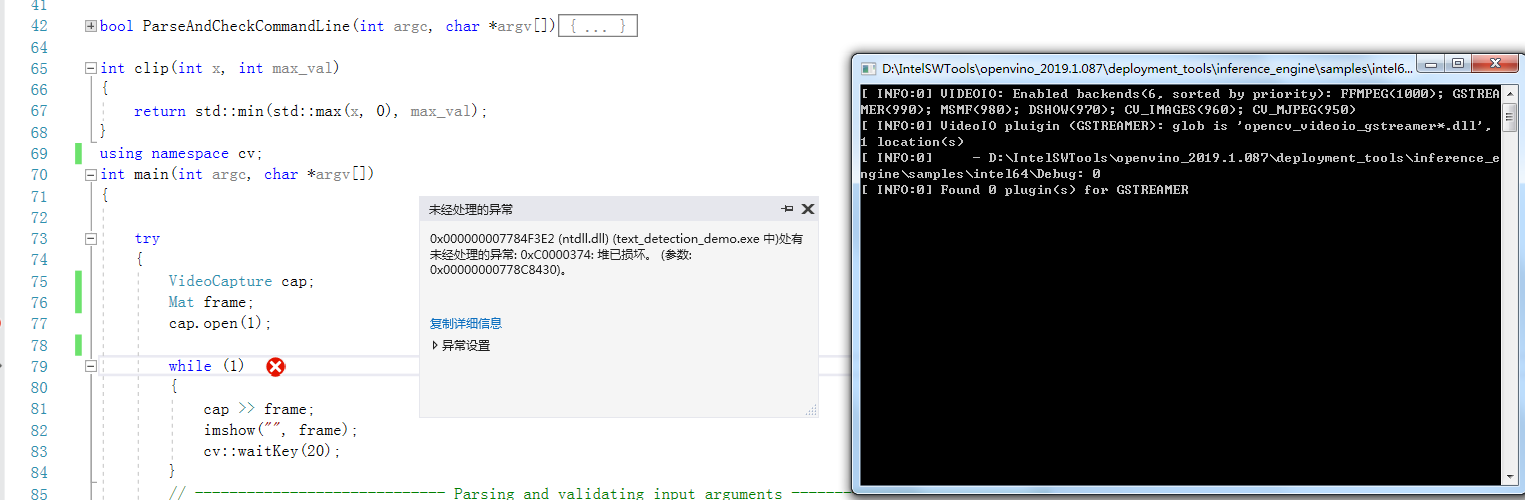

Intel OpenVino环境下 调用VideoCapture打开电脑摄像头

- 写回答
- 好问题 0 提建议
- 关注问题
 分享
分享- 邀请回答
-

1条回答 默认 最新
 你知我知皆知 2024-08-09 05:38关注
以下回答参考 皆我百晓生、券券喵儿 等免费微信小程序相关内容作答,并由本人整理回复。
要解决这个问题,首先确保在OpenVINO环境中安装了正确的依赖库和工具,并且正确配置了摄像头设备。以下是一个使用OpenVINO环境中的VideoCapture类来打开电脑摄像头的示例:
#include <iostream>
#include <string>
#include "opencv2/opencv.hpp"

using namespace cv;
using namespace std;

// Function to open a VideoCapture device
VideoCapture videoCaptureDevice = VideoCapture(0);

if (!videoCaptureDevice.isOpened()) {
    cout << "Error opening camera." << endl;
}

// Check if the device was opened successfully
if (!videoCaptureDevice.isOpened()) {
    throw runtime_error("Camera device could not be opened");
}

// Capture frames from the video stream
while (true) {
    Mat frame;
    // Read a new frame from the video capture device
    videoCaptureDevice >> frame;

    // Display the captured frame
    namedWindow("Frame", WINDOW_NORMAL);
    imshow("Frame", frame);
    waitKey(1);
}
在这个例子中,我们首先尝试打开摄像头(通过
VideoCapture(0)),如果成功则进入循环读取视频帧并显示它们。注意,这个程序没有错误检查或异常处理。例如,它可能不会捕获到非零状态码,或者不处理失败的输入。如果你的应用程序需要这些功能,请添加适当的错误处理逻辑。
解决 无用评论 打赏举报 分享
- 2023-01-12 10:51Zhijun.li@Studio的博客 YOLOv7教程系列:三、使用onnx导出成openvino模型,并调用接口进行摄像头推理预测
- 2023-09-08 00:11三头龟的博客 非常简单的yolov5部署openvino加速,小学生也能马上学会
- 2024-10-09 11:24fengsongdehappy的博客 用:python export.py --weights yolov5s.pt --include onnx --dynamic 得到yolov5s.onnx 二、安装openvino 官网:Install Intel® Distribution of OpenVINO™ Toolkit from PyPI Repository — OpenVINO™ ...
- 2024-08-01 02:57何以法考人的博客 主要步骤有:配置OpenVINO C++开发环境下载并转换YOLOv5预训练模型使用OpenVINO Runtime C++ API编写推理程序下面,本文将依次详述1.1 配置OpenVINO C++开发环境配置OpenVINO C++开发环境的详细步骤...
- 2024-09-29 17:45我就是全世界的博客 OpenVINO™(Open Visual Inference and Neural Network Optimization)是由英特尔开发的一款开源工具套件,旨在加速深度学习模型的推理过程。OpenVINO的名字中,“Open”代表其开源特性,“Visual Inference”强调...
- 2024-08-03 04:04hellovalor的博客 YOLOv5兼具速度和精度,工程化做的特别好,Git clone...本文主要介绍在C++中使用OpenVINO工具包部署YOLOv5-Seg模型的主要步骤。另外开源社区对YOLOv5支持实例分割的呼声高涨,YOLOv5在v7.0中正式官宣支持实例分割。...
- 2025-10-30 08:58Clf丶忆笙的博客 文章详细讲解了环境搭建、模型转换(从PyTorch到OpenVINO格式)、推理代码实现等关键步骤,并提供了性能优化建议。通过OpenVINO部署的YOLOv11模型能够充分发挥Intel硬件潜力,实现高效的实时目标检测,适用于边缘...
- 2024-09-14 02:50薛定谔少爷的博客 合集 - OpenVINO(2)1.【OpenVINO】基于 OpenVINO Python API 部署 RT-DETR 模型01-122.... 英特尔发行版 OpenVINO™ 工具套件基于 oneAPI 而开发,可以加快高性能计算机视觉和深度学习视觉应用...
- 2025-11-04 18:53罗博深的博客 本文深入探讨Intel Movidius与OpenVINO在边缘AI部署中的应用,涵盖环境搭建、模型优化、推理加速及YOLOv5等实战案例,解析硬件特性、性能优化策略与行业落地场景。
- 2024-11-06 15:06英特尔开发人员专区的博客 哪吒开发板是专为支持入门级边缘AI应用程序和设备而设计,能够满足人工智能学习、开发、实训等应用场景。为了测试该开发板的推理性能,同时测试所推出的[OpenVINO™ C# API]...
- 2026-02-07 17:45威哥说编程的博客 工业视觉上位机开发中,YOLO模型的推理框架选择直接决定“部署效率、运行性能、硬件适配”——ONNX Runtime兼容性最强但性能中等,TensorRT性能最优但部署门槛高,OpenVINO适配Intel硬件且轻量化,三种框架各有优劣...
- 2022-01-27 19:37翼达口香糖的博客 七万字详解paddle-openVINO【CPU】-从环境配置-模型部署全流程 在这篇文章你将会接触到:paddle-openvino框架、两者在Linux、windows多种配置方式、使用LabelMe对paddle数据的标注转换与划分、图像分类/目标检测/...
- 2025-03-08 22:28踏过千层浪的博客 官网英特尔® 发行版 OpenVINO™ 工具套件 安装openvino pip install openvino 安装好后导出openvino格式的模型 yolo export model=yolo12n.pt format=openvino 更改模型为yolo12n_openvino_model 这时候直接来到...
- 2025-10-21 01:44c6d7e8f9g的博客 本文详细介绍了如何利用YOLOv11与OpenVINO工具套件,在智能监控场景中构建高性能的实时目标检测系统。通过模型转换、INT8量化以及高效的视频推理流水线设计,实现在边缘设备上兼顾精度与速度的优化部署,有效解决...
- 2025-12-10 07:27ppp33的博客 边缘AI是指在靠近数据源头的终端设备上直接运行人工智能模型,其核心在于算力受限条件下的高效推理。原理上依赖硬件加速器(如VPU)与轻量级推理引擎协同,通过模型量化、图优化和零拷贝数据传输提升能效比。技术...
- 2024-06-28 08:00dotNET跨平台的博客 点击蓝字 关注我❝ 英特尔发行版 OpenVINO™ 工具套件基于 oneAPI 而开发,可以加快高性能计算机视觉和深度学习视觉应用开发速度工具套件,适用于从边缘到云的各种英特尔平台上,帮助用户更快地将更准确的真实世界...
- 2024-08-20 16:54奇华智能的博客 OpenVINO在模型部署前,首先会对模型进行优化,模型优化器会对模型的拓扑结构进行优化,去掉不需要的层,对相同的运算进行融合、合并以加快运算效率,减少内存拷贝;推理引擎对不同的硬件提供统一的接口,底层实现...
- 2025-10-03 06:00葛月渊的博客 OpenVINO工具包提供的异步推理机制(Asynchronous Inference)正是解决这类问题的关键技术,通过将AI计算与数据预处理、结果后处理并行执行,可显著提升应用响应速度和吞吐量。本文将从工作原理、实现方式到性能优化...
- 2024-01-19 14:40FL1623863129的博客 总的来说,OpenVINO是一个功能强大、易用性强的工具套件,它为开发者提供了从模型训练到推理的一站式解决方案,使得深度学习技术能够更好地应用于实际场景中,提高计算机视觉和人工智能应用的性能和效率。【openvino...
- 没有解决我的问题, 去提问
