

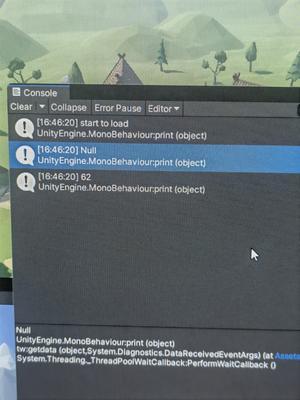
如上图所示,使用unity运行python脚本,onnx(一种通用深度学习模型格式)模型可以开始加载,但是无法加载完成。已知直接使用pycharm指定一个虚拟环境(与unity指定的python虚拟环境是同一个),该脚本的代码可以运行。
问题:如何使该脚本能够成功在unity上运行?
#库导入区
from PIL import Image
import numpy as np
import os
import json
import onnxruntime as ort
#############

#全局变量定义区
print('start to load')
#如第二张图所示,unity上显示程序打印了'start to load'但是在下面这句出现了问题,没有打印'load succeeded'
ort_session = ort.InferenceSession('model/model.onnx')
print('load succeeded')
class_names = ('person', 'bicycle', 'car', 'motorcycle', 'airplane', 'bus', 'train', 'truck', 'boat', 'traffic light',
               'fire hydrant', 'stop sign', 'parking meter', 'bench', 'bird', 'cat', 'dog', 'horse', 'sheep', 'cow',
               'elephant', 'bear', 'zebra', 'giraffe', 'backpack', 'umbrella', 'handbag', 'tie', 'suitcase', 'frisbee',
               'skis', 'snowboard', 'sports ball', 'kite', 'baseball bat', 'baseball glove', 'skateboard', 'surfboard',
               'tennis racket', 'bottle', 'wine glass', 'cup', 'fork', 'knife', 'spoon', 'bowl', 'banana', 'apple',
               'sandwich', 'orange', 'broccoli', 'carrot', 'hot dog', 'pizza', 'donut', 'cake', 'chair', 'couch',
               'potted plant', 'bed', 'dining table', 'toilet', 'tv', 'laptop', 'mouse', 'remote', 'keyboard',
               'cell phone', 'microwave', 'oven', 'toaster', 'sink', 'refrigerator', 'book', 'clock', 'vase', 'scissors',
               'teddy bear', 'hair drier', 'toothbrush')
img_folder_path='images'
target_width = 640
target_height = 640
lest_confidence = 0.5
max_iou = 0.33
#############
//unity调用的代码如下:
using System.Collections;
using System.Collections.Generic;
using UnityEngine;
using System.Diagnostics;
using System;

public class tw : MonoBehaviour
{
    // Start is called before the first frame update
    void Start()
    {
        RunPythonScript();
    }

    // Update is called once per frame
    void Update()
    {

    }
    public void RunPythonScript()
    {
        Process p = new Process();
        string path = @"C:\Learning_or_working_for_AI\人工智能项目\参赛项目\无人机主项目\图像处理模块\run_model.py";
        p.StartInfo.FileName = @"C:\Users\11590\anaconda3\envs\run_the_modle\python.exe";

        p.StartInfo.UseShellExecute = false;
        p.StartInfo.Arguments = path;
        p.StartInfo.RedirectStandardError = true;
        p.StartInfo.RedirectStandardOutput = true;
        p.StartInfo.RedirectStandardInput = true;
        p.StartInfo.CreateNoWindow = true;


        p.Start();
        p.BeginOutputReadLine();
        p.OutputDataReceived += new DataReceivedEventHandler(getdata);
        p.WaitForExit();

    }
    public void getdata(object sender,DataReceivedEventArgs e)
    {
      print(e.Data);
    }
    //"C:\Learning_or_working_for_AI\人工智能项目\参赛项目\无人机主项目\图像处理模块\run_model.py"
    //"C:\Users\11590\anaconda3\envs\run_the_modle\python.exe"


