现在提取目标里面出来好长一部分东西也不知道如何让它与YOLO提取出来的边界框坐标一样啊
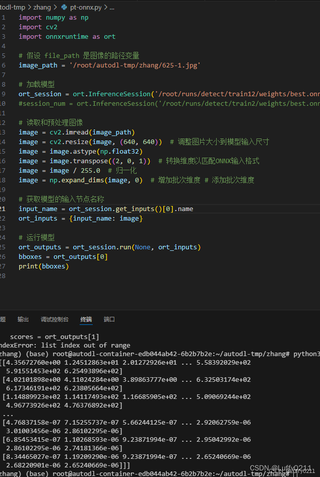

现在提取目标里面出来好长一部分东西也不知道如何让它与YOLO提取出来的边界框坐标一样啊
 分享
分享
以下回复参考:皆我百晓生、券券喵儿等免费微信小程序作答:
要将ONNX模型的输出与YOLO提取的边界框坐标对应,首先需要了解ONNX模型的输出格式。从给定的代码中无法直接生成YOLO风格的边界框坐标,但可以根据ONNX模型的输出进行计算。以下是一个可能的解决方案:
以下是一个可能的实现:
import numpy as np
import cv2
import onnxruntime as ort

def preprocess_image(image_path, input_shape):
    image = cv2.imread(image_path)
    image = cv2.resize(image, input_shape)
    image = image.astype(np.float32)
    image = image.transpose((2, 0, 1))
    image = image / 255.0
    image = np.expand_dims(image, 0)
    return image

def postprocess_onnx_output(ort_outputs, image_shape):
    bboxes = ort_outputs[0]
    scores = ort_outputs[1]

    image_height, image_width = image_shape[:2]

    yolo_bboxes = []
    for i in range(len(bboxes)):
        bbox = bboxes[i]
        x_center = (bbox[0] + bbox[2]) / 2 / image_width
        y_center = (bbox[1] + bbox[3]) / 2 / image_height
        width = (bbox[2] - bbox[0]) / image_width
        height = (bbox[3] - bbox[1]) / image_height
        x_center, y_center, width, height = [float(x) for x in [x_center, y_center, width, height]]
        score = float(scores[i])
        yolo_bboxes.append([x_center, y_center, width, height, score])

    return yolo_bboxes

image_path = '/root/autodl-tmp/zhang/625-1.jpg'
input_shape = (640, 640)
image_shape = (640, 640, 3)

image = preprocess_image(image_path, input_shape)
ort_session = ort.InferenceSession('/root/runs/detect/train12/weights/best.onnx')
ort_inputs = {'input': image}
ort_outputs = ort_session.run(None, ort_inputs)

yolo_bboxes = postprocess_onnx_output(ort_outputs, image_shape)
print(yolo_bboxes)
注意:这个实现假设ONNX模型的输出格式与YOLO的输出格式相似。实际情况可能会有所不同,因此可能需要根据实际的ONNX模型进行调整。
分享 创建了问题
8月19日
创建了问题
8月19日

